Activity
Mon
Wed
Fri
Sun
Jul
Aug
Sep
Oct
Nov
Dec
Jan
Feb
Mar
Apr
May
What is this?
Less
More
Memberships
Tech Snack | Vibe Coding & AI
19.1k members • Free
SW Automation Plus
24 members • $39/month
SW Automation
8.5k members • Free
AI Automation Society
387.1k members • Free
AI Automation (A-Z)
154.8k members • Free
AI Agency OS
2.1k members • Free
AI Workshop Lite
24.4k members • Free
Ai Automation Vault
15.2k members • Free
Ai Titus
908 members • Free
577 contributions to AI Automation Society
Feb 24 •
Track tokens
Hi everyone! I'm trying to implement AI Agent logging in n8n based on this tutorial: https://youtu.be/vVdS-ZEFf50?si=eFIw-W-PDVrfZb0b&t=157 Even though I've enabled the 'Return Intermediate Steps' option, the output still only returns the basic response. The detailed token usage and intermediate steps aren't appearing in the output data at all. Has anyone else encountered this issue? Is there a specific expression or perhaps an additional Code node required to properly extract these JSON fields? Thanks for the help!

💎
⭐
Nov '25 •
🚀New Video: How to Use the NEW Nano Banana 2 in n8n (cheaper & no watermark)
What a crazy week in the AI space... In this video, I break down Google’s new NanoBanana Pro image model, and it is hands down the most detailed image generator I’ve used so far. I’ll show you how to plug it into n8n to level up your AI agents and automation workflows, and how to get it running cheaper than the official price with no watermarks. We’ll walk through text to image, image to image, and using multiple input images so you can test different prompts right away. The setup is simple, there’s no code needed, and you can follow along step by step as we build this workflow together.
18 likes • Nov '25
Wtf, nano banana 2? The first version was amazing, I'm curious to see if this one is even better.
💎
⭐
Nov '25 •
🚀New Video: The Cheapest & Easiest Way to Self-Host n8n (Beginner's Guide)
In this video, I’ll show you the cheapest and easiest way to self-host n8n using a Hostinger VPS, even if you’re a complete beginner. Self-hosting can feel scary at first, but with this setup you don’t need any DevOps or technical background. I walk you through the full process step by step, including one-click installation, how to set up automatic backups, how to update and maintain your instance, and how to scale it when you need more power. By the end, you’ll have your own private and secure n8n environment that runs smoothly, costs less, and lets you sleep at night knowing everything is in your control. Code NATEHERK for 10% off yearly hosting plans
2 likes • Nov '25
This guide is perfect for beginners! Love how you made self-hosting n8n so straightforward. Excited to try the Hostinger setup!
2 likes • Nov '25
@Nate Herk Fully automatic n8n updater: checks daily for new stable version → upgrades & restarts in one command. Zero-touch maintenance! Grab it here: https://www.skool.com/ai-automation-society/n8n-auto-update-workflow-daily-stable-version-check-upgrade-zero-touch?p=a3a9ad23
Nov '25 •
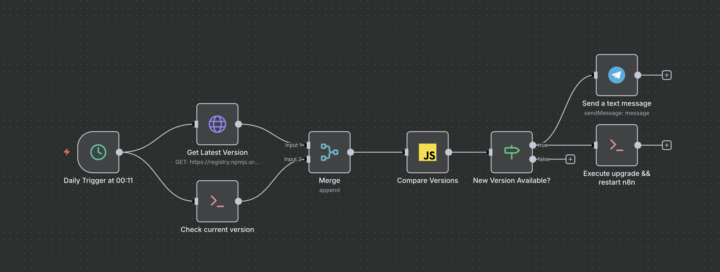
n8n Auto-Update Workflow – Daily Stable Version Check & Upgrade (Zero Touch)
This ready-to-import n8n workflow automatically keeps your self-hosted n8n instance on the latest stable version – no manual updates ever again. How it works (runs daily at 00:11 or on any schedule you set): 1. Fetches the official n8n metadata from the npm registry 2. Runs `n8n --version` locally 3. Compares versions in a Code node 4. If a newer stable release exists → one single Execute Command node does everything: npm install -g n8n@stable --force && systemctl restart n8n 5. Sends a clean Telegram notification with old → new version number Key benefits - 100 % hands-free updates (perfect for production servers) - Only upgrades to @stable tag (never next/beta) - Single command upgrade + restart = zero downtime in most cases - Works out-of-the-box on Ubuntu/Debian with systemd - Easily adaptable for PM2, Docker, screen/tmux, etc. - Safe: only runs when an update is actually available Setup in 60 seconds 1. Import the workflow 2. Add your Telegram bot credentials & replace YOUR_CHAT_ID_HERE 3. (Optional) adjust the schedule or restart command for your environment 4. Activate → done! Ideal for anyone running n8n via npm + systemd who wants to sleep well knowing the instance is always patched and up-to-date. Enjoy truly set-and-forget n8n maintenance!
Nov '25 •
Veo3 API Help
Hi everyone! Does anyone have a working JSON example for the Google Gemini / Veo 3 API that successfully uses an input image in an image-to-video request? I’m specifically looking for the correct JSON structure required by the **official Veo 3 API**, not any third-party tools, wrappers, or integrations. I’ve tried multiple formats and examples I found online, but none of them actually used the image I sent in the request — the generated video always ignored my input image. If you have a working request example or an official reference, I’d really appreciate it!
1-10 of 577