Activity
Mon
Wed
Fri
Sun
Aug
Sep
Oct
Nov
Dec
Jan
Feb
Mar
Apr
May
Jun
Jul
What is this?
Less
More
Memberships
AI Automation Society
422.9k members • Free
AI Marketing Insiders
1.5k members • Free
379 contributions to AI Marketing Insiders

5h •
🚨 Watch Out For Scam AI Videos on YouTube
One of my cybersecurity connections shared this video with me yesterday and this made my jaw drop... 100% fake, AI-generated tutorial that is scamming viewers with a copy/paste terminal command that allows this hacker to access your computer. And even worse - They fabricated the engagement with fake views, likes, comments, etc. to fool people. Many of us probably thought 'AI' right when you hear the avatar voice but millions would never catch this. Stay safe out there!

1 like • 4h
Trust has gone for sure, this is madness. Can we divebomb the comments section 😂

1d •
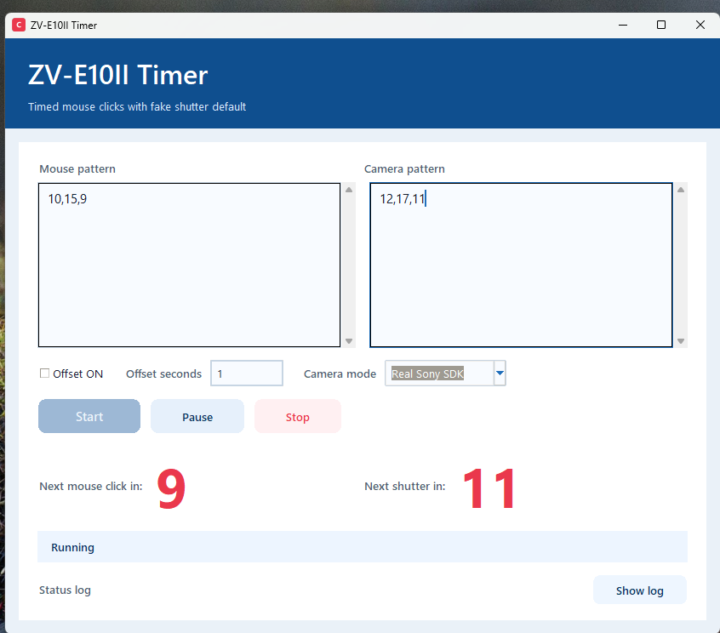
My first Software/Hardware automation 🤩
I thought I'd share this, maybe it will help someone. So today I made an app that controls my camera and an automation on my computer working together as one workflow :). I set timing for mouse clicks and camera shutter. It triggers the automation and the camera to shoot photos which at the end of run are automatically downloaded to the computer or I could have the photos be used to trigger another automation that uses them. Anywho 😄the point is that you can create apps that control hardware with claude code/codex. You just need SDKs from the manufacturers. Apparently they are available for these devices too not just cameras: smart lights, smart plugs, label printers, receipt printers, barcode scanners, RFID readers, payment terminals, microcontrollers, Raspberry Pi, Arduino, drones, gimbals, 3D printers, robots, robotic arms, audio/video gear, smart locks, thermostats, sensors. It's cool that pretty much anyone could create such automations now, not just software automations. Imagine what you can automate in your business
1 like • 19h
@Rafal Glaz Ha ha! Fable is very good, you're right. I've been using for quite a bit of my website migration work. You need to get cracking, you've got work to do 😂
1 like • 7h
@Rafal Glaz

0 likes • 23h
Hi @Ivan Azdejkovic , welcome to the community. "No sales" usually splits into two very different problems, so worth pinning down first: are people landing on your store and not buying, or are you not getting visitors yet? The fix is completely different depending on which one it is. Since this is an AI marketing community, that's a good thing to hand to AI before you hire anyone. Paste your store or a product page into Claude or ChatGPT and ask it to critique the offer, the copy and the buying journey as if it were a sceptical customer. It'll usually flag the obvious leaks, thin product descriptions, unclear pricing, no reviews, a clunky checkout, and give you a list to work through. Then a marketer can help with the parts that need a human eye. Which is it for you, traffic or conversion?
1 like • 23h
@Ryan Doser if they were bundled with a community, course or template would it make a difference? AI would probably come back and say don't bother too! 😂

7d •
New AI Marketing Insider
Hey everyone, my name is Adam, I'm from Houston Texas, and I own a Home Theater Company. Currently, my interests fall into two categories with AI: Speed and Knowledge. I love having the ability to get more done at a much faster rate than I was originally capable of. It feels like I have a second brain and two extra arms. I'm also obsessed with everything I've been able to learn across Claude and Codex.
0 likes • 1d
Hi @Adam Fuller, welcome to the community. The "second brain and two extra arms" line is spot on, that's exactly how it feels. I run most of my business through Claude Code for the same reason, less about doing brand new things and more about getting the everyday stuff done without it draining me. The 3D-modelled rooms are a lovely use, letting someone see their space before they commit takes a lot of the guesswork out of the sale. Are you finding the visualisations are actually shifting how customers decide, or is it still early days?
3d •
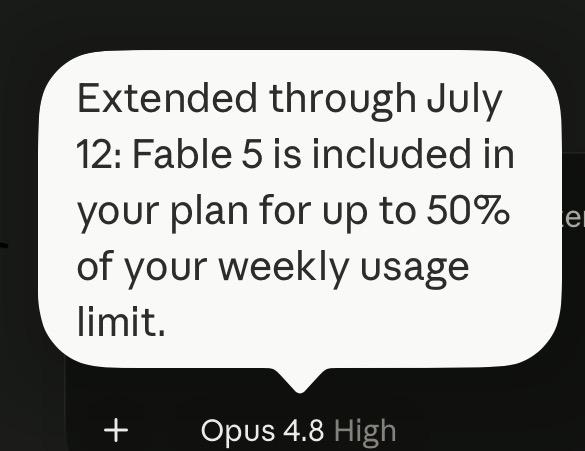
Fable 5 free on paid plans until 12 July, 50% weekly cap still applies
It's just after 10pm here in the UK and the attached popped up on my iPad Claude app. PR tactic perhaps, who knows. 😂
0 likes • 1d
@Nesil Ozer Absolutely, even without Fable, continuous improvement invaluable. I do my learning review at the end of every session.
1-10 of 379

@catherine-eadie-9569
Passionate about human-first marketing, ethical AI, and making a real difference. Always learning, always sharing.
Online now
Joined Jul 27, 2025
Edinburgh
Powered by