Activity
Mon
Wed
Fri
Sun
Aug
Sep
Oct
Nov
Dec
Jan
Feb
Mar
Apr
May
Jun
Jul
What is this?
Less
More
Memberships
AI Automation Society
419.1k members • Free
AI Marketing Insiders
1.4k members • Free
369 contributions to AI Marketing Insiders

3d •
Happy Fourth of July 🇺🇸
Happy Fourth of July to all my fellow AI Marketing Insiders who live in America! I hope you have a fun and safe weekend with friends & family 🇺🇸


5 likes • 3d
May the 4th be with you 🥳
2 likes • 2d
@Amy Swayze You too!

3d •
Introduction.
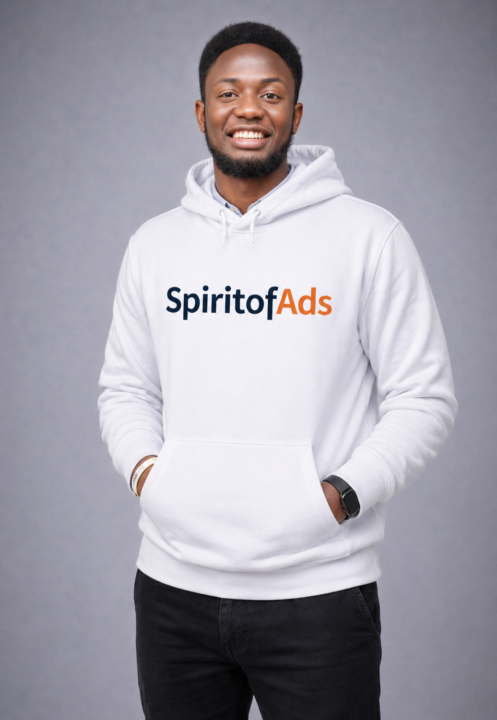
Hi everyone 👋 I’m Olaleke Olamide Taiwo, and I’m based in Nigeria. I’m someone who’s deeply driven by growth both personally and professionally. I enjoy building systems, solving problems, and constantly upgrading my skills in marketing and technology. Professionally, I work as an Advertising Strategist, Performance Marketer, and Revenue Growth Strategist. I help e-commerce and service-based businesses (locally and internationally) turn paid ads into predictable revenue by building systems that attract, convert, and retain customers often powered with AI automations. What excites me most about AI is how it is changing the way we create, scale, and automate marketing. The idea that one person can now do the work of an entire team using the right AI tools is what pulled me here. I joined this community because I want to sharpen my skills, learn smarter ways to build and scale campaigns, and connect with people who are serious about using AI to stay ahead in marketing. Looking forward to learning from you all and contributing as well. Thanks.
1 like • 3d
Hello @Olaleke Olamide Taiwo, good to have you join us, lots of skills and tips to gained from being here!

3d •
Test Quiz
Hello all, on Tuesday's call with Corey Ganim, I got to working on an Ai Assessment but one thing that came up was some kind of pre-qualifying questions. I've built this quiz. If you would go to quiz.myqualityguy.com and fill it out and tell me what you think. Feedback is appreciated.
2 likes • 3d
Hi @Mike Bryan , I went through it and it's looking good. One bit of friction I hit: on Q5 I picked "Barely any" for how much of my week goes to admin, then Q6 asked whether I'd tried to fix this before. That didn't quite work, because I'd just said there's barely anything to fix in the first place. Might be worth adding some conditional logic there, so if someone answers "Barely any" on Q5 they skip Q6 or get a reworded version. Everything else flowed nicely, and I liked the Money / Need / Desire breakdown at the end. Are you branching the final result off those three scores?
5d •
June 2026 Community MVPs 🏆
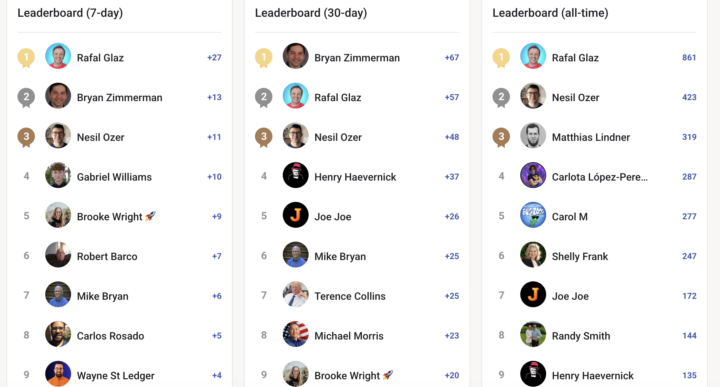
I wanted to shoutout the Top Members (MVPs) of the AI Marketing Insiders for the month of June! We're currently over 1,400 total members which is awesome and only growing from here. Special thanks to @Catherine Eadie and @Nesil Ozer for all of their help behind the scenes 🤝 I appreciate all of you, and these individuals are leading the way and pushing this community forward: 30 Day Leaderboard 🏆 1. @Bryan Zimmerman 2. @Rafal Glaz 3. @Nesil Ozer 4. @Henry Haevernick 5. @Joe Joe 6. @Mike Bryan 7. @Terence Collins 8. @Michael Morris 9. @Brooke Wright 10. @Jeff Shipman Other Members on the 7 Day Leaderboard 🏆 - @Robert Barco - @Carlos Rosado - @Wayne St Ledger - @Ron Meyer All Time Leaderboard 🏆 1. @Rafal Glaz 2. @Nesil Ozer 3. @Matthias Lindner 4. @Carlota López-Peredo 5. @Carol M 6. @Shelly Frank 7. @Joe Joe 8. @Randy Smith 9. @Henry Haevernick 10. @Mike Bryan I look forward to seeing the Community Leaderboard for July and beyond 🫡
3 likes • 5d
Great to see so many new members in such a short space of time. Please do bring your questions and experiences. So much still to learn and don't forget @Ryan Doser's Friday live sessions for paid members, which is a space to ask questions, keep up to date on what's going on as AI continues to move at a speed most of us can barely keep up with! 😀
0 likes • 3d
@Cha Lloyd

4d •
The New Guy from Mississippi!
Hey team! I'm Jonathan. I have owned a web agency for 15+ years and have been building WordPress websites for even longer. I recently found Ryan's podcast and have been binging just about every episode! I had already started building out and converting old WordPress sites to Astro with Claude Cowork, so I felt like @Ryan Doser and I were brothers from the start! Fun tidbit: After listening to the Rank and Rent podcast episode, I built out a complete site and it's already ranking (albeit on page 4 of Google)! I'm amped to be here and am already so grateful for this community!
1 like • 3d
@Jonathan Wilson This is fab, I've saved it for reference as I keep working on it. Thank you so much! I've not heard of Savella. I've been using Cloudflare for a few landing pages on subdomains, built with Astro and GitHub. Any particular reason you'd go for Savella? I'm currently pulling all the content off WordPress, as I didn't want to lose anything I already have, including the structure, since it's an established site. So that's good confirmation for me. My current theme is Bridge, so I've still to work out the design. I'll be so glad not to have to 'manage' pesky plugins any more, cache plugin included. I'm excited to keep going with it over the summer, when things are a little quieter for me work-wise.
1 like • 3d
@Jonathan Wilson Ah, that makes sense now, thank you! I'm happily set up on Cloudflare for my static sites just now, but I'll keep Sevalla in mind for anything that needs a database or a bit more behind it. Really appreciate you offering to help, I may well take you up on that as I go!
1-10 of 369
@catherine-eadie-9569
Passionate about human-first marketing, ethical AI, and making a real difference. Always learning, always sharing.
Active 5h ago
Joined Jul 27, 2025
Edinburgh
Powered by