Activity
Mon
Wed
Fri
Sun
Jul
Aug
Sep
Oct
Nov
Dec
Jan
Feb
Mar
Apr
May
What is this?
Less
More
Owned by Evelene
A private space for survivors ready to regain strength, mobility, and peace of mind without feeling lost or alone.
Memberships
Skoolyard 🧃
1k members • Free
Work From Anywhere
97 members • $29/month
Pen Pal Cafe
39 members • Free
Zen Den Mind - Signal Clarity
124 members • Free
Let's Be Better For Ourselves
68 members • Free
LUXX Creator Academy
162 members • Free
Skool Add-ons
980 members • Free
GRACE GLOBAL~ReNEWing yoUth
93 members • Free
The Live Event Studio
512 members • Free
108 contributions to Skill & Soul Studio

🔥
10h •
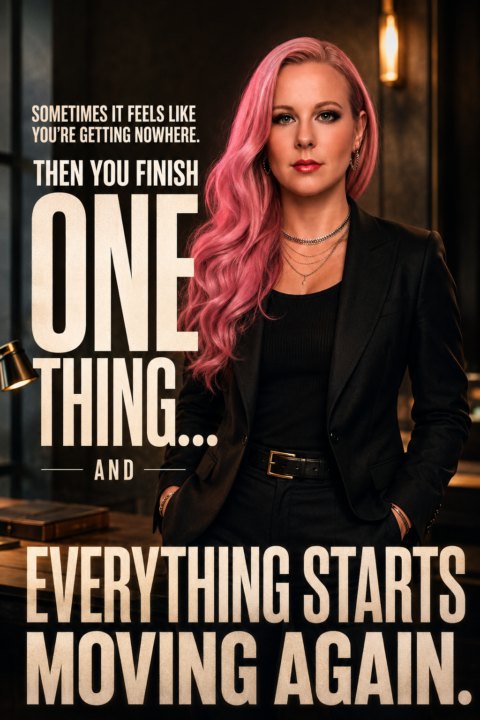
The Power of Finishing One Thing
Some days it feels like you're working hard and getting absolutely nowhere. You tick things off. You show up. You keep going. And nothing seems to change. Then you finish one thing. One task. One project. One decision. One thing you've been putting off. And suddenly everything starts moving again. Progress isn't always a giant breakthrough. Sometimes it's just finishing the thing that's been slowing you down. Prompt Transform the uploaded image into a premium cinematic motivational poster while preserving the subject's identity, facial structure, skin tone, and recognizability. Completely replace the existing clothing with a sophisticated, modern, high-end outfit. Dress the subject in a tailored dark jacket layered over a premium fitted shirt or lightweight knit. The styling should feel polished, intentional, successful, and aspirational. No casual clothing, hoodies, graphic tees, or athletic wear. The outfit should communicate momentum, discipline, and personal growth. Position the subject confidently in a clean, modern environment with subtle depth and atmosphere. Use warm cinematic lighting with soft highlights and rich contrast. Create a feeling of clarity, forward movement, and renewed energy. The image should feel like a professional magazine cover or luxury personal brand campaign. Expression: calm confidence, quiet determination, focused optimism. The subject should appear grounded and composed, not overly smiling or celebrating. The emotion is the feeling of finally gaining traction after a period of frustration. Photography style: luxury editorial portrait, professional camera, shallow depth of field, cinematic color grading, highly detailed skin texture, realistic lighting, natural posture, sharp eyes, premium composition. The struggle is NOT shown visually. There are no split scenes, before-and-after effects, dark-versus-light comparisons, or representations of failure. The image exists entirely in the present moment of confidence and momentum. The difficult days are only referenced in the quote.

4 likes • 9h
@Manda Jackson @Raven Steele you both are incredible women!
2 likes • 4h
@Manda Jackson you’re welcome!☺️
🔥
4d •
Anyone feel like this
My brain in every century: ✨ overthinking ✨ dramatic scenarios ✨ creating problems that don’t exist But at least the outfit changes. Prompt: Use the uploaded person as the main subject and preserve their identity, facial features, and recognizability. Create one funny cinematic portrait about being an overthinker breaking through mental noise.Randomly choose one era between the 1700s and today. Fully transform the outfit, hairstyle, setting, props, and lighting to match that era.Make the scene humorous, expressive, and slightly absurd — not dark or overly serious. The subject should look overwhelmed but funny and relatable, with an exaggerated ‘my brain will not shut up’ expression.Show visual chaos around them: flying notes, dramatic clocks, messy reminders, symbolic distractions, confused background characters, or objects representing too many thoughts. Add witty readable phrases on some notes, such as: ‘What if?’ ‘Did I reply weird?’ ‘Too many tabs open’ ‘Brain, please stop’ ‘This could have been an email’ ‘Overthinking: since forever’ ‘Do I matter???’ ‘I need a sign’ ‘Why am I like this?’The subject should appear as if they are pushing through the chaos with humor and determination, not defeated. Use a dynamic pose, playful facial expression, cinematic lighting, premium editorial photography, sharp focus, detailed skin, realistic anatomy, cohesive color grading, and era-accurate costume design.Overall mood: funny, stylish, chaotic, theatrical, and relatable — a premium portrait of someone surviving the loudest thoughts in their own head.

3 likes • 2d
@Jessica Fish I love that!
2 likes • 1d
@Nisha Jackson thank you!😍
🔥
3d •
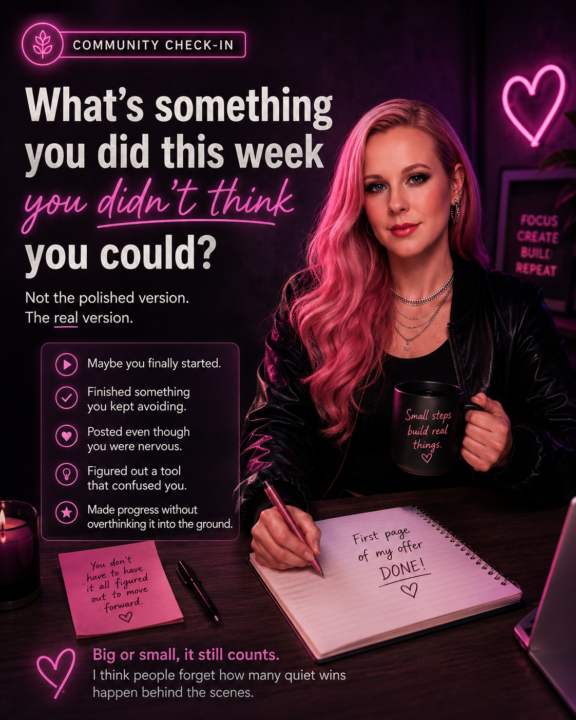
What’s something you did this week
What’s something you did this week you genuinely didn’t think you could do? Not the polished version. The real version. Maybe you: • finally started • finished something you kept avoiding • posted even though you were nervous • figured out a tool that confused you • made progress without overthinking it into the ground Big or small, it still counts. I think people forget how many quiet wins happen behind the scenes.
3 likes • 2d
@Manda Jackson I will!☺️
3 likes • 2d
@Antonio Totino thank you!😊
🔥
3d •
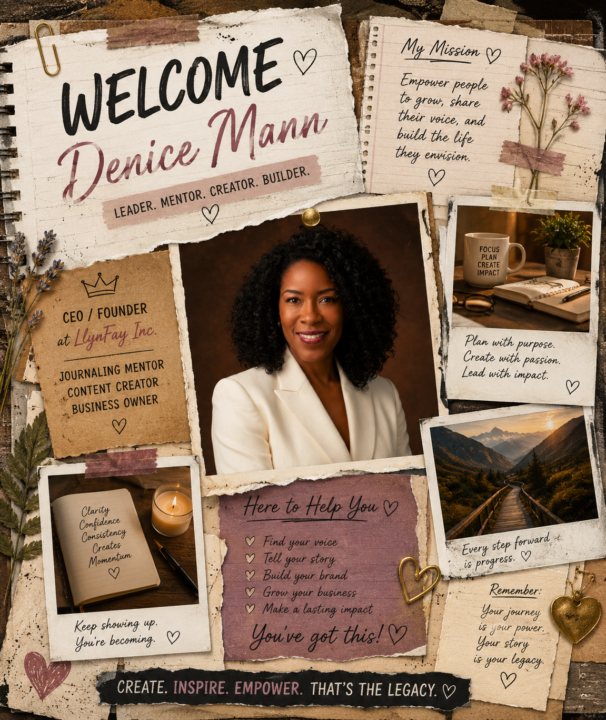
Welcome
Welcome, @Denice Mann Your passion for empowering others through journaling, creativity, and leadership brings such an inspiring presence to the community.
8 likes • 3d
Hello and welcome @Denice Mann !
🔥
8d •
What did everyone do while Skool was down today? 😅
After living here for 10 years, I somehow ended up going to the races for the first time because my aunt and uncle were visiting from Victoria and the timing just worked out. Normally I would’ve been sitting at the computer refreshing pages, checking notifications, and “just quickly” working on something. Instead, I disappeared for the afternoon, watched races I barely understood, ate way too much, people-watched, and actually switched my brain off for a few hours. Wasn’t on my 2026 bingo card, but honestly… it was a pretty good reminder that sometimes the unexpected stuff ends up being the fun part.

3 likes • 8d
@Manda Jackson i am so happy for you!
2 likes • 5d
@Manda Jackson
1-10 of 108
@evelene-sterling-1353
Owner of Cancer Thrivers and an admin. for The Skoolyard. I am 72 years old, widowed and retired. I enjoy gardening, sewing and crocheting.
Active 1h ago
Joined Dec 28, 2025