Activity
Mon
Wed
Fri
Sun
Oct
Nov
Dec
Jan
Feb
Mar
Apr
May
Jun
Jul
Aug
Sep
What is this?
Less
More
Maker School: AI Automation
2.5k members • $184/m
Maker Zero: Claude Code, AI
23.8k members • Free
Vibe Coding School
845 members • Free
AI Bits and Pieces
877 members • Free
Automate Genius
39 members • Free
Go To Market AI Automation
81 members • Free
AI Made Simple
1k members • Free
The AI MBA
2k members • Free
Real-World AI Builders
509 members • $29/month
1 contribution to AI Bits and Pieces

Jul 3 •
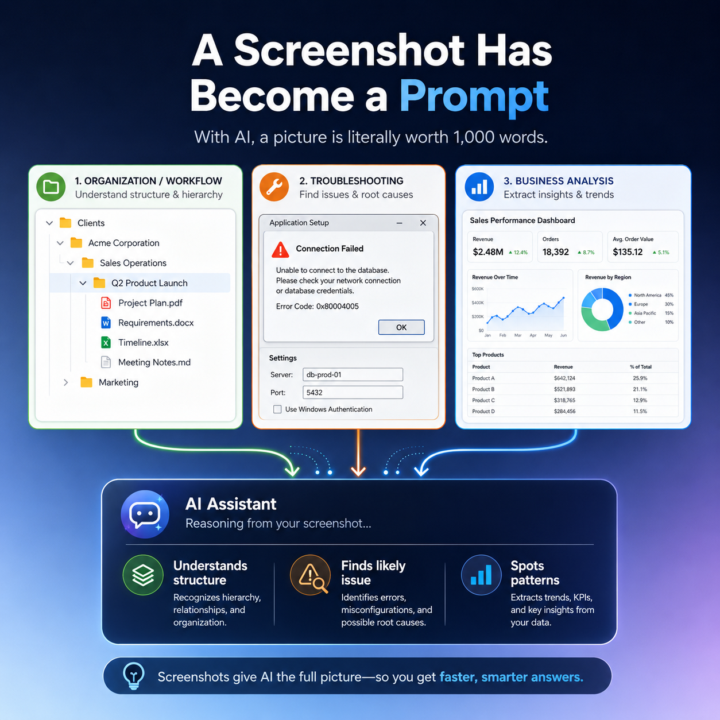
🖼️ With AI, a Picture Is Literally Worth a 1,000 Word Prompt
"A picture is worth a thousand words." That phrase has always been true, but with today’s LLMs it is starting to take on a much more practical meaning. One of the quiet advances in AI is not just better writing, coding, or summarization. It is image recognition and, more importantly, image understanding. I have noticed this in my own workflow. In the past, when I wanted Claude or ChatGPT to understand what I was looking at on my screen, I would usually describe it first. I would explain the structure, the problem, or the context, and then I would paste the screenshot to support what I had already written. Now I often skip that step entirely. I just paste the image and go. And the AI gets it. That is a bigger shift than it sounds. The improvement is not simply that the model can read text inside an image. It is that it can often understand what the image is doing, why it matters, and how it connects to the broader conversation. In other words, the image itself has become usable context. I ran into this recently while organizing my directory structure for a new project. I needed to update Claude on changes I had made, and instead of describing the folder structure, I simply pasted the screenshot into the chat. Claude immediately responded: “That's a clean hierarchy: client → business area → project. Every future engagement follows the same pattern.” That response stood out to me because Claude did more than recognize folder names. It understood the hierarchy. It understood the logic behind the structure. It understood the intent of the organization. And it connected that image to the ongoing context of the conversation without me needing to explain much at all. This is starting to change how I work with LLMs, and I think it has broader implications for a lot of people using AI in practical ways. A screenshot is no longer just supporting material. In many cases, it is now the prompt. Example 1: A very useful example is organizational or workflow context, like the file folder case. Instead of describing a folder structure, a software layout, or a system you are building, you can often just show it. The AI can quickly interpret the structure, identify patterns, and give feedback on what is organized well, what may be unclear, and what the next step should be.

2 likes • Jul 8
That’s a really practical point @Michael Wacht. I’m noticing the same thing: a screenshot is often faster and more precise than any written description, especially for structure. It just gets the point faster. I did something similar last year with a custom GPT: I described a folder structure with a screenshot, and it generated the terminal commands that I then ran on macOS.
1-1 of 1

@erich-keller-1588
Sales Professional in IT, SaaS & Tech
Active 1m ago
Joined Jul 2, 2026
Powered by