Activity
Mon
Wed
Fri
Sun
Jan
Feb
Mar
Apr
May
Jun
Jul
Aug
Sep
Oct
Nov
Dec
What is this?
Less
More
Memberships
Learn Power Apps
2.5k members • Free
7 contributions to Learn Power Apps

Nov '24 •
How to set displayMode of a button based on a condition that loops through gallery content
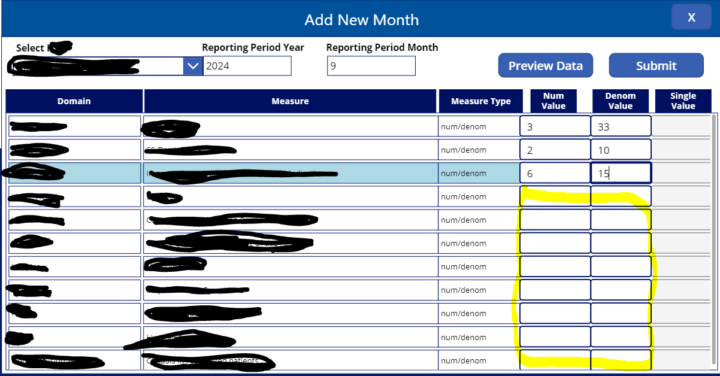
I wanted to ask if anybody had an example of how to do this in PowerApps. I have an App that collects data through a gallery with a couple of text input fields. The 'Submit' button needs to be in disabled mode until user has filled all the text input fields in the gallery. At that point, when all text input fields are filled, the 'Submit' button should be in Edit mode until user removes some data and leave input fields empty. How can I loop through the collection behand the gallery each time a user enters or removes data from each input field to see if there are any empty cells and then change the DisplayMode of the button accordingly?
1 like • Nov '24
@Elvis Eyobor Thanks so much. This works just great!
0 likes • Nov '24
@Mike Gillis This will work for each row to check that both num and denom are present, but for the entire gallery, still need to use the CountIf and check for all items in the gallery. Thanks for the reply!!
Mar '24 •
Fill property of a component wouldn't change
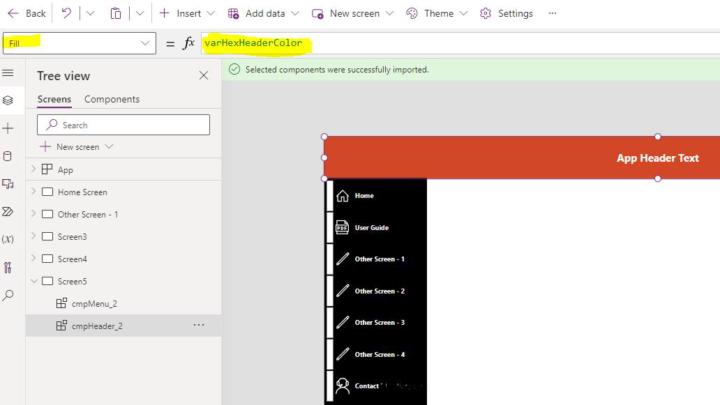
Hello everyone. I wondered if somebody could help with this issue. I built 2 simple components in a Component Library (header and menu components). Then I inserted those 2 components from the Component Library into my App. Within the app, I have a variable called 'varHexHeaderCollor' which I am trying to use to set the Fill property of the 2 components in my App. The 1st screenshot shows the header component selected in my App and you can see the Fill property is set to the 'varHexHeaderColor' variable and it's working as expected and color has changed to orange which is the color stored in that variable. The 2nd screenshot shows the menu component select and you can see that I changed the Fill property to the same 'varHexHeaderColor' variable and there are no errors, however, the Fill color of the menu component remains to be black. Why the menu component wouldn't change the color after setting the Fill property? The menu component has a gallery with a few controls on it and the header component has only a few label controls. Thanks!
0 likes • Mar '24
@Elvis Eyobor Thanks for your reply. It seems it can't be changed to anything, not a variable color and not a static color. Any idea why not?
2 likes • Mar '24
While I still can't explain why it doesn't work in this app, I re-did the whole thing from scratch and it's working.
Feb '24 •
Filtering collection for records where a column has null values
I have a simple collection called colDataSet where 'display_id' column could be a null. I need to filter for and display all records in a Gallery using the colDataSet where display_id is null. I tried the following in the 'Item's property of the Gallery, but none is returning records where display_id column has null: Filter(colNullRecords, !(Value(display_id)), project) // returns 4 records where display_id = 0, but I need to filter for when display_id is null Filter(colNullRecords, !IsNumeric(Value(display_id)), project) // not returning anything Filter(colNullRecords, IsBlank(Value(display_id)), project) // not returning anything Filter(colNullRecords, !(display_id), project) // returns 4 records where display_id = 0 Filter(colNullRecords, !IsNumeric(display_id), project) // not returning anything Filter(colNullRecords, IsBlank(display_id), project) // not returning anything If there is any post out there for how to filter for nulls in collections, please point me to that. Thanks much!
0 likes • Feb '24
Update: I resolved this by filtering the data source and using IsBlank(display_id), but would still like to know how to find records that have nulls in certain field in a collection. ClearCollect(colNullRecords, Filter('data_source', IsBlank(display_id)));
1 like • Feb '24
@Shawn Garmer yes, it would, thanks!

Feb '24 •
➡️ I need your help... 🙏😭
I'm trying to understand you (my audience) better so I can better serve you guys. ❤️🔥🔥 🗣️ Please copy the following questions in a private chat to me with the answers. Then comment down below with "done". The reason I ask this is because I'd hate for other's comments to influence your answers that might not otherwise come to mind. 1️⃣ What specific problem were you trying to solve when you came across Power Apps? 2️⃣ What other software did you consider before choosing Power Apps? 3️⃣ What brought you here or to us; or, why are you here? 4️⃣ How did you hear about Power Apps? 5️⃣ Why do you think Power Apps is the solution to your need? 6️⃣ Are you looking to utilize Power apps for personal or business? 7️⃣ Are you self employed, work for a company, or what is your work status? 8️⃣ What's your industry and position/title? For those of you who answer, you will get 30% off our new workshop we'll be holding soon. For those who have already paid for the upcoming workshop, you already have this discount in the price you've paid. 🛣️ Could you please get back to me by the end of the week (Friday 5pm EST). ⌛

1 like • Feb '24
done
Jan '24 •
Is it possible to set the 'Fill' property of a component with a value from SQL Server table?
We would like the 'Fill' property of a component in PowerApp to be set based on a hex color value stored in a SQL Server table. For example, we have a simple config table in SQL server and the value is different between DEV, QA and PROD SQL servers. So, when we build an App and connect to SQL Server on DEV, then the hex value of the color is X, and when we promote the App from DEV to QA, the hex value of the color would be different without us needing to change it manually. The same way, when we promote the App to PROD environment, the hex value of the color would be different. Is it possible to set the 'Fill' property of a component based on a value stored in SQL server table?
1 like • Jan '24
Yes, I got it, thanks!
1-7 of 7

@er-resetar-8871
I am a beginner in PowerApps, eager to learn quickly.
Active 388d ago
Joined Jan 23, 2024
Powered by