Activity
Mon
Wed
Fri
Sun
Jun
Jul
Aug
Sep
Oct
Nov
Dec
Jan
Feb
Mar
Apr
May
What is this?
Less
More
Memberships
AV
AI-Powered Virtual Assistants
83 members • Free
Agency Flywheel Hub
4.6k members • Free
AI Money Lab
72.2k members • Free
Agency Owners
19.9k members • Free
AIpreneurs (Free)
10.4k members • Free
AI Automation Agency Ninjas
20.6k members • Free
Elite Sales Alliance
22k members • Free
Faceless Creators
11.7k members • Free
Insidr AI Community
8.5k members • Free
5 contributions to SOLIDWORKS Accelerator

Aug '25 •
🚨🤖 I built a free SolidWorks Course Pro Coach (AI)🚨
🚨🤖 I built a free SolidWorks Course Pro Coach (AI) — a sidekick trained on my methods, ready 24/7.🚨 It can help you with: 🔧 Rebuild errors 🧩 Broken mates ✏️ Sketch stability 📦 Large assembly performance ⚡ Try it here: SOLIDWORKS COURSE PRO COACH (AI) This tool is not my full course. It won’t give you the structured training, complete workflows, or direct support my students get. But it will get you unstuck on common issues in seconds. 👉 Give it a spin, and let me know what you think. ✌️ Talk soon, Aryan P.S. 💬 Your feedback on its performance is much appreciated! you can comment below how you wish it could be better!

1 like • Nov '25
This is super cool

Nov '25 •
Sweep cut
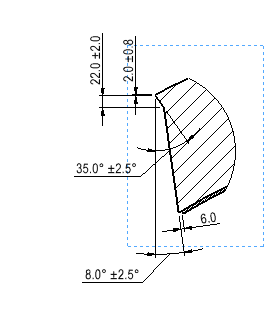
Hi, may I please ask for some guidance for sweep cut. I'm not very familiar with sweep cut and need some help to solve this issue. I have a circular cut out of a pipe wall which I want to make a weld prep like the sketch. When I model this I'm not able to create the weld prep with the vertical mid-line vertical all around, it seems like the mid-line angle outwards and doesn't cut even around the model. The front plane view looks right, but the Right plane view is wrong. Thank you in advance.
1 like • Nov '25
Sounds like a tricky sweep setup.
Oct '25 •
Let me tell you why I made this
After reading the poll results of a survey I sent to everyone in my list, I found out that many claim that they can follow a tutorial start to finish, but cannot finish a project on their own. I know SCP members can do that but I still would like to get your opinion on this vdieo if you don’t mind. Also I would appreciate your likes and Hypes (new button) on that video🙏
1 like • Oct '25
Finishing projects is the real test.

May '25 •
Driven dimensions
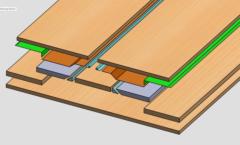
Hello guys, I have 2016 version of solidworks at my workplace. And when I create sketches and input dimensions while creating Sketch entities it gives driven dimensions. How to make it driving? I have to delete them every time or giving it later by smart dimensions and it is slowing my sketch making speed. Please help me guys. .
1 like • Jun '25
Check if sketch is fully defined.
May '25 •
Automate either with built in feature or create one
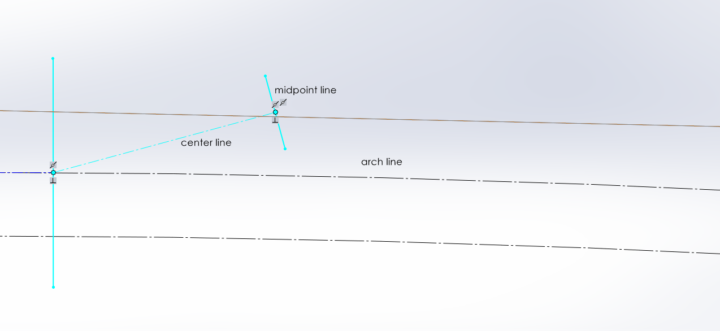
A centerline should coincide with an arch and midpoint line. the pattern doesnot work or maybe i do not how does it work . i tried however do not get the desired result. In the screen shot below, you will see what do i would like to do, since i have to create 10 such lines , doing manually is borring. could someone has any idea. thank you
1 like • May '25
Have you tried snapping tools?
1-5 of 5

@emery-davis-1561
Pay-per-performance AI marketing campaigns. We only get paid after you get sales & collect money
Active 17h ago
Joined Jan 17, 2025
Powered by