Activity
Mon
Wed
Fri
Sun
Aug
Sep
Oct
Nov
Dec
Jan
Feb
Mar
Apr
May
Jun
Jul
What is this?
Less
More
Owned by Diane
Under Construction
Memberships
ACQ Vantage Growth
175 members • Free
AI Bits and Pieces
807 members • Free
Scaling Founders AI
9 members • Free
AI for Life
34 members • $497
Synthesizer: Free Skool Growth
44.6k members • Free
Brand Sharks
581 members • Free
AI Automation Society Plus
3.8k members • $99/month
Skoolers
165.1k members • Free
🇺🇸 Texas IRL Events
455 members • Free
19 contributions to AI Bits and Pieces

🔥
5h •
🎤 Speaking to 125 Small Businesses with NFL Great Led to an AI OS Deal
🏈 My friend @Herman Moore called me, former NFL wide receiver, Detroit Lions. "I'm speaking tomorrow to 125 small business owners. Want to join me and talk about AI?" One day's notice. I built one slide with five points. My strategy, let the room decide which ones we went deep on based on body language and reaction. No fixed script, just reading the energy and following it. Herman worked that stage right alongside me. Great public speaker, no surprise there given his career. We had an easy back-and-forth in front of the audience. 25 minutes on stage. Plain English, no hype. Here's what those 25 minutes turned into: - 12 post talk conversations - 5 leads - 2 solid appointments Results: 1. The Deal: AI OS. A 50-hour build. Not a prototype, not a pilot. A real system going into a real business. 2. The Opportunity: AI Executive Coaching. One business wants me in the room at the executive level as a fractional CAIO, not as a vendor they call when something breaks. 3. The Second Opportunity: Enterprise AI Enablement. AI opportunity mapping, then AI education for their front office professionals. Now here is the important part. I didn't walk in with just a polished pitch. I walked in with the practical AI knowledge that I get from AI Bits and Pieces, and advanced development knowledge from AIS+, and AI for Life where I learn to build complex and trending AI solutions. This is where I: try new things, explore advanced ideas, learn from other professional builder, sharpen the saw, ...and stay ready for that moment you may not expect. If it sounds like a full time plus job... it is. However, this is what enables me to walk in with one slide, a friend who trusted me enough to hand me a mic, and 125 people willing to listen for 25 minutes.

🔥
1 like • 4h
@Michael Wacht oh yes! Crushing it! BECAUSE you were READY!💎
🔥
1 like • 4h
@Michael Wacht correct!
🔥
Apr 26 •
📦 Out of The Box in 90: Suno Turns My Poem Into AI Song for Daughter
Welcome to the Out of The Box Series — where I test how far curiosity and AI can take you in 30, 60, or 90 minutes using today’s best no-code and low-code tools. No studio. No production team. No advance training. Just exploration to see what we can do — right out of the box. 🎧 Finished Song*: I Got Your Six Little Girl 🎬 This Episode: Suno.com – AI Song Creation 🕒 Time Limit: 90 Minutes 📂 Category: AI Music & Personal Creativity 🎶 What Is Suno? Suno is an AI music generation tool that can create songs from prompts, lyrics, and style direction. In this case, Suno did the musical composition. I uploaded my original lyrics. 🎧 Finished Song*: I Got Your Six Little Girl Because rights and ownership matter, I started with lyrics I had written myself and kept the words original. With Suno Pro, you can publish what you create, so I wanted to be thoughtful about what I uploaded and refined. 📝 Backstory In February 2020, I wrote a poem for my daughter called I Got Your Six Little Girl. It was written from the perspective of a father looking back on all the firsts: - first heartbeat - first breath - first steps - first bike ride and moments in between The poem was already written. But I cannot sing. I cannot play instruments very well. I was never in the band. So I wanted to see if I could use AI to help turn the poem into a song to give her as a graduation present. ⏳ What I Built in 90 Minutes: Within one focused session, I: 🎼 Uploaded my original lyrics into Suno 📝 Converted the poem format into a song lyric format 🎚️ Used Suno’s interface presets to guide the style 🔁 Generated multiple versions 🎧 Listened for tempo, transitions, hooks, and continuity 🎵 Created a strong working version of the song 🎧 Finished Song*: I Got Your Six Little Girl The prompt was less of a traditional instruction and more of a music style descriptor.

🔥
2 likes • 6h
@Michael Wacht you are a rare man to recognize and execute a poem celebrating your daughter! Love this, love your heart! Only 22 iterations is honestly impressive!! ❤️
🔥
2 likes • 6h
@Michael Wacht perspective landed! You and your wife prepared her OS with incredible details that gave her a choice to blow through every perceived obstacle! This song is for you and your wife too, it is incredible the resolve!
🔥
7d •
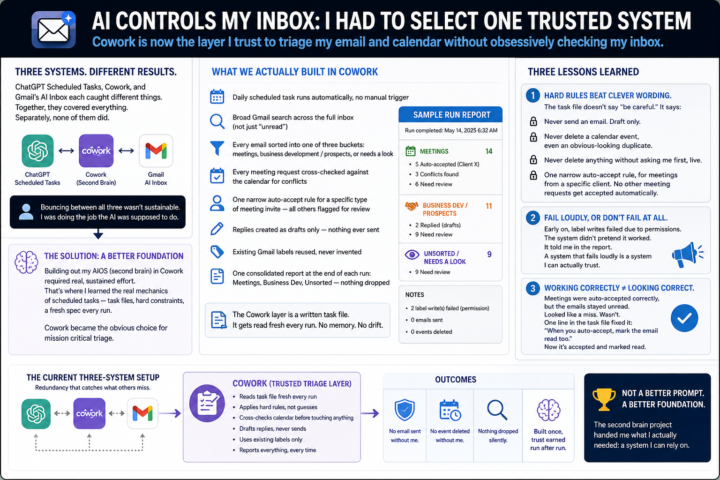
📬 AI Controls My Inbox: I Had to Select One Trusted System
The results across the three systems weren't consistent. ChatGPT Scheduled Tasks, Cowork, and Gmail's own AI Inbox each caught different things. Together, they covered everything. Separately, none of them did. So I found myself doing something I hadn't planned on: bouncing between all three, cross-checking one against another, instead of trusting any single one to just handle it. That's not sustainable. That's a person doing the job the AI was supposed to do. Around the same time, on an unrelated but related project, I started building out my AIOS — what I've been calling my second brain. Getting that set up required real, sustained effort inside Cowork. That's where I actually learned how Cowork's scheduled tasks work. Not the surface version. The real mechanics — task files, hard constraints, a run that reads a fresh spec every time instead of carrying memory forward. It was clear to me that Cowork was the best choice for mission critical triage at this point, and therefore the scheduled task is much more robust. 📝 What we actually built in Cowork - A daily scheduled task that runs the inbox triage automatically, no manual trigger - A broad Gmail search across the full inbox, not just "unread" — misclassified emails don't show up if you only look at unread - Every email sorted into one of three buckets: meetings, business development / prospects, or needs a look - Every meeting request cross-checked against the calendar for conflicts before anything gets touched - One narrow auto-accept rule for a specific type of meeting invite — all other meeting notices get flagged for review, not guessed on - Replies created as drafts only — nothing ever sent automatically - Existing Gmail labels reused, never invented on the fly - One consolidated report at the end of each run: Meetings, Business Dev, Unsorted — nothing dropped silently That's the skeleton. Here's what happened once it actually ran. The Cowork layer is a written task file. It gets read fresh every run. No memory of the last one. Nothing to slowly drift.
🔥
2 likes • 6d
@Michael Wacht I look forward to catching up on this post!
🔥
2 likes • 6d
@Michael Wacht you arr crushing it! I am really looking for to dialing it in
🔥
9d •
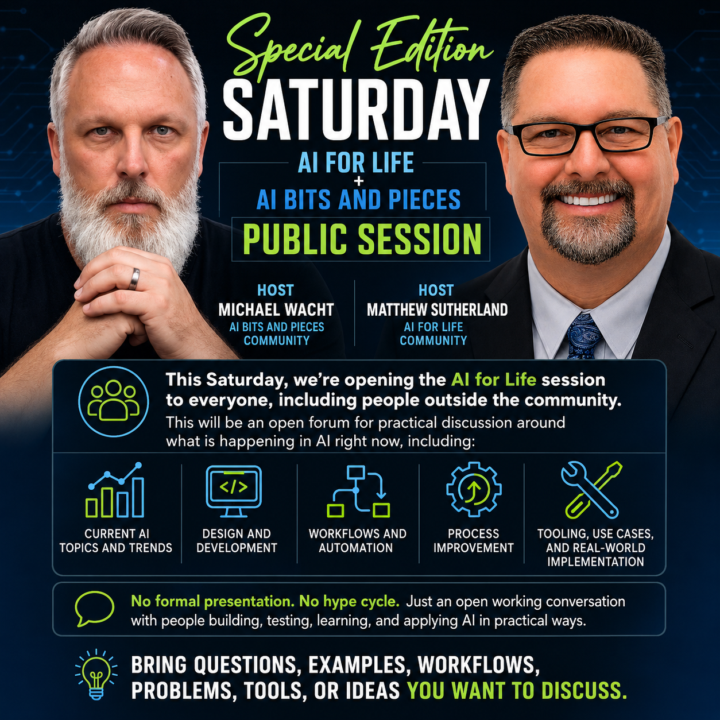
12:30pm EST Today - Special Edition Saturday Live Zoom Meeting Ai For Life + AI Bits and Pieces
Join us on Zoom Saturday, July 11, 2026 12:30 ET - 13:30 ET we’re opening the AI for Life + AI Bits and Pieces session to everyone, including people outside the community. Join instructions https://us06web.zoom.us/meetings/81545596982/invitations?signature=NQBPitO7KYhO4f7NHMddMYVn476zmP8rjoEmkdhIvzY Meeting ID: 815 4559 6982 Passcode: 050131 Hosts: - 𝗠𝗶𝗰𝗵𝗮𝗲𝗹 𝗪𝗮𝗰𝗵𝘁 from 𝗔𝗜 𝗕𝗶𝘁𝘀 𝗮𝗻𝗱 𝗣𝗶𝗲𝗰𝗲𝘀 𝗰𝗼𝗺𝗺𝘂𝗻𝗶𝘁𝘆. - 𝗠𝗮𝘁𝘁𝗵𝗲𝘄 𝗦𝘂𝘁𝗵𝗲𝗿𝗹𝗮𝗻𝗱 from 𝗔𝗶 𝗳𝗼𝗿 𝗟𝗶𝗳𝗲 𝗰𝗼𝗺𝗺𝘂𝗻𝗶𝘁𝘆. This will be guided questions plus an open forum for practical discussion around what is happening in AI right now, including: - The explosion of AIOS aka Second Brain - AI hot topics and trends - Design and development - Workflows and automation - Process improvement - Tooling, use cases, and real-world implementation Join us for an open working conversation with people who have been building, testing, learning, and applying AI and automations in practical ways. 𝗦𝘂𝗯𝗺𝗶𝘁 𝗾𝘂𝗲𝘀𝘁𝗶𝗼𝗻𝘀 𝗽𝗿𝗶𝗼𝗿 𝘁𝗼 𝘁𝗵𝗲 𝗲𝘃𝗲𝗻𝘁 𝗳𝗼𝗿 𝗰𝗼𝗻𝘀𝗶𝗱𝗲𝗿𝗮𝘁𝗶𝗼𝗻. We’ll kick things off with pre-submitted questions. Simply submit your question(s) in the comments below, or direct message me in Skool. ✨ Claude will pick the question order. And of course bring questions, examples, workflows, problems, tools, or ideas you want to discuss during the open forum. Hope to see our friends there: @Ron Nedd @Frank Priboy @Gina Wang @Debbie Ai @Pedro Gomez @Usman Mohammed @Nick Mohler @Mike AI Consultant @Diane McCracken @R S @Collin Thomas @Jacob Brodsky @Bradley Kerman @Md. Abdullah Al Mafi @Michele Wacht @Mark Zayec @John Romano @Josh Frison
🔥
1 like • 7d
@Matthew Sutherland yes! 🚀 💯
🔥
1 like • 7d
@Matthew Sutherland went on the USS Midway last night, it was amazing. 3k of us! Wild experience!
🔥
14d •
📬 AI Controls My Inbox: First Review After 72 Hours
So, was it perfect? Nope. Did I miss anything critical? Two emails. Fortunately, one person texted me, and the other email my wife asked if I saw it - so, there was no major negative impact. But that is exactly why I am doing this experiment. I do not want to know if AI can manage my inbox when everything goes perfectly. I want to know where the cracks show up when I am not looking every day. Here is what I learned after the first 72-hour cycle. 📝 Lesson one: the first cycle had a built-in advantage. Because I was already familiar with the current state of my inbox, I knew what I expected to see. I had a mental map of open conversations, active deals, pending follow-ups, and emails that might matter. That made the first review easier, but that advantage starts to disappear in the next cycle or two. Once I stop carrying the recent inbox context in my own head, the system has to stand on its own. That is when the real test begins. 📝 Lesson two: prompts matter. 📝 Lesson three: prompts matter even more. Yes, this experiment is quickly becoming a lesson in prompt design. Even though I did not open my inbox during the 72-hour window, I did adjust the prompts based on what I expected to come in and what was getting through that should not have been. - Some spam and promotions still surfaced. - Some categories needed tighter language. - Some escalation rules needed more clarity. That does not mean the system failed. It means the operating instructions needed refinement. And that is probably the biggest early takeaway. AI inbox management is not a set-it-and-forget-it system. At least not yet. It is more like training an operations assistant. You give it a role. You define the boundaries. You observe the misses. You tighten the rules. Then you run the next cycle. 📝 Final lesson: redundancy matters. At this stage, built-in redundancy has real benefits. For this experiment, I used three AI layers: - Claude Cowork - ChatGPT Scheduler - Gmail AI Inbox
🔥
2 likes • 14d
Great recap, and yes, the idea is not perfection on day one! Great reminder!
🔥
1 like • 14d
@Michael Wacht powerful humility~!
1-10 of 19

Online now
Joined May 27, 2026
Texas
Powered by