Activity
Mon
Wed
Fri
Sun
Mar
Apr
May
Jun
Jul
Aug
Sep
Oct
Nov
Dec
Jan
Feb
What is this?
Less
More
Memberships
Scale Your Coaching
20.7k members • Free
Tradetopia Exchange
2.5k members • Free
Peakvest Society
12.7k members • $1/year
37 contributions to InvestCEO with Kyle Henris

Mar '25 •
TradingView ETH Background Color Update
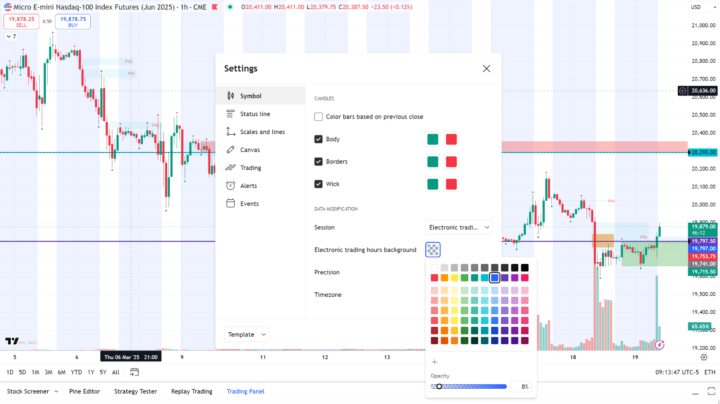
I bet some of you are scratching your heads, wondering why, as of yesterday, your TradingView background highlighted the Off-Regular Trading Session hours in blue. Some of you might like the change, and others might not. I for sure didn't like it, and found it annoying. If you don't like it, and would like to change it back to the way it was... 1. Right-Click on your Chart background 2. Click on 'Settings' 3. Under 'Settings', select the 'Symbol' tab or menu 4. Change the 'Electronic trading hours background' color from blue to white or the color that matches your regular trading hours

1 like • Mar '25
Yes! had to google it! Thank you!

👑
Mar '25 •
Mark Your Calendars ☘️
Hey InvestCEO fam! Many of you have been anxiously waiting to hear more about the new opportunities involving my automated day trading software. Those of you who attended the bootcamp a couple weeks ago have even been checking out the performance and getting daily activity reviews. I promised I’d get you more info soon, and that time is a week away! On Monday March 24th at 7:30pm est I’ll be diving into the new opportunity and how you can get involved. Zoom link is on your Skool calendar :) Kyle
7 likes • Mar '25
Can’t wait to hear all about it!

Mar '25 •
300k Update (I was wrong, it's still alive)
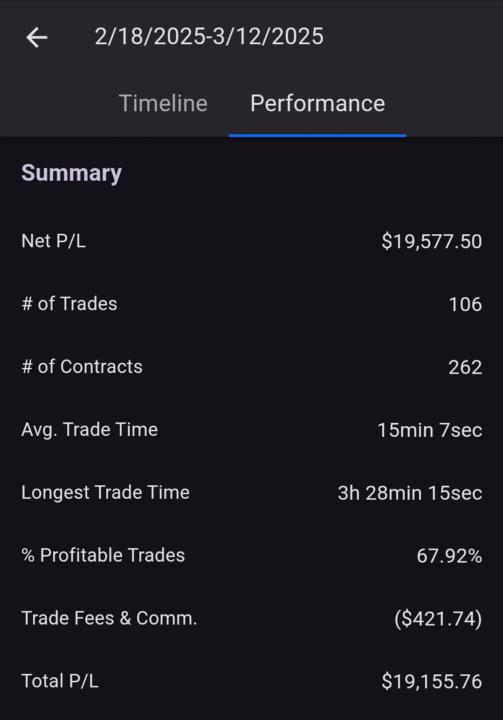
So on the last post I thought I got failed out because I got the liquidated message, but turns out I just inadvertently had my risk settings at 2k max daily loss. So I didn't lose the account, just got locked out for the day. Proud to report I am up to $19,155 profit, and only need $845 more profit to pass this monstrosity of an eval. Trade stats below.
1 like • Mar '25
That is so cool!! Way to go!! You got this!

Mar '25 •
Plan Area Time Interval for 1M Superman
What time interval are most people using to create their plan areas for trading 1 minute Superman? I was originally using the 1H for the plan area (based on the classroom videos) but I recently saw a training video from one of the coaches that said 15 or 30 minute for the plan area would be better.
1 like • Mar '25
If I remember correctly, during Boot Camp Kyle said that he prefers the one hour but there isn’t a ‘right’ TF for planning … you could use whatever timeframe works best for you.

4 likes • Mar '25
[attachment]
1-10 of 37

@devon-cabreja-2189
Child of God, Wife, mom of 4 great kiddos, nurse, and avid cruiser! Looking for financial freedom in order to have the ability to give back!
Active 3d ago
Joined Oct 15, 2024
Ruskin FL
Powered by