Activity
Mon
Wed
Fri
Sun
Sep
Oct
Nov
Dec
Jan
Feb
Mar
Apr
May
Jun
Jul
Aug
What is this?
Less
More
Owned by Des
Content marketing for creators over 40. Build an audience on YouTube, Instagram, TikTok and beyond, then turn it into real income. Free.
Turn your Skool community into $1K-$5K/month - even with just 0-50 members
A Heart For Writing
105 members • Free
CS
Cooking Skool
13 members • $5/year
Skool Events Daily
450 members • Free
The Positive Point Community
6 members • Free
Empowered Investor Pathway
7 members • $5,000
YouTube Mastermind
38 members • $2,000/year
56 contributions to Skool Monetization Strategies

🔥
Mar 5 •
Closing This Community :(
Hi all, it's with great regret that I am closing this Skool. This was a test of a test of a test, and it has now fulfilled its purpose. Just thought I would let you know before the doors finally close.
🔥
1 like • Mar 5
@Shaz Jones Just a test 🙂
🔥
Feb 25 •
How to Launch a Profitable Skool Community in Just 37 Days
If you think launching a paid Skool community takes months of audience building, endless content creation, and waiting for the "perfect" moment, Mona Weathers just proved you wrong. She pivoted from a homesteading niche on YouTube and Facebook groups to accidentally discovering Skool (while exploring AI avatars), then built two thriving communities: - Next Level Creator Hub (310+ members, free entry with premium upgrades) – focused on repeatable systems for traffic, community, and income so solopreneurs and creators achieve intentional, sustainable growth. - Offers to Launch – launched from pure idea to 21 paid members on Day 1 in only 37 days, testing a paid public community model at $97 one-time fee. Here is my interview with her - https://youtu.be/bENHFrRQ5sE Here is her main Skool community - Next Level Creator Hub: https://www.skool.com/next/about?ref=c75adaa832e449d8b1ef463c22b1d8a9 Most new Skool owners get stuck in "build mode": creating courses, hoarding content, tweaking offers endlessly—while revenue stays at $0. Mona's approach flips the script: spot a real pain point (like "I don't know how to sell/upgrade offers in my community"), validate fast with a lean launch, use urgency and mindset shifts to drive paid signups, then refine based on real buyer feedback and conversations. This post breaks down her fast-launch strategy, including the 37-day timeline, the 48-hour price ladder that created action without sleaze, her killer auto-DM question for instant engagement, and why "go deep before you go wide" beats vanity metrics every time. If you're sitting on a Skool idea, struggling with monetization, or wondering how to turn free members into paying ones—this is your no-fluff roadmap. Here's what you'll learn: • Why focusing on depth (real conversations) grows communities faster than chasing numbers • The ONE auto-DM question that gets 90-95% response rates and starts helping immediately
1
0
🔥
Feb 22 •
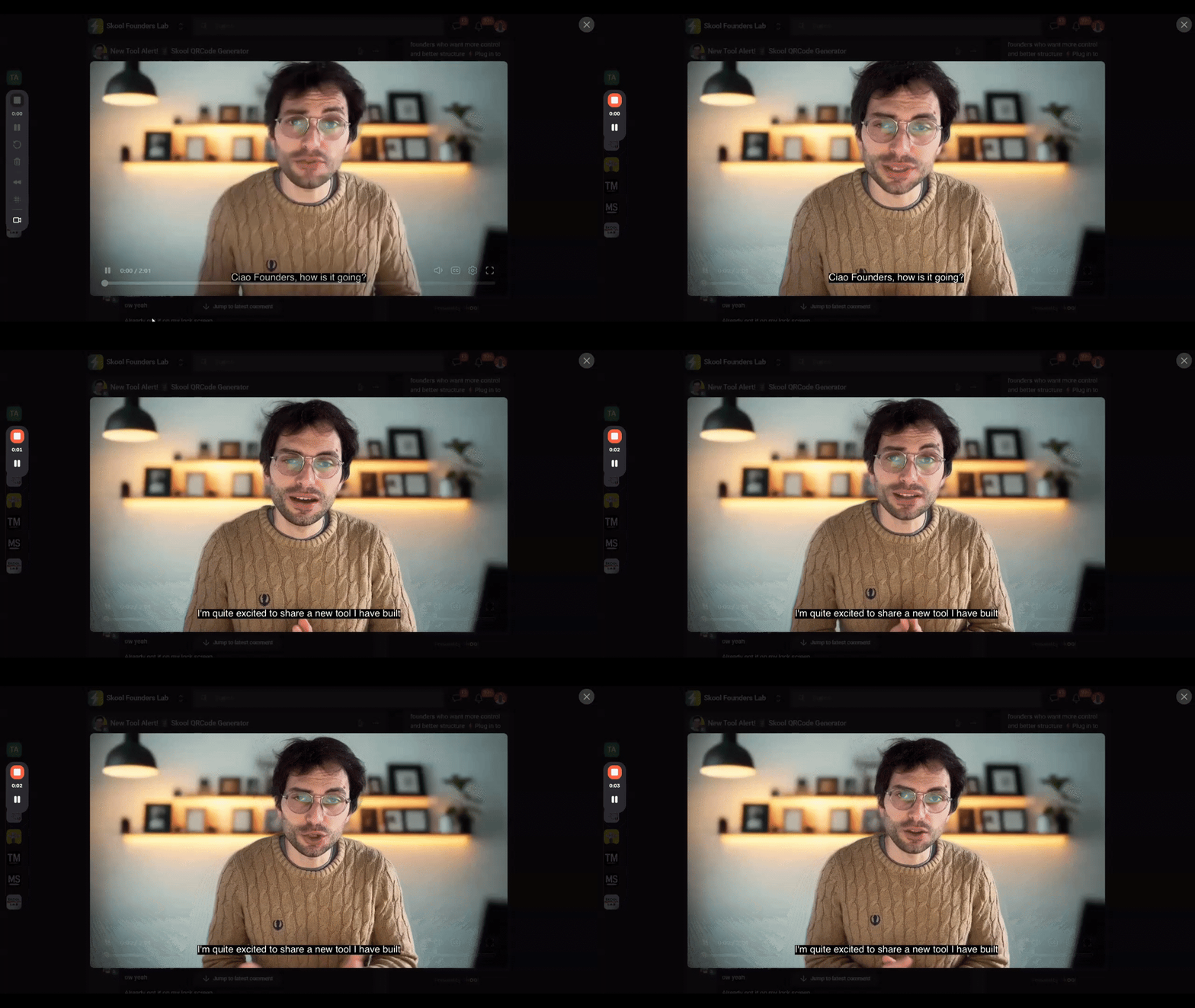
New Tool Alert! 📱 Skool QRCode Generator
Hey everyone, My good friend Claudio Campobassi from Skool Founders Lab just built a free tool that solves a real-world problem for community owners. The Skool QR Code Generator turns your community URL into a QR code or custom smartphone wallpaper. If you're ever at a networking event, speaking on stage, or just meeting a potential member in person, you can share your community instantly. No fumbling with links. No spelling out URLs. You can even set it as your lock screen so sharing requires zero unlocking. For those of you actively growing your communities, this is a simple way to bridge your online community with any offline conversations you're having. Free to use: https://claudiocampobassi.com/skoolqrcode If you try it, drop your wallpaper design in the comments — curious to see what people create! Connect with Des: LinkedIn • Facebook • Instagram • Instagram 2 • Substack • Pinterest • Des Dreckett YouTube • Skool Monetization YouTube • The Authority Engine Community • The Authority Engine YouTube
🔥
1 like • Feb 23
@Steve Robertson You're welcome 🙂
🔥
Feb 21 •
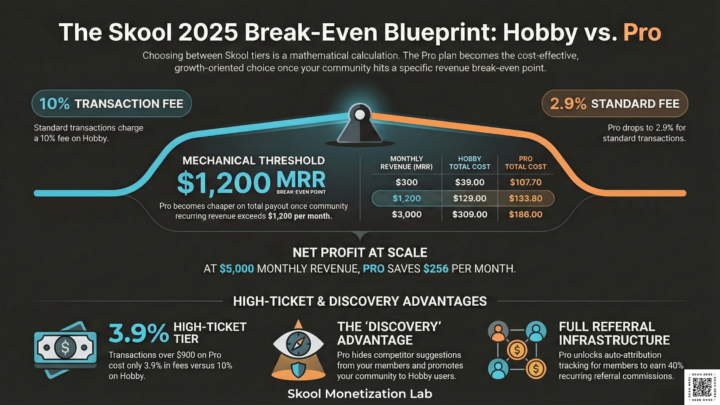
How Much Does It Cost to Host a Skool Community?
The complete 2025 breakdown — including the transaction fee maths most guides skip Since the Skool Hobby plan rollout in Q3 2025, the platform cost calculation for community owners has shifted materially. I run a paid Skool community — Skool Monetization Lab — on the Pro plan, with 33 members, 100% retention, and recurring membership revenue across Standard, Premium, and VIP tiers. The $99/month Pro plan fee is one of the first questions prospective community owners ask me about. Here is the complete answer, including the transaction fee maths that most pricing breakdowns either skip or get wrong. The choice between Hobby and Pro is a mechanical calculation of Stripe-integrated MRR and LTV preservation. The break-even point lands at $1,000–$1,200/month in community recurring revenue — closer than most community owners expect, and lower than competitor platform comparisons typically show. There is no free plan. Both plans include a 14-day creator trial. Both include unlimited members, unlimited courses, and all core Skool features. The differences are strategic, not cosmetic. THE TWO PLANS AT A GLANCE Hobby Plan — $9/month Transaction fee: 10% + $0.30 per transaction Admins: 1 only Branding: "Powered by Skool" badge on your community Suggested communities: Shown to your members in the sidebar Affiliate auto-attribution: Limited / restricted Free trial: 14 days Members and courses: Unlimited ───────────────────────────── Pro Plan — $99/month Transaction fee: 2.9% + $0.30 (transactions up to $900) / 3.9% + $0.30 (transactions above $900) Admins: Unlimited Branding: Fully white-labelled, no badge Suggested communities: Hidden from your members (your community gets promoted to Hobby users instead) Affiliate auto-attribution: Full auto-tracking Free trial: 14 days Members and courses: Unlimited Transaction fees are deducted before your weekly Stripe Express payout. You do not pay Stripe separately.
0
0
🔥
Feb 15 •
How to Launch a Profitable Skool Community in 10 Days
If you think launching a Skool community requires months of prep work and perfect content, Katya McEwen just proved you wrong. She built two profitable communities - 1,600 and 2,500 members - using a 10-day launch strategy that generated $9,000 from cold Facebook ads. Here is my interview with her - https://youtu.be/O28D5nBJYes?si=255GNzaBKBnlPdSp Here is her Skool community - Oracle Connections Most community owners spend weeks building courses, creating content libraries, and perfecting their offer before launching. Meanwhile, they're making $0. Katya's approach flips this: she sells on Day 2 of her launch, validates the offer with real revenue, then builds based on what members actually need. This post breaks down her unconventional Skool community launch strategy, including the exact 10-day timeline, why she pitches on Day 2, and how she uses "finishers clubs" to drive retention. If you're sitting on a community idea waiting for the "right time," this is your roadmap. Here's what you'll learn: • Why 10-day launches outperform 3-day scarcity tactics • The Day 2 pitch strategy that converted $9K from cold traffic • How to build "finishers clubs" that create retention without forced engagement • Facebook ad tactics for profitable Skool communities Why 10-Day Launches Beat 3-Day Scarcity Plays Most launch advice pushes hard 3-day deadlines: open cart Friday, close Sunday, create FOMO, profit. Katya does the opposite - she runs 10-day "adventures" that prioritize implementation over urgency. Here's her philosophy: if people only join because of scarcity, you lose them the moment that pressure disappears. Instead, she builds self-trust. Members complete a tangible project (designing 25 oracle cards in 7 days), experience a win, and join because they want more of that feeling. The structure looks like this:
1
0
1-10 of 56

🔥
@des-dreckett-6753
Helping creators turn YouTube into paid Skool members. Built The Content Revenue Lab from scratch. No big audience needed.
Online now
Joined Jan 9, 2026
Spalding