Activity
Mon
Wed
Fri
Sun
Aug
Sep
Oct
Nov
Dec
Jan
Feb
Mar
Apr
May
Jun
Jul
What is this?
Less
More
Memberships
81 contributions to AI Automation Society

💎
⭐
13d •
Congrats to our June graduates! #AISChallenge🎉
Huge shoutout to everyone who finished the 7-Day Challenge this month and got certified. Seven days, zero to your own executive assistant in Claude Code. Step by step, from nothing to shipped. These 46 members put in the reps and walked away with a working assistant they built themselves: Larry Crane, Al Mulrooney, Hassan Eid, Brandon Claeys, Marc-Antoine Siewe, Neelima Rani, Javier Yranzo, Elmuntasir Mukhier, Cristian Victoria, Alberto Galdames, Harena Juan Rabarijaona, Greg Faysash, Logan Clegg, Paul Forster, Estefania Tidwell, Vuk Simić, Iain Littlejohn, Mark Moran, Julius Waggoner, Michael Wijaya, Ilias Kirbashev, Leviticus Kinchen, Duy Nguyen, Vina Egg, Žiga Kalan, David Richardson, Lesetša Mutchinya, Abrie van Wijk, Firoz Shaikh, Farel Viaho, Alberto Camacho, Tito Burga, Chad, Peter Lukacsi, Sanjana N, Ayhan Bulut, Jerry, Hamza Sajjad, Tim van Kollenburg, Elias B., Ismoiljon Farhodov, Tim Metzner, Java Hardge, Philippe, Papa, Robin Pinchard If you haven't started yet, the challenge is completely free and it's right here: https://www.skool.com/ai-automation-society/classroom/dda699b7?md=08b046f630344596b864d1cd4304bda0 One lesson, one build, each day. By the end you'll have your own Claude Code assistant up and running. See you in the next cohort. - Nate


3 likes • 13d
Congrats!
💎
⭐
Jun 13 •
400,000 members.
When I started the AI Automation Society, I had no idea it would grow into this. Under two years later and we just crossed 400k. The largest AI automation community in the world. Yes, the space is exploding. But this community grew because you guys keep showing up, asking questions, dropping answers, sharing builds, and helping the person one step behind you. Huge thank you to the team that keeps this thing running, and to every single one of you who's posted, commented, or just been here. I feel lucky to get to do this. So excited to share with you guys what we've been quietly cooking up over here at AIS...👀 - Nate

3 likes • Jun 13
Woah!! That is a huge accomplishment!
💎
⭐
Jun 10 •
🚀New Video: I Turned Claude Fable Into The Ultimate Second Brain
My entire life and business now live in one second brain, and Claude Fable understands it better than I do. In this video I walk through my full Claude Fable AI operating system using the four Cs framework: context, connections, capabilities, and cadence. You'll see exactly how my files and folders are set up, how I keep improving it every day, and the usage tips I rely on to get more out of it.
1 like • Jun 11
This is awesome!
💎
⭐
May 9 •
🚀New Video: This is The Most Powerful Tool to Give to Claude Code
Printing Press lets you turn any tool into a CLI that AI agents can actually use efficiently. It gives you a catalog of ready to go CLIs and also helps you turn almost anything into a CLI in minutes. If you've ever watched MCPs eat your tokens for breakfast, this video shows why CLIs are the better path for agent setups.
1 like • May 11
Woah this is awesome!

Apr 16 •
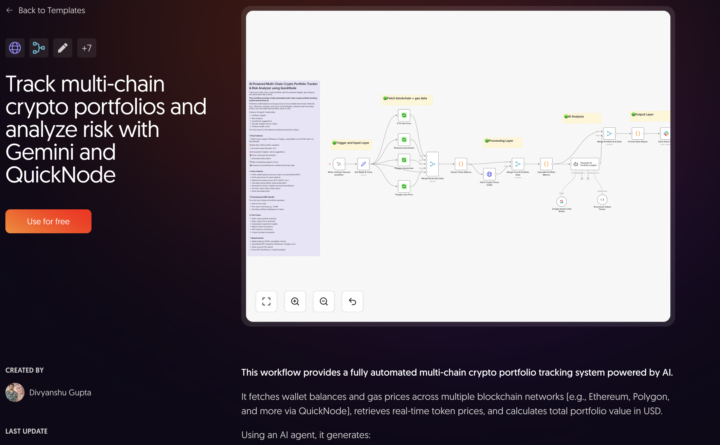
🚀 AI-Powered Multi-Chain Crypto Portfolio Tracker (n8n Template)
Hey everyone 👋 Just published a new n8n template that solves a problem I kept facing while tracking crypto portfolios. 👉 The problem: - Managing portfolios across multiple chains is messy - You only see balances, not real insights - No clear view of risk or allocation - Everything feels manual and time-consuming 👉 What this template does: • Tracks wallet balances across chains (ETH, Polygon & more via QuickNode) • Converts everything into USD • Calculates portfolio allocation (%) • Uses AI to generate insights, risk & suggestions • Analyzes gas fees across chains • Sends a clean report directly to Slack • Can run daily (set it once and forget it) 👉 Think of it as your AI crypto portfolio assistant Would love to hear your feedback or ideas to improve this 🙌 🔗 Free template: https://n8n.io/workflows/15042
1 like • Apr 18
@Divyanshu Gupta this looks cool!
1-10 of 81
Active 1h ago
Joined Mar 31, 2025
Puyallup, WA
Powered by