Activity
Mon
Wed
Fri
Sun
Nov
Dec
Jan
Feb
Mar
Apr
May
Jun
Jul
Aug
Sep
Oct
What is this?
Less
More
Owned by Dar
Novice to advanced canner you'll find your people here. Recipes, chat, videos and more. Join this international community today and CONNECT.
Client Acquisition for Coaches
768
5.0
Free
Second Act Wealth Society™
242
Free
Wineries Of The World
21
Free
THE SKOOL HUB
5.6k
5.0
$10/m
Skooligans
623
Free
The Creative Jukebox
115
Free
🎙️Skool Summit Stage🎙️
1.6k
5.0
Free
Gluten Free Cooking
105
Free
Art Hub
55
$3/m
8 contributions to Skool Extensions 🧩

Aug 4 •
Question Marco
I am one of the founders of skooligans community and we have a black cat as our icon. For some reason one of our members has this icon next to his flame. He however cannot see it, only I can. But it also shows up in HIS community and when he DM's me. Yet his own community icon doesn't. Nobody else I know does that or has their icon next to the flam either. I am the only one who sees it of those I've talked to about it. Darren suggested since I use your extension maybe that's why. Could is be something with your extension doing that?

1 like • Aug 4
@Marco Berlin But Joey, isn't in your community and I am on your standard tier. Interesting...
1 like • Aug 5
@Kristine Alise nope, I don't use the tags.
Jun 3 •
Share Food Love
In the Share Food Love Community, you will find: 1) An experienced home cook with over 40 years cooking for 1-500 people. Plus, all her foodie friends from around the world, giving you the opportunity to ask any question you’d like on any number of cuisines, types of techniques, types of kitchen equipment and cultural dishes. 2) Modules on meal planning, shopping, storing, stocking, and much more to help you get the most bang for your buck in this crazy expensive world. 3) Video and downloadable recipes to try on your own along with tips and tricks videos to help you out in the kitchen. 4) LOVE. You can’t make good food without love. We share the food love and the LOVE love with all who join. We want you to feel the warmth of the kitchen, partake in the shenanigans, snitch a cookie or two, have a cup of coffee or tea, and learn a little something along the way. Join at the Premium level to get all the cookies in the jar. You WANT all the cookies, I promise. It’s a bargain at $25/month.

2 likes • Jun 3
@Marco Berlin 🫶
2 likes • Aug 3
@Prisca Tamayi come on over...

🔥
Jun 22 •
Keyboard Shortcuts
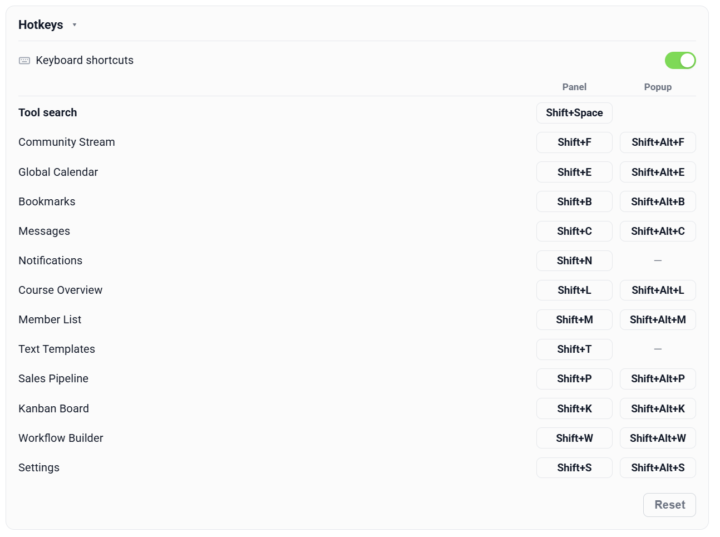
𝗞𝗲𝘆𝗯𝗼𝗮𝗿𝗱 𝗦𝗵𝗼𝗿𝘁𝗰𝘂𝘁𝘀 — 𝗢𝗽𝗲𝗻 𝗔𝗻𝘆 𝗣𝗮𝗻𝗲𝗹 𝗪𝗶𝘁𝗵𝗼𝘂𝘁 𝗥𝗲𝗮𝗰𝗵𝗶𝗻𝗴 𝗳𝗼𝗿 𝘁𝗵𝗲 𝗠𝗼𝘂𝘀𝗲 Every Skool Extensions panel sits behind a toolbar click — fine once, tiresome when you bounce between Calendar, Members and the Stream all day. Keyboard Shortcuts turns the whole toolkit keyboard-first: a new Hotkeys section in the Settings carries a master switch that turns shortcuts on or off, and from there every panel gets its own key combo. Each panel carries two bindings — one to open it in the sidebar, one to pop it out into the larger window — so you land straight in the view you want. Click a binding field, press the combo you'd like, and it's set. The defaults follow a simple scheme — Shift plus the panel's letter for the sidebar, Shift+Alt for the pop-out — but every one is yours to rebind. Live conflict detection flags a combo that's already taken before it can collide, and one click resets the whole set back to defaults. Your bindings are saved and synced across your devices. There's also a Tool search — its own shortcut opens a search box over the page where you type to filter every tool and panel at once. Enter opens the match in the sidebar, Shift+Enter pops it out. No hunting through the toolbar when you can't remember where something lives — open the search, type a few letters and go. Keyboard Shortcuts can be toggled on or off in the Hotkeys section of the Extension Settings. --- 𝗧𝗮𝘀𝘁𝗮𝘁𝘂𝗿𝗸𝘂̈𝗿𝘇𝗲𝗹 — 𝗝𝗲𝗱𝗲𝘀 𝗣𝗮𝗻𝗲𝗹 𝗼̈𝗳𝗳𝗻𝗲𝗻, 𝗼𝗵𝗻𝗲 𝘇𝘂𝗿 𝗠𝗮𝘂𝘀 𝘇𝘂 𝗴𝗿𝗲𝗶𝗳𝗲𝗻 Jedes Skool-Extensions-Panel sitzt hinter einem Toolbar-Klick — einmal okay, lästig, wenn du den ganzen Tag zwischen Kalender, Mitgliedern und dem Stream springst. Tastaturkürzel macht das ganze Toolkit tastatur-first: Ein neuer Bereich „Tastenkürzel“ in den Einstellungen hat einen Hauptschalter, der die Kürzel ein- oder ausschaltet, und von dort bekommt jedes Panel seine eigene Tastenkombination. Jedes Panel hat zwei Belegungen — eine öffnet es in der Seitenleiste, eine klappt es ins größere Popup-Fenster auf —, sodass du direkt in der gewünschten Ansicht landest. Klick ins Belegungsfeld, drück deine Kombi, fertig. Die Standardwerte folgen einem einfachen Schema — Shift plus der Anfangsbuchstabe des Panels für die Seitenleiste, Shift+Alt fürs Popup —, aber jede lässt sich neu belegen. Eine Live-Konflikterkennung markiert eine bereits vergebene Kombi, bevor sie kollidieren kann, und ein Klick setzt das ganze Set auf die Standardwerte zurück. Deine Belegungen werden gespeichert und über deine Geräte synchronisiert.
5 likes • Jun 22
Sweet! Thanks @Marco Berlin 🫶🥰
🔥
Jun 20 •
Schedule Posts (VIP Feature 💎)
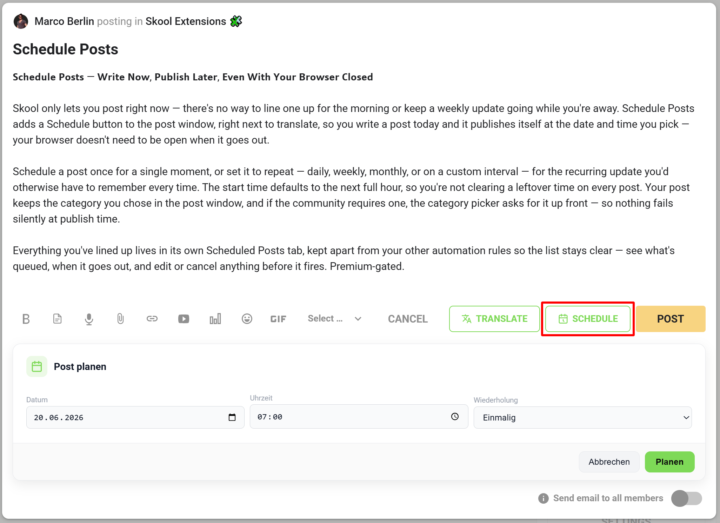
𝗦𝗰𝗵𝗲𝗱𝘂𝗹𝗲 𝗣𝗼𝘀𝘁𝘀 — 𝗪𝗿𝗶𝘁𝗲 𝗡𝗼𝘄, 𝗣𝘂𝗯𝗹𝗶𝘀𝗵 𝗟𝗮𝘁𝗲𝗿, 𝗘𝘃𝗲𝗻 𝗪𝗶𝘁𝗵 𝗬𝗼𝘂𝗿 𝗕𝗿𝗼𝘄𝘀𝗲𝗿 𝗖𝗹𝗼𝘀𝗲𝗱 Skool only lets you post right now — there's no way to line one up for the morning or keep a weekly update going while you're away. Schedule Posts adds a Schedule button to the post window, right next to translate, so you write a post today and it publishes itself at the date and time you pick — your browser doesn't need to be open when it goes out. Schedule a post once for a single moment, or set it to repeat — daily, weekly, monthly, or on a custom interval — for the recurring update you'd otherwise have to remember every time. The start time defaults to the next full hour, so you're not clearing a leftover time on every post. Your post keeps the category you chose in the post window, and if the community requires one, the category picker asks for it up front — so nothing fails silently at publish time. Everything you've lined up lives in its own Scheduled Posts tab, kept apart from your other automation rules so the list stays clear — see what's queued, when it goes out, and edit or cancel anything before it fires. --- 𝗣𝗼𝘀𝘁𝘀 𝗽𝗹𝗮𝗻𝗲𝗻 — 𝗝𝗲𝘁𝘇𝘁 𝘀𝗰𝗵𝗿𝗲𝗶𝗯𝗲𝗻, 𝘀𝗽𝗮̈𝘁𝗲𝗿 𝘃𝗲𝗿𝗼̈𝗳𝗳𝗲𝗻𝘁𝗹𝗶𝗰𝗵𝗲𝗻, 𝗮𝘂𝗰𝗵 𝗯𝗲𝗶 𝗴𝗲𝘀𝗰𝗵𝗹𝗼𝘀𝘀𝗲𝗻𝗲𝗺 𝗕𝗿𝗼𝘄𝘀𝗲𝗿 Skool lässt dich nur sofort posten — es gibt keine Möglichkeit, einen Beitrag für den Morgen vorzubereiten oder ein wöchentliches Update laufen zu lassen, während du weg bist. „Posts planen" fügt dem Postfenster einen Planen-Button hinzu, gleich neben „Übersetzen": Du schreibst einen Post heute, und er veröffentlicht sich von selbst zum Datum und zur Uhrzeit, die du wählst — dein Browser muss dafür nicht offen sein. Plane einen Post einmalig für einen einzelnen Zeitpunkt oder stell ihn auf wiederkehrend — täglich, wöchentlich, monatlich oder im eigenen Intervall — für das regelmäßige Update, an das du sonst jedes Mal denken müsstest. Die Startzeit steht standardmäßig auf der nächsten vollen Stunde, sodass du keine übrig gebliebene Uhrzeit bei jedem Post wegklicken musst. Dein Post behält die Kategorie, die du im Postfenster gewählt hast, und braucht die Community eine, fragt die Kategorie-Auswahl gleich danach — so scheitert nichts still beim Veröffentlichen.
13 likes • Jun 20
Cool!
🔥
May 26 •
Fan Group
Are you a fan of the Skool Extensions 🧩 ? Then join the fan group and exchange ideas with other fans in messenger style. This way you will also get to know more and more about the group function of the extension. Group: Skool Extensions 🧩 - Fan Group Join the group: https://www.skool.com/?skool-ext-join=sGyK6YHFv1pG&ek=bkNTol3bilYxYm62jpdktxq5Mdej3AiQMXElOzq7lno

7 likes • May 26
So cool. Glad to be the first! Can't wait to chat with everyone.
1-8 of 8

@darlene-brown-6217
I'm just trying to help fellow canners. Pull up a chair to the kitchen island. Sample the cookies, feel the warmth, join in, have a coffee. Enjoy.
Active 44m ago
Joined Mar 24, 2026
Alaska
Powered by