Activity
Mon
Wed
Fri
Sun
Nov
Dec
Jan
Feb
Mar
Apr
May
Jun
Jul
Aug
Sep
Oct
What is this?
Less
More
Clever Kit Pilot
567
Free
Second Act Wealth Society™
248
Free
AI Mastery
144
Free
CyberWise with Tamara
81
Free
The Hypnosis Lab
48
Free
BUILD-A-SKOOL-ACADEMY
226
Free
ZeroOne · Your First AI Agent
15.5k
Free
15 contributions to AI Bits and Pieces

Jun 26 •
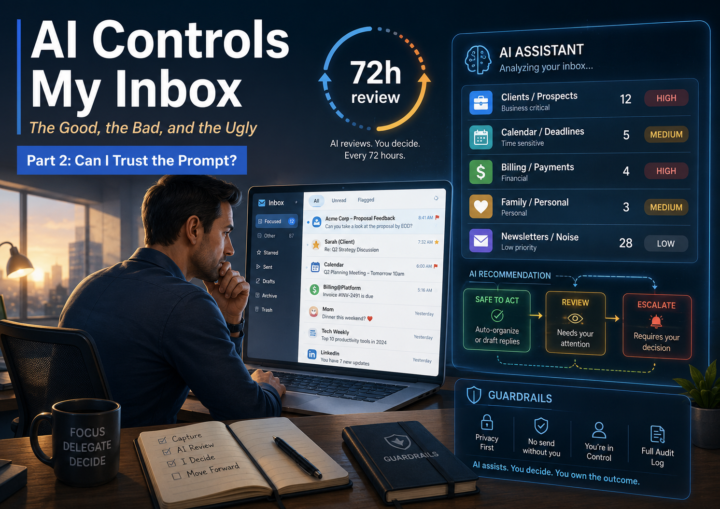
📬 AI Controls My Inbox: Feeling Nervous on Day 1
This morning, I woke up feeling a little nervous. It wasn't because AI was going to read my inbox—it has been doing that for months. What made me uneasy was knowing that I was no longer going to be the reading it at all for three days. My inbox isn't just business. It's clients, prospects, personal email, financial information, family logistics, subscriptions, and everything in between. I also have a few active deals in progress, so missing the wrong email could have real consequences. Since I had fully committed to letting AI review my inbox first, I wanted to make sure the instructions were as clear and complete as possible, and that ChatGPT and I were on the same page. One thing I like about ChatGPT Scheduled Tasks is that I can prompt directly inside the email notification chat, which means it already has context, that makes it very easy to refine the instructions without starting from scratch. So, without reading my email, I asked a simple question: 💬 The Prompt: I would like to look my email every three days. How should we enhance the prompt? Or is it good? 🤖 ChatGPT’s Response: Your current prompt is good for twice-daily alerts, but if you only plan to personally check email every three days, I would strengthen it. The main enhancement is to make the AI act less like a “notification filter” and more like an email operations assistant with escalation judgment. Here is a stronger version: Review my recent email and notify me only when a message likely needs my attention before my next manual inbox review. I personally review my inbox every 72 hours, so prioritize anything that cannot safely wait three days. Flag emails involving: - Clients or prospects - Time-sensitive requests - Deadlines, renewals, billing, payments, payroll, contracts, or account/security issues - Anything from VIP senders - Messages that require a reply, approval, decision, review, or action Ignore by default: - Promotions - Spam - Newsletters - Automated notifications - Receipts or FYI-only updates, unless they involve money, account access, deadlines, or risk

1 like • Jun 27
Well, I’m still on the fence about this. Just old Skool intuition. Proceed with caution ⚠️ 🤣
1 like • Jun 27
@Michael Wacht I thank you for your bravery. AI is evolving so fast. I’m exploring and building but learning more about the vulnerabilities as well. Keep up the good work. 💯❤️🔥💪🏽
Jun 27 •
🐺 Intangibles That Help Close Deals When ROI Is Uncertain
I’m excited to announce the upcoming launch of “Lone Wolf AI League”, a new premium Skool community for people determined to become the AI resource inside their company, agency, executive room, board room or marketplace. Inside Lone Wolf AI League, I will share real-world AI strategy, deal strategy, wins, losses, client conversations, consulting realities, business execution, and what it actually takes to compete in the AI economy. This post is an example of the type of content and conversations we will explore inside the community. 🐺 I consider ROI, and most customers do as well, to be strictly financial: revenue gained, cost reduced, margin improved, cash flow improved, inventory reduced, or labor avoided. Those are ROI conversations. However, not every valuable project starts with a clear ROI. When faced with this situation, this is how I help the client understand which operational outcomes are important enough to justify moving the project forward. Those outcomes usually fall into three categories: - Capturing tribal knowledge, - Making hidden processes visible - Compressing the time it takes to make decisions. The first operational outcome is capturing tribal knowledge. 🐺 Capturing Tribal Knowledge: Tribal knowledge is no longer just what employees know. Increasingly, it is what employees have built inside personal AI accounts, private prompts, spreadsheets, automations, shortcuts, and informal workflows. If critical process knowledge is being built inside personal accounts, the company may not actually own the operating system its employees are using to get work done. That creates a real business risk. The employee becomes more productive, but the business does not necessarily become more capable. And when that employee leaves, the company may lose both the person and the process. The second operational outcome is bringing opaque processes into the light. 🐺 The Black Box Many companies have processes that technically work, but nobody can clearly explain how decisions are being made.

1 like • Jun 27
Very interesting, can’t wait to learn more. Thanks 😊
May 12 •
NotebookLM in 10 Bites: Convert Note to Source (6/10)
Bite 6 — Turn a Note into a Source If you have been following along, so far, you have: ✅ Signed up ✅ Created a notebook ✅ Added a source ✅ Asked your first question ✅ Created your first output ✅ Saved useful notes Now we get to one of the most powerful features in NotebookLM. Today, we are going to turn a note into a source. This matters because once you start organizing and refining responses, you are no longer just working with the original document. You are starting to shape better information. You can capture those knowledge nuggets, clean them up, and move them into a source file that NotebookLM can use again. This is where things start to get really useful. Instead of only working from the raw material you started with, you can begin working from a more refined version of that material. That means NotebookLM is no longer just helping you read and summarize. It is helping you build better source material. 📝➡️📂 Note to a Source: Refine and reuse This feature lets you take the best parts of your work and turn them into new source material NotebookLM can build on. Now let’s use it. 👉 Start with a saved note Pick a note you created from a chat response or Studio output. Steps: ☐ Open your notebook ☐ Go to the Notes area in the Studio panel 👉 Turn the note into a source Steps: ☐ Select the note or select the 3-dot menu ☐ Choose the option to turn it into a source ☐ ☐ Confirm it now appears in your Sources panel That’s it. You just turned your own refined work into source material NotebookLM can use again. That is a big shift. You are no longer limited to the original document. You are now helping NotebookLM work from a cleaner, more organized layer of information that you helped create. This is one of the reasons NotebookLM becomes so powerful over time. You can start with messy information, refine it through chat and notes, and then turn those better insights back into a source. That creates a loop: Source → Chat → Notes → Better Source And that is where the real value starts to show up.

1 like • May 12
Well, a little complicated using my phone. 😉 Thank you for your support.💯🔥
1 like • May 12
Both at times. My phone can only handle so much. 😂
May 12 •
Been Away - Daughter Graduated from College
I’ve been a little quiet here the past few days for a very good reason. I was away watching my daughter graduate from college as a nurse and helping her pack up for the next stage of life. Proud girl dad moment, for sure. The good news is she already has a job lined up and is excited for what comes next. It is one of those moments where you realize how fast time moves, how much work goes into raising kids, and how rewarding it is to see them step into their own future. Back in the mix now and catching up. Grateful for this community, and also grateful for a few days focused on family.

3 likes • May 12
Congratulations 🎈🍾🎊 Michael. Best Dad ever! She is brilliant and beautiful. Enjoy the blessed moments. 👏🏽🥳
Feb 24 •
🤝 New Community Categories
As the membership has grown, I get several questions from the community. Therefore, we’ve added three main spaces for you to communicate with the community — here’s what each one is for, with examples 👇 ❓Ask the Community Use this when you’re looking for help, advice, or feedback. Examples: - “Has anyone tried ___?” - “How would you approach ___?” - “I’m stuck on ___ — any ideas?” 💬 General Discussion Use this for thoughts, updates, conversations, or anything that doesn’t fit elsewhere. Examples: - “Lately I’ve been thinking about ___” - “Sharing something interesting I came across” - “Curious what everyone thinks about ___” 🎉 Wins Use this to celebrate progress — big or small. Examples: - “Finally finished ___!” - “Small win, but I’m proud of it” - “Hit a milestone today 🎉” ✨ If you’re ever unsure — General Discussion is always a safe choice. Jump in anytime. Short posts are more than welcome!
1 like • Feb 24
👍🏽😊
1-10 of 15

@darden-smith
“Embracing years of wisdom as my guide, I launch my A.I. journey. Blending timeless elegance and proving it’s never to late to start a new chapter.”
Active 2h ago
Joined Oct 2, 2025
Powered by