Activity
Mon
Wed
Fri
Sun
Nov
Dec
Jan
Feb
Mar
Apr
May
Jun
Jul
Aug
Sep
Oct
What is this?
Less
More
Mastering.com Members Club
39.1k
4.8
Free
JZ Microphones Community
1.7k
Free
Unison Producer Growth Hub
50k
Free
20 contributions to Mastering.com Members Club

Aug 24 •
Produce-a-Thon Replays
Any idea when or if there will be replays of the last Produce-a Thon?

Feb 13 •
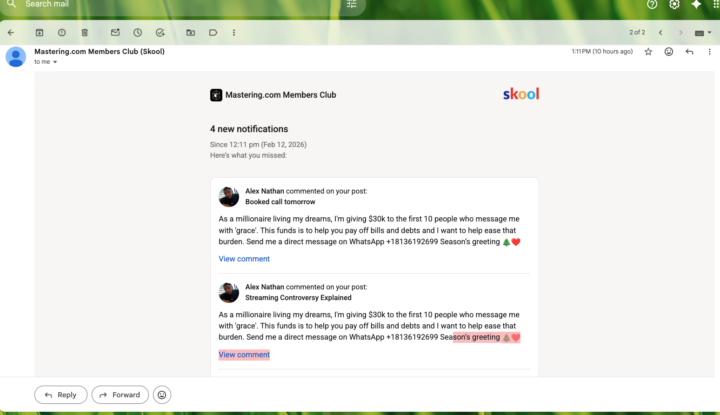
Still being hacked
This So Called Millionaire has my email or is using mastering.com members Club to get this email to me. I clicked on his name in my skool notifications as usual, and, as you can see, he says the same exact thing 4 or 5 times in a row. I thought I should let mastering.com know that he is still doing it. It was said that mastering.com had it under control after it started last month. Well, He's Back. I hope somebody finds out who's doing this and make him stop.
1 like • Feb 13
Depending on your email service provider you might have the option to block the sender. Then mark it as spam. That should stop you receiving emails from the sender.
Jan 12 •
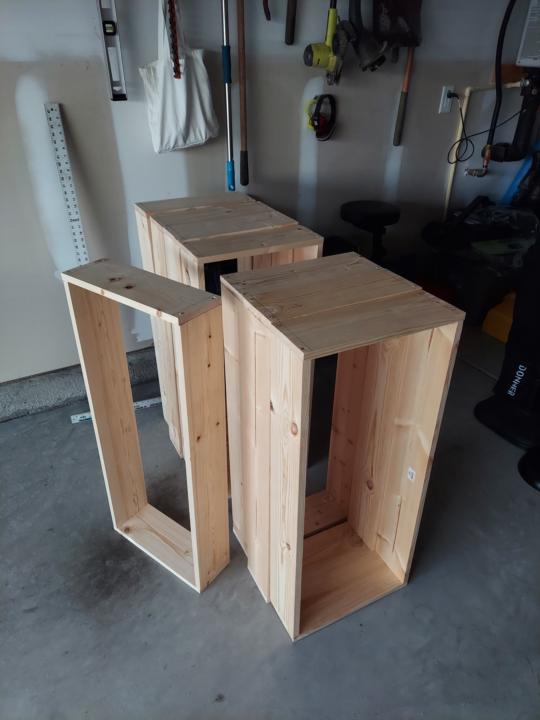
Building Bass & Broadband Traps
What should I fill them with? All answers welcome. Budget-friendly answers preferred. These will be open-back, porous traps covered with discount fabric. Cheers!
1 like • Jan 12
You can get great info here - https://www.youtube.com/@AcousticsInsider. The fill material isn't super critical but you can gain better low frequency absorption by leaving at least 2 to 4 inches of air space behind the traps, even more for corner bass traps. The air space will reduce the reflections better than placing traps against the surface. This video is on fill density - https://www.youtube.com/watch?v=AXMdmu6Jt88. Lower density works better but can settle over time unless your design can prevent it. I have a few ideas on how to design for lower density fill. The physics of sound is based on wave propagation. Sound is energy and the laws of physics states that energy can not be lost (conservation of energy law). Energy can only be converted to another form of energy. When you trap sound the energy is converted from adiabatic to isothermal, the same principle of using sound absorbing material inside a speaker cabinet. The deeper your traps are the lower the frequency of absorption and spacing them away from boundary surfaces increases the effect.
1 like • Jan 13
@Jason Van Deman Did you get the calibration file with the ARC mic? Any calibrated mic will work as long as you have the calibration file. The file is the actual frequency response of the mic and if used with a program like REW, the file corrects for the frequency response of the mic. I use SonarWorks SoundID Reference myself.

Dec '25 •
De-Essers in Vocal Processing: Workflow Thoughts
When it comes to de-esser usage, I understand the idea of using it at the very end of a mastering chain. However, when the goal is to fix vocal issues on the vocal track, my current thinking is that applying a de-esser earlier in the chain can help avoid excessive high-frequency cuts later on with EQ. In other words, controlling harsh sibilance first allows for more natural and musical EQ decisions afterward. Of course, I know there are many valid approaches, so I’d really love to hear: - Your preferred ways of using de-essers - Your thoughts or feedback on my approach Recently, the de-essers I’ve been using are: - Hardware: SPL De-Esser - Plugins: Softube Weiss Deess - When I need a more aggressive result: Softube Deesser On the other hand, one de-esser I couldn’t quite get to work for me—possibly due to the learning curve—was Wavefactory’s Re-Esser. Looking forward to hearing how everyone else approaches this!
4 likes • Dec '25
It has always been my opinion to correct the source or as close to it as possible. If de-essing can't be accomplished during recording, then it needs to be done early on in the vocal channel chain to keep it out of any other processing done. I like to use as little processing as possible but use whatever is necessary. As far as the mastering chain goes, I also believe in using as little as possible but use whatever is necessary. Everyone has their own approach and there is no right or wrong but whatever gets the job done and as always, use your ears, they will generally tell you what works for you. Don't be afraid to experiment.

Aug '25 •
What the heck does this knob do?
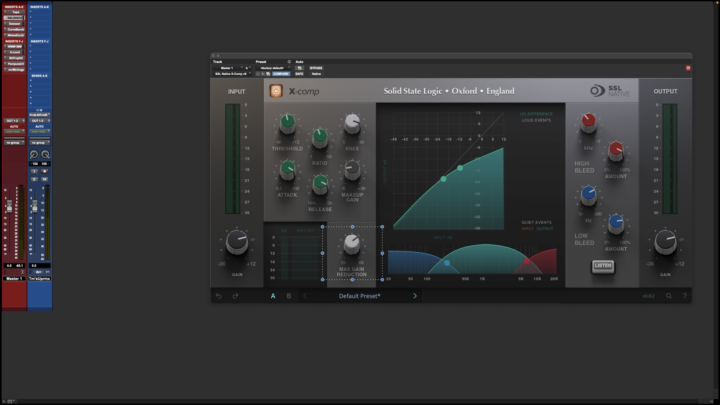
Hey, guys. Could someone please look at the screenshot I attached and tell me, for the love of all that is holy, what this little knob does? I read the user guide, which didn't click. My masters always come out getting louder on the quieter parts of my beats and parts where there are less instruments playing. I randomly mess with this knob and eventually, I find a spot that levels it out. I want to get to a point to where I just know where to set it. The rest of the compressor is no problem, although the bleed section was giving me problems, too, until I read the user guide, but afterwards, that part was a breeze to work. How do I make this "Max Gain Reduction" knob work for me?
2 likes • Aug '25
@Rick Sanders The ratio knob at the top goes from 1 to 50. It sets the amount of gain reduction after threshold is exceeded. 50 is maximum reduction at whatever the max gain reduction knob is set to. Any thing less than 50 on the ratio knob will be less than the max max gain reduction knob setting. The way to set max gain reduction knob is the maximum amount of gain reduction you need for control of the input signal. If the input signal only needs 30 dB of gain reduction then a setting of 30 on the gain reduction knob would give the maximum amount of control needed and it would also make ratio knob more sensitive to it's range of control setting. Basically the ratio knob has a range of 1 to 50. This is not the dB of gain reduction, it is just a measure of how far the knob is turned. If the max gain reduction is set to 20 (it's lowest setting) then the ratio knob will adjust from no reduction (1) to full 20dB reduction at(50). That means that a small adjustment of the ratio knob will have a small change to the amount of gain reduction applied to the input signal after threshold. If the max gain reduction knob is set to 60dB, the the ratio knob will adjust the amount of gain reduction after threshold from none (1) to full reduction 60dB at a setting of (50). This means that the same amount of small adjustment of the ratio knob will have a larger amount of change to the reduction applied to the input signal after threshold. The ratio knob has the same amount of adjustment travel but a higher max gain reduction setting means that the finite amount of travel that the ratio knob has will be less sensitive (larger amount of adjustment for small knob changes). If the input signal only needs a small amount of dB reduction , then a smaller max gain reduction setting is all that is needed and the ratio adjustment knob will be more sensitive to small adjustments. If the input signal needs a massive amount of reduction then a higher max gain reduction setting is needed and the ratio knob will be less sensitive to small adjustments but will have the amount of total gain reduction needed. The SSL X-comp is a bit more complex than most other compressors. The ratio knob is not calibrated to 1:1 or 5:1 or any usual ratio settings, it's just numbered from 1 to 50 as an amount of knob travel. The actual ratio is varied from 20dB full clockwise rotation to 60 dB full clockwise rotation, therefor the ratio setting of the ratio knob would be different for different max gain reduction knob settings. Hope that helps, if you need more clarity just ask and I'll be happy to try and clear it up more.
3 likes • Aug '25
@Andy Laird Normally you would adjust the attack, release, and ratio settings to allow transients through. The max gain reduction setting besides setting the maximum amount of gain reduction also affects the sensitivity of the ratio knob. Transients and dynamics are actually two different aspects or the program material. Transients are excursions above the average level whereas dynamic range is the difference between the quietest and the loudest level of program material.
1-10 of 20
@dan-morehouse-8440
Retired live sound engineer. Currently have a speaker repair business. I have a modest home studio and I am always looking for new things to learn.
Active 16d ago
Joined Aug 16, 2022
Powered by