Activity
Mon
Wed
Fri
Sun
May
Jun
Jul
Aug
Sep
Oct
Nov
Dec
Jan
Feb
Mar
Apr
What is this?
Less
More
Memberships
PIRF VIP Speaking Course
111 members • $35/month
Let's Master English
5.5k members • Free
2 contributions to Let's Master English

Mar 19 •
Turning off Box emails
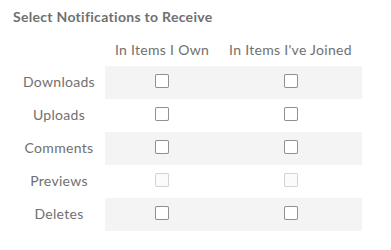
Hi, How do I stop all email notifications from box.com? I keep getting alerts for "2026 LIVE Class LINKS", even though I’ve unchecked all the notification boxes in Account Settings -> Notifications
2 likes • 28d
@Shane Peterson Maybe something is off in my profile and some old settings overlap with the new ones...? I've just: As for #1 - checked all the boxes and clicked "Save changes", then unchecked them and clicked "Save changes" again As for #2 - checked all the "notify me when someone...", clicked "Save changes", then unchecked and selected "Use my default notification..." and clicked "Save changes" again (I keep getting "Sorry, there was a problem saving the settings for this folder" though) We'll see if that helps... As for "•" - yeah, I don't mind getting those emails. I'm just trying not to get Box class announcements. Out of curiosity: why is Francis the only one that sends announcements through Box? OK, also Gulya from time to time, but I don't see other coaches using that file.
3 likes • 28d
@Coach Miguel looking into my mailbox, I only have messages from Box.com since Mar 7 (I've removed the older ones, so can't tell you what it looked like before) and all of them are from Francis. But looking at comments in "2026 LIVE Class LINKS", I see that also @Gulya Karimova added comments on Mar 9 and 23 and I don't have those emails.
Jan 26 •
Downloading classroom materials
How do I download videos from the Classroom section? Is that even possible? Or does the Classroom admin have to enable this feature? It’s the only thing preventing me from fully migrating from box.com.
1 like • Jan 29
There is yet another solution: https://fetchv.net/ It detects videos on Skool, converts them to mp4 and downloads
1 like • Feb 8
For the future searches: you can also use https://downloadhelper.net/
1-2 of 2