Activity
Mon
Wed
Fri
Sun
Jan
Feb
Mar
Apr
May
Jun
Jul
Aug
Sep
Oct
Nov
What is this?
Less
More
Memberships
High-Ticket & Info Marketing
3.6k members • Free
Lifestyle Foundr Group™
8.7k members • Free
The Vibe Code
336 members • Free
Vibe Coders
617 members • Free
aiOS App Builders
305 members • Free
Vibe Coders Club
261 members • Free
Goat Network - Launchpad
139 members • $49/month
AI Automation Agency Hub
272.5k members • Free
3 contributions to Vibe Coders

4d •
Read this if you are deeply into vibe coding!!
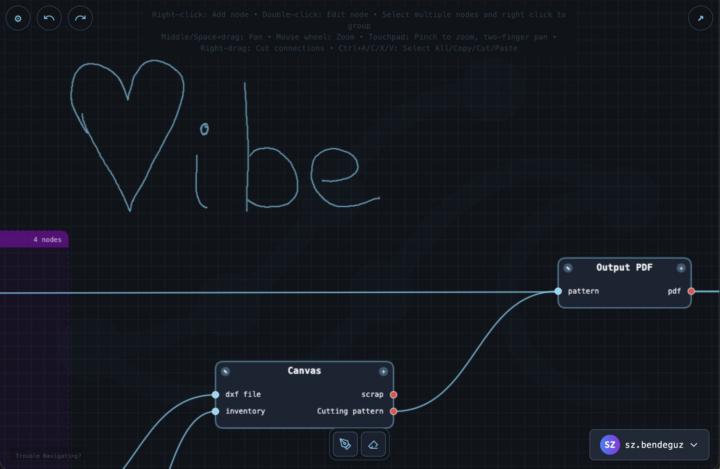
Hey everyone! I’M MAINLY TALKING TO THOSE OF YOU WHO ARE DEEPLY INTO VIBE CODING AND LOVE NODE-BASED THINKING AS MUCH AS I DO. Together with a friend, we’ve built a tool called Flowcrest, and honestly it completely changed the way I work. I might be biased, but it solved a very real problem for me. I’m the kind of person who loves planning ahead. When I start a project, I already have a full map in my head — ideas, structure, relationships, constraints, little details. And until now, I only had two ways to handle that: 1. Dump everything into one giant prompt. 2. Or hold myself back and develop in tiny pieces while taking messy notes. Both are painful. If I write everything into one big prompt, the AI struggles — not just because it’s long, but because the logic has no structure. Human language is terrible at describing a system with hierarchy, references, and flow. It becomes tangled fast. If I break it into tiny prompts, most of my mental energy goes into keeping the whole structure in my head, planning ahead, and trying not to confuse the model. It’s slow and mentally exhausting. And since I come from a background of using node-based tools (like Blender’s node graphs), one day it hit me: Why not build my system the same way? Visually. Modularly. With tiny parts to create a structure. So we built Flowcrest. How it works (this is where people usually ask questions, so let’s make it clear upfront): Each node represents a small module of your project — a tiny, focused idea, written in plain human language. No code needed. You give each node: a simple description optional input/output ports representing what information flows in and out connections to other nodes to express the logic You end up with a clean, visual “blueprint” of your project. Then Flowcrest exports two things, which the AI uses together: 1. A general instruction prompt This explains to the AI how to read your Flowcrest structure. It tells the model what a node is, what inputs/outputs mean, and how the whole blueprint should be interpreted.
0
0

12d •
Searching for wicked creative vibe coders.
I get a lot of jobs for scraping public info and could use help to keep up with the demand. Message me for more info
0 likes • 12d
I followed you in
14d •
We built a visual tool to stop vibe-coding chaos (free demo)
There comes a point when vibe-coding is both a blessing and chaos. Either you try to describe your whole project in one huge prompt, which AI partially understands, or you break it into pieces and lose sight of the big picture. Flowcrest bridges these two worlds. It's a visual node-based editor where you can describe each module in natural, human language (just like you would explain it to an AI agent) and then connect them based on data flow. At the end, with a single click, you can export the entire structure as JSON or an AI-ready prompt. Development becomes logical, visual, and fully AI-compatible. Overview of the Technology Flowcrest is designed around a node-based architecture; each functional module of your project is represented as a node. The user gives each node a clear, human-readable description (a micro-prompt, if you will) that defines what this node is supposed to perform and how. By connecting the nodes through input-output relationships, (which are also specified by the developer) the developers can see the full data flow and be certain, that the overall logic remains consistent and intuitive. Grouping, color-coding, and annotation features help maintain clarity in complex projects. Exporting is smooth: the system can output structured JSON files or AI-ready prompt packages. Every node (micro-prompt) is represented in the final JSON with its connections to other modules, and that prevents AI from misinterpreting instructions or creating conflicting outputs. This structured approach lets developers scale their projects without losing control or clarity. In addition, Flowcrest supports bidirectional workflows. One can import projects made in IDEs such as JavaScript, Python, Java, C#, PHP, Go, and Rust, and immediately see a node-based visualization of their architecture; on the other hand, newly created node structures can be exported for artificial intelligence-assisted code generation or documentation. The editor itself is fully interactive: Default prompts can be tweaked by the user, nodes can be dragged and dropped, connections adjusted and images attached as references. Cloud-based storage, autosave functionality, and project management tools combine to allow multiple concurrent workflows and collaboration across teams in Flowcrest.
0 likes • 12d
@Mike Turner definietly! In the webapp you can import projects that you already have and see the whole structure of it. Where are missing parts or functions that are not completely good. You can make partial changes and exports also to work on some elements in a more focused way!
1-3 of 3