Activity
Mon
Wed
Fri
Sun
Feb
Mar
Apr
May
Jun
Jul
Aug
Sep
Oct
Nov
Dec
Jan
What is this?
Less
More
Owned by Chris
Unlock Gravity Forms Mastery & AI-Powered Business Systems Join a community where pros strategize, build, and automate real client workflows
Memberships
Free Skool Course
30.7k members • Free
FREE AI SEO Mastermind Group
1.8k members • Free
Community Builders - Free
8.9k members • Free
Skool Speedrun (Free)
11.8k members • Free
Kourse (Free)
114.5k members • Free
OfferLab
9.5k members • Free
Skoolers
189.3k members • Free
Start Writing Online
19.4k members • Free
The AI Report Pro
404 members • $129/y
23 contributions to Gravity Ranger Elite

27d •
Using Blocks When Publishing Through WordPress
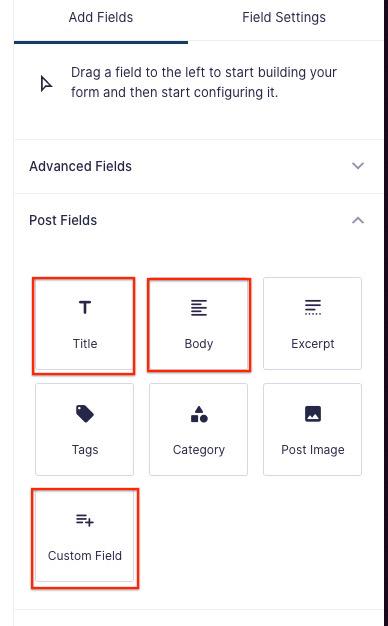
If you use the block editor and use Gravity Forms to publish a post, it does not use the heading or paragraph blocks to publish the content, it dumps the content in a classic block. I had someone ask me this question yesterday: > Hi, when creating a post in WordPress, one can insert a table into the post by choosing the "table block". Can Gravity Forms allow a user to submit a WP table through a frontend form? Thank you for any help. The short answer is, Yes. The long answer is it require custom code. Not a lot and nothing too tricky but I was able to come up with a simple solution for this specific use case that creates a table with the submitted content. You can grab the code snippet here: https://gist.github.com/chrisegg/e83999289f641fcf400d9e3a0a36c9ea How to Use: 1. Update the form ID check to match your target form. 2. Replace the merge tags ({Name:1}, {Email:2}, etc.) with your own field labels and IDs. 3. Add this snippet to a plugin, MU-plugin, or your theme’s functions.php file. 4. Ensure the Gravity Forms Post Fields are configured to create a post. This is a simple solution that addresses a single use case, so let me know if you need help expanding upon this to fit your solution. Be sure that you are using the Post Fields shown in the screenshot. In this specific example I am using the Custom Fields type for the Email, Name, Company fields. I've also included the form template file so you can import it and see the setup. Enjoy! Chris
0
0
Oct '25 •
Masterclass 10.10.25 Discussion Board
Hope you enjoyed this months training on Membership sites! Use this post to discuss the class and ask your questions and provide any feedback
0 likes • Dec '25
@all I recently had a consulting project were we built an advanced membership site with Gravity Forms, and to do so required some code to handle a few different functions so I thought I would post those here for you all. Membership Renewal Calculation https://gist.github.com/chrisegg/1cce636027b371509ad0f22b8389071a Membership Expiration Date Calculation https://gist.github.com/chrisegg/fb427d348d744bcffd1fe68ba584c600 Change Role for Expired Memberships https://gist.github.com/chrisegg/0fd5d157ed1780dba0b8112bb891fb28
Sep '25 •
New Plugin Demo: Show a Popup Message Based on User Input in Gravity Forms
Ever wanted to display a popup message before a form is submitted, based on what the user selects? I just built a lightweight plugin that does exactly that for Gravity Forms — and it’s super flexible. 🔥 Use Case That Sparked the Idea Someone asked if it was possible to show a popup when a user enters a zip code outside a service area — just to notify them before they submit the form. That kicked off this mini plugin: it uses HTML fields in Gravity Forms and turns them into modals, triggered via conditional logic. 🧪 How It Works - You create an HTML field like usual in your Gravity Form. - You set conditional logic to show the field when certain selections are made (e.g. wrong zip code, out-of-stock item, high quantity). - You check a new setting I’ve added: “Display as Modal when Visible.” - When the condition is met, instead of appearing on the page, the field content is displayed as a popup modal. 🙌 That’s it. No extra JS or third-party popup tools needed. 🧠 What You Can Use It For - 🚫 Zip codes outside your service area - 🔒 Product variations that are out of stock - ⚠️ Quantity warnings (e.g. “Max allowed is 10”) - 💡 Educational reminders or disclaimers - ❗️Flags for non-ideal selections without blocking form submission You can even choose whether to hide the submit button based on the selection (with native conditional logic). Or just let them submit anyway — totally up to you. 🔁 You Can Add Multiple Popups The plugin supports multiple HTML fields set to display as popups — so you can use it in multiple spots in a single form. 📺 Watch the full demo here if you want to see how it behaves with dropdowns, checkboxes, and number fields. Let me know in the comments if you’d use this or have ideas for other triggers — it’s still experimental, but I’d love your feedback before I decide what to do with it.

0 likes • Oct '25
Here is the beta code snippet for this one if you want to test it out. Should we turn this into an actual Gravity Forms Add-On with a custom field type?
0 likes • Dec '25
You can even use conditional logic to hide the submit button so when they close the popup, they still can't submit the form. Obviously, if they change their responses, they could get through, but I'm sure it would reduce some of those nonleads. What we call "good friction."
Sep '25 •
🎯 Have You Used Conditional Shortcodes in Gravity Forms
I don't think this is a very well-known feature of Gravity Forms, but it is awesome! I ran into a small but important challenge while working on a reporting system for WP Mantis, my WordPress support company. We’re building out a form to generate weekly site reports that get emailed to clients, and I wanted those reports to be more visually clear based on status updates. Here’s what I needed: - ✅ If a client’s site is clean, I wanted the text to appear green. - ❌ If there’s a security issue, the text should show up red. - 🖥️ And if we don’t host the site, the hosting section in the report should be hidden altogether. The solution? Conditional shortcodes — one of Gravity Forms’ lesser-known but incredibly powerful tools. 💡 What Are Conditional Shortcodes? Conditional shortcodes let you control which content shows up in confirmations or notifications based on form field values. You can do things like: - Change styling (color, bold, etc.) depending on selected values - Show or hide entire sections - Create dynamic content that feels personalized and intelligent In my case, I used them to: - Apply conditional styling to the Security Status section (green for clean, red for issues) - Show or hide the Hosting Report section based on whether we host the client’s site 📧 The Result? When the form is submitted: - The notification email shows “Clean” in green ✅ - Or “Issue Found” in red ❌ - And the hosting section only appears if applicable It’s a clean, professional, and clear way to communicate status without cluttering the report. 🧪 If You’ve Never Used Conditional Shortcodes… Now’s the time to try. You won’t need them every day—but when you do, they can make your notifications feel polished and purposeful. 🎥 Watch the video if you want to see it in action. Let me know if you’ve used conditional shortcodes creatively—I’d love to see what others are doing with this feature!

1 like • Dec '25
@Priscilla Monahan sorry, looks like I forgot to add the video to the post, I just uploaded it for you!

1-10 of 23

@chris-eggleston-5349
Business owner. Teaching people how to build software solutions with Gravity Forms.
Active 4d ago
Joined Aug 19, 2025
Powered by