Activity
Mon
Wed
Fri
Sun
Jul
Aug
Sep
Oct
Nov
Dec
Jan
Feb
Mar
Apr
May
Jun
What is this?
Less
More
Memberships
Automated Marketer
4.2k members • Free
Google Ads Dropshipping (Free)
6.6k members • Free
Storebuild.ai - By Zendrop
3.9k members • Free
1C
1% Cashflow Blueprint.
12 members • Free
Automations Hub®
107 members • Free
Strength Purpose Legacy
47 members • Free
AI Bits and Pieces
782 members • Free
The RoboNuggets Network (free)
52.4k members • Free
eCom Messiah
7.6k members • $1/month
77 contributions to Paid Ad Secrets

May 16 •
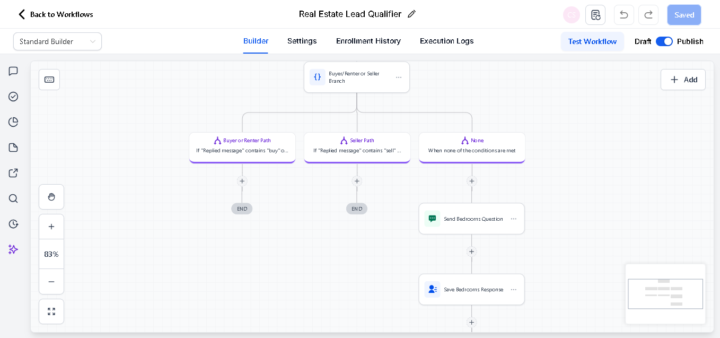
AI Real Estate Lead Qualification Workflow
Real Estate Designed and implemented an AI-powered real estate lead qualification workflow to automate lead engagement and improve response efficiency. The system automatically greets new leads through a chat widget, collects buyer or renter information, and qualifies prospects based on their responses. The workflow helps real estate businesses streamline communication, identify high-quality leads faster, and improve conversion rates by guiding prospects through a structured qualification process. It also reduces manual follow-up by automating initial conversations and lead categorization. Built to support real estate agents, brokers, and property businesses looking to scale lead management and improve customer response time. IF YOU NEED A CRM EXPERT - AI Automation Specialist - Real Estate CRM Expert - Lead Generation & Qualification Expert - GoHighLevel Workflow Builder
Apr 24 •
Most people think they need more traffic… but their funnel isn’t even ready.
I’ve been quiet here for a bit not inactive, just locked in behind the scenes building. Lately, I’ve been working on client projects inside GoHighLevel setting up funnels, pipelines, and automations that actually do the job. And here’s what I’ve noticed… A lot of funnels look good, but they don’t move people. So I decided to share one of the recent builds 👇https://stopglp1hairloss.com/landing It’s a 4-step sales funnel simple on the surface, but structured to: - Landingpage - Lead Capture - Scan Page - Result Page No fluff. Just a system working together. I’ll start sharing more of what I’ve been building and learning from these projects. Curious what do you think matters more right now: more traffic or a better funnel? 👇
0 likes • Apr 26
@Vernae Rhem That’s a fair point A well-structured funnel can definitely amplify traffic, especially when people actually convert and share or come back. I’ve just seen a lot of cases where traffic was there, but the funnel wasn’t doing its job. Once that’s fixed, everything else performs better. Curious, have you tested improving a funnel and seen traffic or conversions shift from it?
Apr 12 •
The "Speed to Lead" Post (For LinkedIn/Agency Owners)
Headline: Why your Meta Ads are "failing" (Hint: It’s not the creative). The Hook: You’re spending $1,000s on Meta Ads, getting "leads," but your calendar is empty. Why? Because a lead is "cold" after just 5 minutes. The Solution (The GHL Bridge): - The Instant Trigger: Use Meta Native Forms. Don't make them leave the app. - The 2-Minute Rule: Your GHL Workflow must fire an SMS the second they hit submit. - The "Double Tap": Follow that SMS with a booking link and a "Deposit Paid" requirement to filter out the tire-kickers. - The Result: You stop chasing leads and start managing appointments. The CTA: Want my "Instant SMS Follow-up" workflow snapshot? Drop a "CALENDAR" below. 👇
Apr 8 •
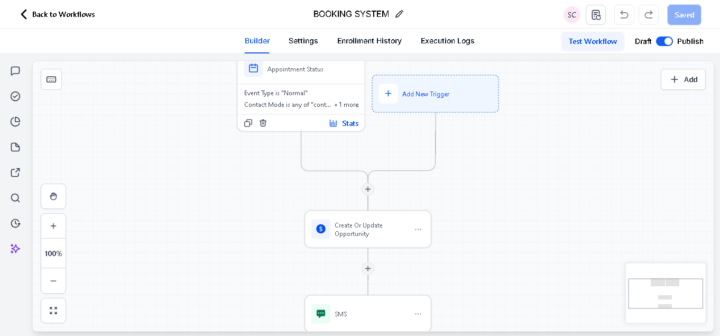
Workflow Not Firing? Check These 3 Hidden Settings
You built the workflow perfectly… But nothing is happening. Before you rebuild everything, check this 👇 ✅ 1. Allow Re-entry If a contact needs to go through the workflow again, this must be enabled. ✅ 2. Check Your “Wait” Steps If the timing is wrong, your entire workflow can silently stop. ✅ 3. Use the History Tab This is the most overlooked tool. It shows exactly where the contact got stuck and why. Stop guessing. Start tracking. Automation only works when every small detail is set correctly.
1 like • Apr 11
@Aaron McDonald Haha hopefully you don’t but if you do, you’ll fix it way faster now
1 like • Apr 11
@Aaron McDonald You’ll thank yourself later 😄 It’s usually the first place I check now before touching anything else.

0 likes • Mar 22
@Lahcen El hail Yeah, there are a few solid ones. Tools like Dorik and Unbounce can generate good landing pages quickly with AI. Just make sure you still refine the copy and offer that’s what really drives conversions.
1-10 of 77

@chad-samuel-1098
I help wholesalers close more deals by automating follow-ups, organizing leads, and setting up landing pages that convert sellers into contracts.
Active 21d ago
Joined Oct 17, 2025
Powered by