Activity
Mon
Wed
Fri
Sun
Dec
Jan
Feb
Mar
Apr
May
Jun
Jul
Aug
Sep
Oct
Nov
What is this?
Less
More
The AI Advantage
130.7k
Free
Poster Print on Demand
17.9k
Free
14 contributions to Poster Print on Demand

11h •
Lister!
If you haven’t tried Lister yet, I highly recommend it. I set up two shops earlier this year and they weren’t really selling many posters, maybe one a week. Since using Lister I’m listing 100s of posters every week, it’s saving me hours, and now the sales are coming in every day. Well worth it, although I’m probably going to have to start declaring my income for tax soon! Not a bad problem to have, I guess. 😅
1 like • 10h
@Mel Betts Log into PrintShrimp and then select Tools, it's in there.

4d •
Struggling with MidJourney
Hi all, I'm really struggling with MidJourney and making it do what I want. I'm trying all sorts of prompts and using the style references etc, but it's just continuously giving me absolutle nonsense. I've also been trying to get a single character (a bunny) into different scenes so I can do poster series, but it's also not working. I've watched a bunch of youtubes on how to do it etc, but the actual system is not playing ball and the output is really low quality. I even tried going super simple with a prompt (like Tom advises us to do in the SKOOL vids) in the screen shot attached, and it's just the worst!! Any tips on how to get MidJourney to be better? 😅

0 likes • 11h
Hi Emma, I had the same struggle with MJ so I know how frustrating it is! I’ve switched to ChatGPT for my images and honestly the image generator is so good now. I use Claude to write my prompts, then paste them into ChatGPT. For your bunny series, once you’ve got a bunny you’re happy with, upload that image back in and ask it to keep the same character in a new scene. It’s much better at keeping them consistent. Might be worth a try. Hope it helps. 😊
Sep 13 •
What does the Delete Products button do?
Happy Sunday everyone! In the PrintShrimp portal, there's a Delete Products button under the three dots on My Products. Does anyone know exactly what it does? I'd like to clear out a batch of posters I uploaded by mistake, but I didn't want to click it and find I'd wiped the lot! Has anyone used the delete button before? TIA, Celia :)
1 like • Sep 13
@Mihai Volintiriu Great! Thanks - much appreciated :)

Aug 28 •
Marking An Order As Complete Without Tracking: Please Read!
Hey guys, I have noticed a lot people making a classic mistake recently of letting their order go past it's dispatch date on Etsy recently. I believe some people are under the misconception that you can only mark an order as complete on Etsy with tracking, or get punished for completing without tracking. This is not the case! So, I asked our community legend @Mihai Volintiriu to put together a little document explaining his process for dispatching orders. As always, he went completely above and beyond. Mihai, as you can see below, has been a Star Seller basically since starting to sell on Etsy. And, as you can see explained in the guide, this has been with marking an order as complete without tracking, and then letting it be added in afterwards. Etsy does not punish you for this! The only thing they do punish, is not marking an order as complete when it was due to be dispatched. We see a lot of people complaining their order is overdue on Etsy as they haven't had their tracking yet. The only way this becomes a problem is if you let it be overdue! Mihai recommends sending the order to PrintShrimp, and then marking the order as complete on Etsy the next day. I personally mark them as complete as I send them over to PrintShrimp largely out of laziness. But it is whatever works for you - main point is to not let them become overdue for dispatch! This is when you will get punished :D Hope this helps clears this up. Also, we would recommend setting your dispatch time to 1-3 days and also ensuring you have set your dispatch/working days to not include the weekends. Doing these will ensure accurate delivery expectations with your customers, and help you get towards Star Seller!

1 like • Aug 28
This (below) is really helpful… I usually pay PrintShrimp immediately but I’ve had buyers change their mind. I’ll hold the order - great idea, thanks! 👏 @Mihai Volintiriu “I do not pay for an order as soon as I received it, as it allows some breathing room for customers who change their mind, to cancel or amend orders throughout the day, therefore avoiding raising cancellation cases with PrintShrimp.”

Apr 23 •
Frames
@Tom Beeston I hope this is OK? I have adapted your email attachments for my shop to advertise the "about" on frames. If it isn't OK, let me know and I will remove them. But I think they are a great addition in helping any questions.
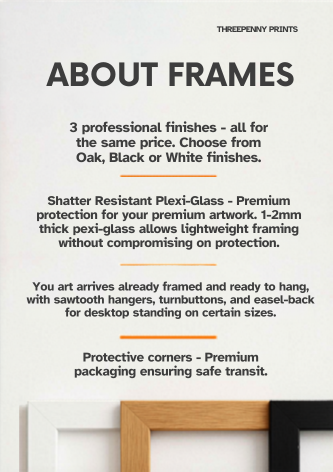
1 like • Apr 28
@Steve Bloomfield There's a little typo you might want to amend... third paragraph should begin "Your..." not "You..."
1-10 of 14

@celia-matthews-2969
Love what PrintShrimp is doing... prices seem very competitive.
Active 9h ago
Joined Feb 18, 2026
Powered by