Activity
Mon
Wed
Fri
Sun
Jan
Feb
Mar
Apr
May
Jun
Jul
Aug
Sep
Oct
Nov
Dec
What is this?
Less
More
Memberships
Learn Power Apps
2.5k members • Free
The Microsoft Stack
108 members • Free
Power Apps Templates
128 members • $25/m
Tech Workshops
62 members • $25/m
3 contributions to Learn Power Apps

Oct '24 •
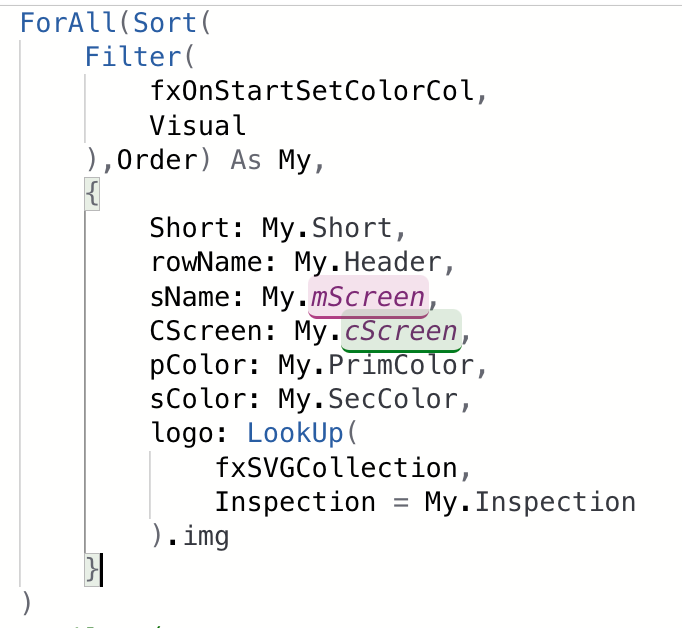
Just proud of myself on this one
Just happy from where I start to where I am Now .... Since the beginning of my journey here. i think this coding below visually explained how much everything i've learned so far really helps me in my journey with Power Platform. I've been able to change this non responsive gallery to the simple code you see in the pic responsive to the user administration lvl. Really proud of this one Just want to share😍 Thank you everyone and specially @Darren Neese for doing those videos online with so much great content. "Filter( Table( { Short: "QC", fName: "Quick Catch", sName: QuickCatch, // QC Complaint for the Past 7 days CScreen: QCComplaintV2, pColor: LookUp( fxOnStartSetColorCol, Inspection = "QC", PrimColor ), sColor: LookUp( fxOnStartSetColorCol, Inspection = "QC", SecColor ), logo: LookUp( fxSVGCollection, Inspection = "QC" ).img, Visible: true }, { Short: "R", fName: "Routine", sName: 'Routine Main', // Routine complete in the past 7 days CScreen: RComplete, pColor: LookUp( fxOnStartSetColorCol, Inspection = "Routine", PrimColor ), sColor: LookUp( fxOnStartSetColorCol, Inspection = "Routine", SecColor ), logo: LookUp( fxSVGCollection, Inspection = "Routine" ).img, Visible: true }, { Short: "A2", fName: "APPA 2", sName: A2Screen, CScreen: A2Completed, pColor: LookUp( fxOnStartSetColorCol, Inspection = "A2", PrimColor ), sColor: LookUp( fxOnStartSetColorCol, Inspection = "A2", SecColor ), logo: LookUp( fxSVGCollection, Inspection = "A2" ).img, Visible: true }, { Short: "A3", fName: "APPA 3", sName: A3Screen, pColor: LookUp( fxOnStartSetColorCol, Inspection = "A3", PrimColor ), sColor: LookUp( fxOnStartSetColorCol, Inspection = "A3", SecColor ), logo: LookUp( fxSVGCollection, Inspection = "A3" ).img, Visible: true }, { Short: "HG", fName: "HouseKeeping", sName: HKScreen, pColor: LookUp( fxOnStartSetColorCol, Inspection = "HG", PrimColor ), sColor: LookUp( fxOnStartSetColorCol, Inspection = "HG", SecColor

2 likes • Oct '24
[attachment]

Oct '24 •
Watched Power Apps Hack: Make Development 10x Easier | Darren Neese Tutorial
Is the Jumpstart 1.5 available or only to members of one of the paid channels?
2 likes • Oct '24
Hi @Randy Greig you may try and check this link : https://go.superpowerlabs.co/superpowerlabsjumpstartcheckout

Sep '24 •
Meet Your New Power Apps Pal, Angela!
📢 Please help me give a warm welcome to your new Community Manager, @Angela Maasin! 🚀 Although, she isn't one of our technical staff, she is more than happy to help each of you get to the next level in your Power Platform journey! You'll start to see her on some of the live streams on Saturday mornings (10am EST), so she may not be a Power Apps beginner for long! 🤔 How can she help you? ⬇️ - Have a question about where to find all our free resources? Ask Angela! - Need an invoice for something you purchased? - What is the next Power Platform workshop about? Ask Angela! - Where is your course you purchased? (pst! check your spam folder!! 😂) Ask Angela! - When is Darren going to do a video on a specific topic that's important to you? Ask Angela! - What is the different between The JumpStart Kit and the template membership? Ask Angela! - Need to know the intricate Power Apps formulas and delegation issues when working with large datasets from Data lakes that spam multiple tenants that need disaster recovery replication that still perform well? Ask Angela! The only question is, what can't Angela help with? Even if she doesn't know, she's going to find out for you! As always, if you're looking for any type of support, you can reach all of us, and Angela, at support@superpowerlabs.co (email links don't work on Skool for some reason, so you may need to copy and paste)
2 likes • Sep '24
@Wendy Meyer Yes Meem😆
2 likes • Sep '24
@Jason Smith Thanks🤝
1-3 of 3
Active 395d ago
Joined Sep 17, 2024
Powered by