Activity
Mon
Wed
Fri
Sun
Sep
Oct
Nov
Dec
Jan
Feb
Mar
Apr
May
Jun
Jul
Aug
What is this?
Less
More
KIW SCHMIEDE
23 members • Free
Claude Masterclass
606 members • $15/month
KI Coding Masterclass
97 members • $87/month
Skool Extensions 🧩
795 members • Free
Community Business (german)
478 members • $100,000/month
Neurohacking Community
1k members • Free
Inner Circle (Skool)
89 members • $5,000
3 contributions to Skool Extensions 🧩

🔥
Mar 30 •
Course Overview (Premium Feature 👑)
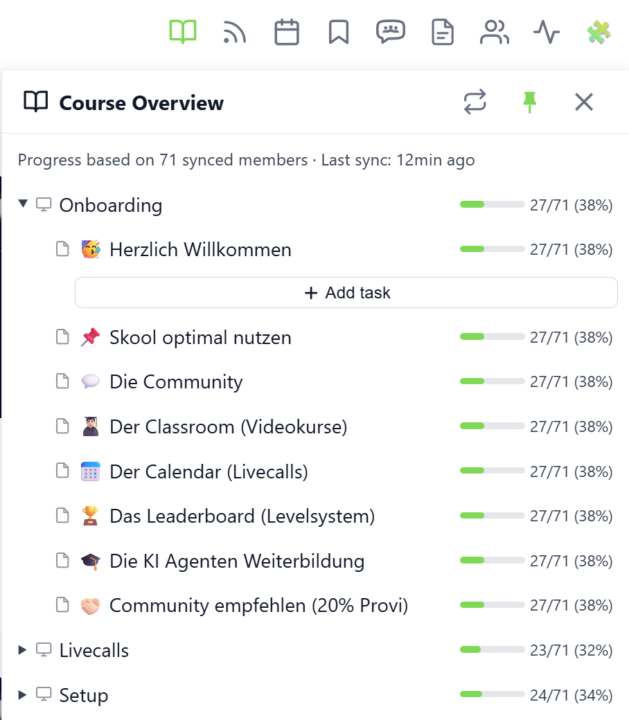
𝗖𝗼𝘂𝗿𝘀𝗲 𝗢𝘃𝗲𝗿𝘃𝗶𝗲𝘄 — 𝗬𝗼𝘂𝗿 𝗘𝗻𝘁𝗶𝗿𝗲 𝗖𝗹𝗮𝘀𝘀𝗿𝗼𝗼𝗺 𝗦𝘁𝗿𝘂𝗰𝘁𝘂𝗿𝗲 𝗮𝘁 𝗮 𝗚𝗹𝗮𝗻𝗰𝗲 Managing a Skool classroom with multiple modules, folders, and pages means a lot of clicking and scrolling to understand the full picture. Course Overview adds a dedicated sidebar panel that shows your complete course structure as an expandable tree — every module, every folder, every page — without leaving the page you're on. Click the book icon in your toolbar to open the panel. Each module shows as a collapsible row with a folder icon for subfolders and page icons for individual lessons. Click any module to expand it and reveal its nested content, loaded directly from Skool's data. The tree remembers which modules you've expanded, so your view stays consistent as you navigate. The real power comes from the completion stats. If you've synced your members' course progress, each module displays a green progress bar showing what percentage of your members have started it. Hover over the bar to see member names, or click it to open a popup with the full list — complete with avatars, tags, and pipeline status. A note at the bottom shows how many synced members the percentages are based on. Hit the refresh button to reload the course structure or update completion stats. The panel respects the 24-hour sync cooldown and shows when the next sync is available. You can pin the panel to keep it open while you browse, resize it by dragging the left edge, or close it when you're done. Course Overview is available for admins and owners only, and works on any page within your community. The feature can be toggled in the Toolkit Settings under the Admin section. --- 𝗞𝘂𝗿𝘀ü𝗯𝗲𝗿𝘀𝗶𝗰𝗵𝘁 — 𝗗𝗲𝗶𝗻𝗲 𝗴𝗲𝘀𝗮𝗺𝘁𝗲 𝗖𝗹𝗮𝘀𝘀𝗿𝗼𝗼𝗺-𝗦𝘁𝗿𝘂𝗸𝘁𝘂𝗿 𝗮𝘂𝗳 𝗲𝗶𝗻𝗲𝗻 𝗕𝗹𝗶𝗰𝗸 Eine Skool-Classroom mit mehreren Modulen, Ordnern und Seiten zu verwalten bedeutet viel Klicken und Scrollen, um das Gesamtbild zu verstehen. Die Kursübersicht fügt ein eigenes Sidebar-Panel hinzu, das deine komplette Kursstruktur als aufklappbaren Baum zeigt — jedes Modul, jeden Ordner, jede Seite — ohne die aktuelle Seite zu verlassen.

🔥
3 likes • Mar 30
@Marco Berlin danke dir. Hast Du noch eine Idee, warum bei mir nicht angezeigt wird, wieviele Mitglieder die einzelnen Classroom-Inhalte angeschaut haben?
🔥
3 likes • Mar 30
@Marco Berlin 👍
🔥
Mar 24 •
Activity Flame
𝗔𝗰𝘁𝗶𝘃𝗶𝘁𝘆 𝗙𝗹𝗮𝗺𝗲 — 𝗧𝗿𝗮𝗰𝗸 𝗬𝗼𝘂𝗿 𝗗𝗮𝗶𝗹𝘆 𝗘𝗻𝗴𝗮𝗴𝗲𝗺𝗲𝗻𝘁 Ever wonder how active you really are in your Skool community? The Activity Flame puts an animated flame icon right in your toolbar that shows your daily activity at a glance. A ring of 10 segments surrounds the flame and fills up as you post, comment, and interact throughout the day. The flame itself changes color and intensity — from grey when inactive to a bright, vivid orange at full activity. Click the flame to refresh your count and watch a satisfying fire animation. Hit 10/10 and a confetti celebration fires off. Why does this matter? Skool awards a flame badge next to your profile name once you reach a 30-day activity streak. The Activity Flame helps you monitor your daily progress so you never accidentally break your streak. Keep an eye on your ring, stay consistent, and earn that permanent flame badge. The feature refreshes automatically every few minutes and can be toggled on or off in the Toolkit Settings. --- 𝗔𝗸𝘁𝗶𝘃𝗶𝘁ä𝘁𝘀-𝗙𝗹𝗮𝗺𝗺𝗲 — 𝗩𝗲𝗿𝗳𝗼𝗹𝗴𝗲 𝗱𝗲𝗶𝗻 𝘁ä𝗴𝗹𝗶𝗰𝗵𝗲𝘀 𝗘𝗻𝗴𝗮𝗴𝗲𝗺𝗲𝗻𝘁 Fragst du dich manchmal, wie aktiv du wirklich in deiner Skool-Community bist? Die Aktivitäts-Flamme zeigt dir ein animiertes Flammen-Icon direkt in deiner Toolbar, das deine tägliche Aktivität auf einen Blick sichtbar macht. Ein Ring aus 10 Segmenten umgibt die Flamme und füllt sich, während du postest, kommentierst und im Laufe des Tages interagierst. Die Flamme selbst ändert Farbe und Intensität — von grau bei Inaktivität bis hin zu einem leuchtenden Orange bei voller Aktivität. Klicke auf die Flamme, um deinen Zähler zu aktualisieren und eine Feueranimation zu sehen. Bei 10/10 wird eine Konfetti-Feier ausgelöst. Warum ist das wichtig? Skool vergibt ein Flammen-Badge neben deinem Profilnamen, sobald du einen 30-Tage-Aktivitäts-Streak erreichst. Die Aktivitäts-Flamme hilft dir, deinen täglichen Fortschritt im Blick zu behalten, damit du deinen Streak nicht versehentlich unterbrichst. Behalte deinen Ring im Auge, bleib konsequent und verdiene dir das permanente Flammen-Badge.
🔥
5 likes • Mar 24
@Marco Berlin Glad you like the idea! I’d really appreciate it if you could implement it.
🔥
3 likes • Mar 24
@Marco Berlin 💪
🔥
Mar 23 •
Sales Pipeline (VIP Feature 💎)
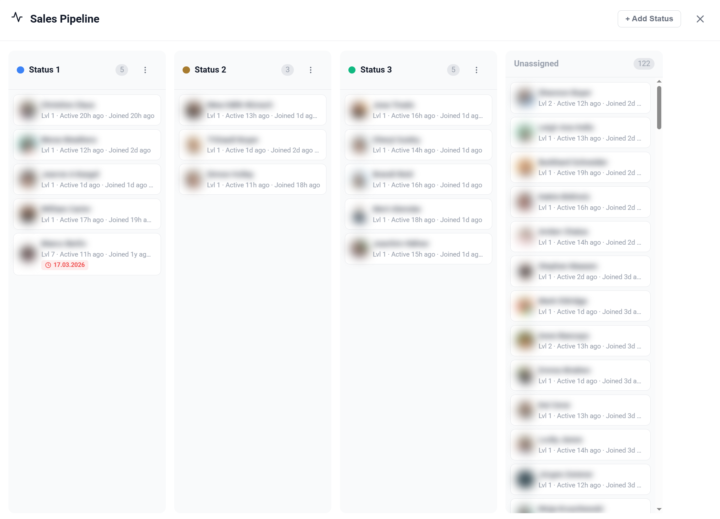
𝗦𝗮𝗹𝗲𝘀 𝗣𝗶𝗽𝗲𝗹𝗶𝗻𝗲 — 𝗧𝗿𝗮𝗰𝗸 𝗠𝗲𝗺𝗯𝗲𝗿𝘀 𝗧𝗵𝗿𝗼𝘂𝗴𝗵 𝗬𝗼𝘂𝗿 𝗙𝘂𝗻𝗻𝗲𝗹 Managing a community means knowing where each member stands in your sales process. The Sales Pipeline gives you a visual, Kanban-style board to track members through customizable stages — right inside Skool. Open the pipeline from the dedicated button in your Members Panel. You'll see a board with columns representing your pipeline stages. Each member card shows the avatar, name, and community. Drag and drop members between columns to update their status, or assign a status directly from the member's right-click context menu in the Members Panel. You have full control over your pipeline stages: create new statuses, rename them, assign custom colors, and drag to reorder. Default stages like "Lead", "Contacted", "Negotiation", and "Closed" are provided to get you started — but you can customize everything to match your actual sales process. Pipeline status badges appear next to member names throughout the platform — in the Members Panel, in comment threads, and on profile cards — so you always have context without opening the pipeline board. The badges use your custom colors for instant visual recognition. The pipeline also works cross-community: members from all your cached communities appear in the board, and you can filter by community to focus on a specific group. All pipeline data syncs via Cloud Sync, so your stages and assignments are available across browsers and devices. The feature can be toggled on or off in the Toolkit Settings under the Admin section. --- 𝗦𝗮𝗹𝗲𝘀 𝗣𝗶𝗽𝗲𝗹𝗶𝗻𝗲 — 𝗠𝗶𝘁𝗴𝗹𝗶𝗲𝗱𝗲𝗿 𝗱𝘂𝗿𝗰𝗵 𝗱𝗲𝗶𝗻𝗲𝗻 𝗙𝘂𝗻𝗻𝗲𝗹 𝘃𝗲𝗿𝗳𝗼𝗹𝗴𝗲𝗻 Eine Community zu managen bedeutet zu wissen, wo jedes Mitglied in deinem Verkaufsprozess steht. Die Sales Pipeline gibt dir ein visuelles Kanban-Board, um Mitglieder durch anpassbare Stufen zu verfolgen — direkt in Skool. Öffne die Pipeline über den dedizierten Button in deinem Members Panel. Du siehst ein Board mit Spalten, die deine Pipeline-Stufen darstellen. Jede Mitgliederkarte zeigt Avatar, Name und Community. Ziehe Mitglieder per Drag & Drop zwischen Spalten, um ihren Status zu aktualisieren, oder weise einen Status direkt über das Rechtsklick-Kontextmenü im Members Panel zu.
🔥
2 likes • Mar 23
The sales pipeline is a great new feature. I had to briefly figure out how it works (hover over a profile with the cursor, right-click, and then assign the person to the respective status by clicking). Super cool.
1-3 of 3

🔥
@burkhard-schneider-6709
Kopf hinter messeflow, dem Booster für Messeauftritte & Leads. Starte mit dem 30-Min.-Messe-Potenzial-Check. Ab Stufe 2 mit Faktor-5-Garantie.
Active 23m ago
Joined Mar 21, 2026
Frankfurt
Powered by