Activity
Mon
Wed
Fri
Sun
Aug
Sep
Oct
Nov
Dec
Jan
Feb
Mar
Apr
May
Jun
Jul
What is this?
Less
More
Memberships
Claude Code Architects
1.5k members • Free
ReachInbox Community
918 members • Free
AI Business Trailblazers Hive
15.1k members • Free
Make Money With Make.com
380 members • Free
Maker School: AI Automation
2.1k members • $184/m
AI Automation Society
424.6k members • Free
The RoboNuggets Community
1.1k members • $97/month
8 contributions to AI Automation Society

Apr 6 •
My Company is Hiring Agentic Solution Engineers (US Based Only)
Hiring Solution Engineers (Senior + Mid-level) at Contextual.io (US Based Only - Citizens) We're a small team at a platform company solving real integration problems -- customs filing, document processing, event-driven connectors. The work is technical: SOAP APIs, XML transforms, event chains, platform architecture. Must have business logic and development skills, but most important is an AI-forward / agentic approach. You use engineered skills, custom commands, variable templates, context systems. Not just prompting -- actually building with AI as a force multiplier. What the work looks like: - Designing event-driven flows on a low-code platform (Node-RED based) - Integrating with external APIs (SOAP, REST, EDI) - Building config-driven architectures that scale across clients - Working directly with platform engineers on architecture patterns This isn't a "prompt engineer" role. You need to understand the code your AI generates, debug it when it breaks, and know when to build by hand vs when to automate. DM me if this sounds like you.
0 likes • Apr 6
@Julio César Martin del campo company policy not mine
Jul '25 •
🎉 Just shipped my first Apify Actor!
Started looking for a Google Maps competitor analyzer... Couldn't find one... So I built one... And here we are! It's like Tinder for businesses - swipe through all your local competitors without the awkward small talk. 🔗 https://lnkd.in/eMzEiDZ9 Sometimes the best tools are born from "fine, I'll do it myself" energy.
0 likes • Jul '25
Direct link https://apify.com/spotcircuit/google-maps-competitor-analyzer
Jun '25 •
📌 Need to clean up company names in Google Sheets?
A client asked me how to normalize messy business names — so I’m sharing the solution here for anyone else dealing with the same headache. ✅ Goal: Strip off things like “LLC,” “Inc.,” and trailing punctuation, convert “+” to “and,” and clean up extra spaces — optionally normalize capitalization too. 🔧 Google Sheets Formula (Preserve Capitalization): excel Copy Edit =TRIM( REGEXREPLACE( REGEXREPLACE( REGEXREPLACE( REGEXREPLACE(B2, ",?\s*\b(LLC|Inc|Incorporated|Corp|Corporation|Ltd)\b\.?", ""), "\+", "and" ), "\s+", " " ), "[\.,]$", "" ) ) Examples Kane Partners LLC → Kane Partners BURKE + CO → BURKE and CO 🔠 Normalize Capitalization (Optional): excel Copy Edit =PROPER( TRIM( REGEXREPLACE( REGEXREPLACE( REGEXREPLACE( REGEXREPLACE(B2, ",?\s*\b(LLC|Inc|Incorporated|Corp|Corporation|Ltd)\b\.?", ""), "\+", "and" ), "\s+", " " ), "[\.,]$", "" ) ) ) More Examples: Dental Medical Careers, Inc. → Dental Medical Careers Solve IT Strategies, Inc. → Solve IT Strategies Global Talent Partners + Associates LLC → Global Talent Partners and Associates Jade & Co. Executive Search LLC → Jade & Co Executive Search Drop a 💬 if you want to adapt this formula for different cases like removing “|” or trimming website taglines!

💎
⭐
Jun '25 •
🚀New Video: Locally Host n8n AI Agents for FREE (step by step)
In this video, I walk you through exactly how to self-host n8n on your own machine using the free AI Starter Kit. This setup also gives you PostgreSQL, Ollama, and Quadrant—all running locally with zero coding required. Even if you’re a complete beginner with no technical background, don’t worry—I break everything down step by step and make it as simple as possible. Just follow along with what I do on the screen. Once you're running everything locally, you won’t need to pay for cloud hosting or a virtual machine—your n8n workflows will run completely free. Plus, your data stays 100% in your environment, giving you full control and peace of mind.
7 likes • Jun '25
@Tony Mahony yeah it was kinda a pain to set up but AI walked me through it you gotta install acme and http traefik or something similar for https then set up a docker config
9 likes • Jun '25
i'd also do a script for updating n8n here is mine #!/usr/bin/env bash set -euo pipefail #--------------------------------------- # n8n Upgrade Script (Docker Compose & Traefik) # Assumes n8n is managed by docker-compose in ~/n8n-traefik # Backs up data, compose file, certs, stops services, # pulls latest n8n, restarts services. #--------------------------------------- # --- Configuration --- # Directory containing docker-compose.yml COMPOSE_DIR="/home/info/n8n-traefik" # n8n data directory used in docker-compose.yml (!! ADJUST IF DIFFERENT !!) N8N_DATA_DIR="/home/info/n8n-data" # Service name for n8n in docker-compose.yml N8N_SERVICE_NAME="n8n" # --- End Configuration --- # Timestamped backup directory TIMESTAMP=$(date +%F-%H%M%S) BACKUP_ROOT="$HOME/n8n-backup-$TIMESTAMP" echo "📦 Creating backup directory: $BACKUP_ROOT" mkdir -p "$BACKUP_ROOT" # Change to the compose directory for context cd "$COMPOSE_DIR" || { echo "❌ Error: Could not change to $COMPOSE_DIR"; exit 1; } echo "📂 Working directory: $(pwd)" # 1. Backup n8n data directory if [ -d "$N8N_DATA_DIR" ]; then echo "⏳ Backing up n8n data from $N8N_DATA_DIR..." # Using rsync can be more efficient for large directories sudo rsync -a --info=progress2 "$N8N_DATA_DIR/" "$BACKUP_ROOT/n8n-data/" echo "✔️ Backed up n8n data directory" # 1a. Explicitly back up SQLite database if using default DB DB_FILE="$N8N_DATA_DIR/database.sqlite" if [ -f "$DB_FILE" ]; then cp "$DB_FILE" "$BACKUP_ROOT/database.sqlite" echo "✔️ Backed up SQLite database file" else echo "ℹ️ No SQLite database file found in $N8N_DATA_DIR (maybe external DB or different location?)" fi else echo "⚠️ Configured n8n data directory '$N8N_DATA_DIR' not found. Skipping data backup." # Consider exiting if backup is critical: exit 1 fi # 2. Backup docker-compose.yml echo "📝 Backing up docker-compose.yml..." cp docker-compose.yml "$BACKUP_ROOT/docker-compose.yml.bak" # 3. Backup SSL certificate data if [ -f "acme.json" ]; then echo "🔒 Backing up acme.json (SSL certificate)..."
May '25 •
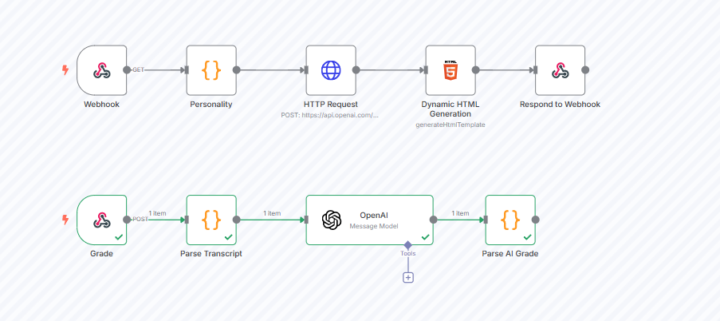
OpenAI Real-time conversation with AI / N8N
I had a client that wanted to train sales people in real-time with different personas, and then evaluate their performance. I really thought about this for awhile, and knew it was possible, but expected it to be complicated. Turns out, the base functionality in n8n can be accomplished with just 3-4 nodes - way simpler than I initially thought. The breakthrough for me was the "generate HTML" node. This lets me call my webhook directly from any web app or link, which is pretty slick. In this setup, I configure a personality for the AI before doing the OpenAI request/Whisper: json{ "instructions": "{{ $json.ai_instructions }}", "model": "gpt-4o-realtime-preview-2024-12-17", "modalities": ["audio", "text"], "voice": "alloy", "input_audio_transcription": { "model": "whisper-1" } } Here's the cool part - the HTML template gets returned to the user, building the page on the fly. So the agent on the other end takes on the specified personality (like a roof salesman), and the conversation feels surprisingly real. When you wrap up, the AI evaluates the transcript and scores your performance based on your criteria. Some other interesting possibilities that came to mind: Interview preparation with AI playing tough interviewers Negotiation training with different difficulty levels Customer complaint handling with progressively angrier customers Medical students practicing patient consultations Language learning through realistic conversation scenarios Security training for social engineering attempts This approach cuts down development time dramatically while still delivering a powerful training tool. The applications are pretty much endless, and it's all easier than expected. Best, Brian
0 likes • May '25
@Mouen Khan thanks man!
0 likes • May '25
here is a little walk through I did with another community. https://vento.so/view/dbf7fffb-756b-4793-a299-2ee27b79c42a?utm_medium=share
1-8 of 8
Active 95d ago
Joined Feb 7, 2025
Ashburn, VA
Powered by