Activity
Mon
Wed
Fri
Sun
Jul
Aug
Sep
Oct
Nov
Dec
Jan
Feb
Mar
Apr
May
Jun
What is this?
Less
More
Memberships
13 contributions to Clief Notes

5h •
I Didn’t Know How to Make a 3D Model—So I Built an ICM Pipeline That Does It for Me
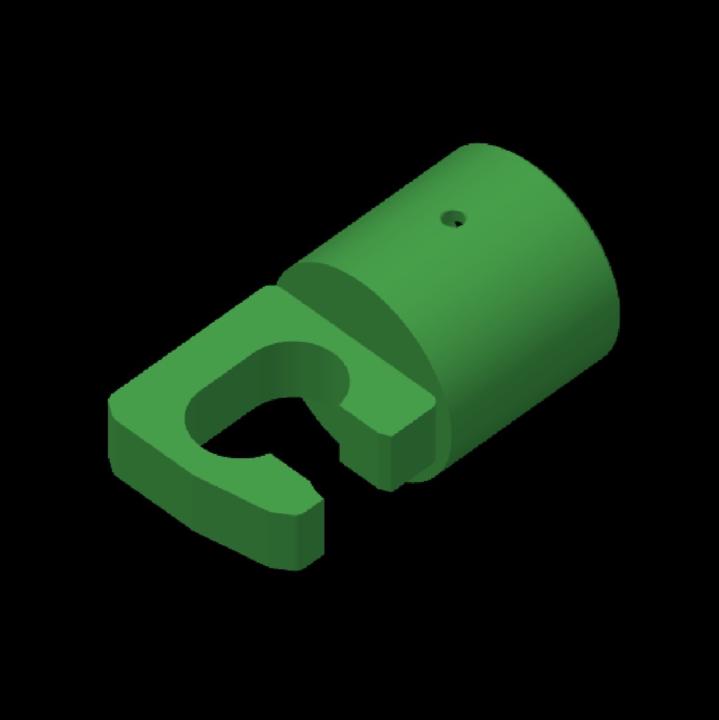
I just completed my first successful real-world 3D print using an ICM-based production pipeline I built—and the part actually works. What makes this interesting is that, before starting this project, I did not even know how to create a 3D model or print file. I started by researching the process and having AI help me build a detailed brief for how a proper 3D-print development workflow should operate. Then I used that brief to create an ICM pipeline that could take an idea from initial concept through modeling, validation, testing, and final print preparation. My first run was a test case. It worked, but it exposed a major inefficiency. The pipeline was completing measurements, geometry validation, design refinement, and several other expensive steps before showing me a visual representation of the object. Once I finally saw the design, I would notice something I wanted to change and have to send the project backward through multiple stages. That meant repeating expensive work and burning a huge number of tokens. So I asked the pipeline to analyze and redesign itself. It restructured the process so that an early visual concept is now presented before the expensive engineering and validation work begins. I can review the object, suggest design changes, and approve the general direction before it spends tokens finalizing measurements, geometry, strength, and printability. That one workflow change produced a significant reduction in token usage. For the first real project, I needed a replacement pole cap for my trampoline. I took a picture of one of the remaining caps, described what I needed, and let the pipeline handle the rest. It: - Interpreted the reference image - Developed the specifications - Created the model - Presented an early visual for review - Incorporated my revisions - Ran geometry and measurement checks - Evaluated strength and printability - Prepared the final print file All I had to do was explain what I wanted, look at the visuals, request a few tweaks, and tell it to get the model ready to print.
0 likes • 4h
@Mira Bradshaw Thanks! Not nearly as useful as your personal operating system but it’s a good first project lol
0 likes • 4h
@Andrew Boyd Thanks! It was a lightbulb moment for sure

Mar 15 •
🏁 Your Stack 1.1 Check-In
Before you build anything, the real question: do you actually need a custom UI? This lesson walks through the Tool Ladder. Most people should stop at Level 3 (VS Code + Claude Code). Custom front-ends are for when the native tools genuinely don't fit your workflow. Where are you on the ladder?
Poll
114 members have voted
0 likes • 1d
i have some build ideas that I think would love better in a custom front end. I like pretty things…

19d •
3 weeks of perfect runs - my personal system is finally humming
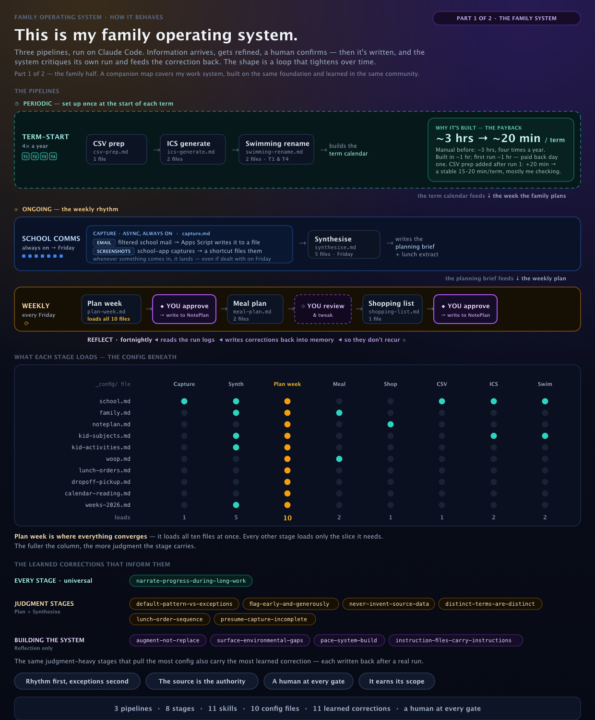
This is the system I'm proudest of, and it's deliberately worth nothing to anyone but me. I've been building it for about two and a half months. My goal? Free up time personally, and test and learn everything I was learning here so that I could be confident in building out things that are proper products at work (or, more accurately, architecting things for my team to build). So this system flies in the face of some of what we learn - it's not meant to have a product launch, it's meant to be so damn unique and customised that it holds no value to anyone other than me. Current outcomes (and I'm going to build again so this will improve): - ~63 hours per year freed up for me - ~ 104 hours per year freed up for my husband - ~$2400 per year saved in food costs (around $50 per week approximately) and reduced food wastage - A calmer family who are not stressed out about what needs to be done when for school - we've gone from a last minute scramble or forgotten gear about once every 2-3 weeks to one item that was a day late in the last two and a half months. (With the root cause of that miss fully addressed instantly in the system). - Three weekly runs in a row where I didn't have to change anything in the heaviest and most challenging workflow (the weekly planning workflow). I just reviewed and approved it to write. Every minute of build time has already been paid back with interest before counting the time freed up for my husband, and I'm only two and a half months in. In fact, the first thing I built paid back on the first run with me being an hour better off from that first run even when you factored in the build time. Here's how it's actually doing that: - Term-start — the first thing I built, and the one I love most. It takes a 7 day timetable screenshot and a CSV file exported from the school app and turns it into an ICS file I can upload into my calendar. Rather than manually creating it, it can apply the reasoning required over the root information and give me the output. It even has a second-pass logic built in for the edge case logic where days aren't in the CSV which usually happens for 1-3 days each term. It works flawlessly. It began as a series of saved prompts and was my first ICM pipeline once I found this community.
1 like • 1d
I think this is amazing. I struggle to keep up when my kids are in school and I have tried building automations in the past to help, but failed and ended up missing more because of it. Maybe this is a sign to give it a second attempt…
1 like • 1d
@Mira Bradshaw I’d love that. I could probably take that as a starting off point and start adapting it to my actual life and ecosystem lol. I’m still figuring out ICM as a whole, so I’m really just a novice at this point. I’m sure as I build, ideas will come out. For example, I just built an ICM idea to STL (3D print file) pipeline and just did my first test runs today and it works! Lol. I was very surprised. I’ve never made a 3D print file, but with this method, now I don’t even have to learn how to, I can just use mock up images and natural language to get what I want modeled. Super cool.

2d •
The veil is being lifted........ slowly <3
It's starting to all make sense! I'm getting more comfortable with Claude in VS Code, and things are finally beginning to click. At the same time, I've realized I don't know a damn thing about CMD/terminal prompting yet. 😂 The more I learn, the further backwards I seem to go. But I'm starting to understand what Clief means about learning from the past—everything feels a lot more connected now. It's been quite the journey. Hope everyone's doing well! ❤️

2 likes • 2d
@Leo Hako-Oja I either hit the peak today, or I am just past the valley of despair. I definitely almost gave up on this yesterday. Then today it started, seemingly, clicking. Time will tell. I spent all day today putting together a workspace for fun to take a 3D model idea and execute an 11 stage pipeline to create the printable files. Tomorrow I should be able to actually run and tweak it.
1 like • 2d
@Leo Hako-Oja That’s awesome brother! Always love streamlining money into the pocket lol. Would be curious to hear more about your 3D printing business. My kids want to sell stuff with me at the local farmers markets lol. The piece I’m building would fit your workflow if they select custom build. It should handle the intake all the way to producing the STK file. Would be neat to see it integrated into a full workflow like yours where they branch to custom build and then it reconnects back into your workflow after the file is presented.

16d •
Used ICM to hopefully land a client conversation today
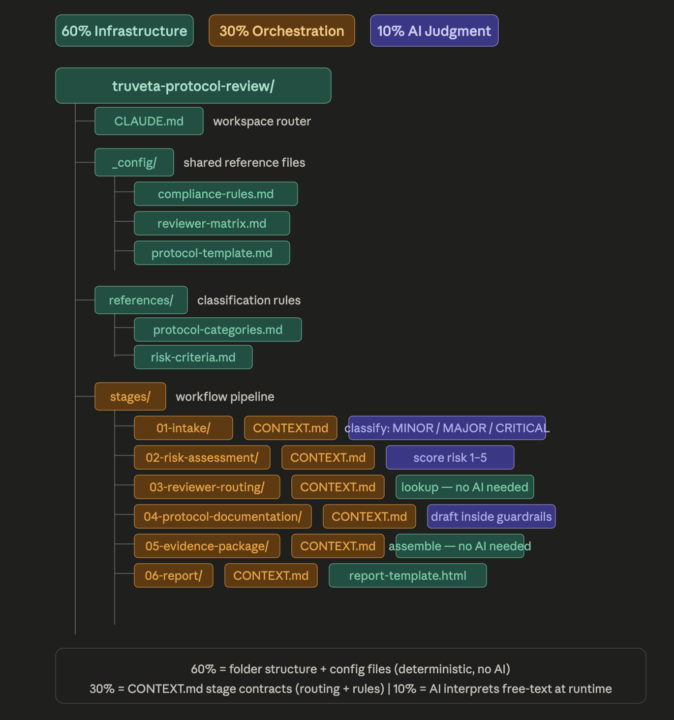
So I reached out to a friend today using an ICM workspace I built as the pitch. He's the founder of a company that aggregates real-world health data from 130 million patients across US health systems. Their customers are pharma and medtech companies doing regulatory research. He posted on LinkedIn this morning about a breast cancer screening study his team published at ASCO. I sent him a message referencing the post, mentioned my mom and grandmother both had breast cancer, and their article caught my attention. Then, mentioned I was building something around a use case specific to his company. He liked the message within minutes. Built it and sent him the overview a few hours later. The workspace automates their internal research protocol review process, from the moment a researcher submits a study request all the way through risk scoring, reviewer assignment, compliance checks, and a final evidence package. Six stages, all connected, each one passing structured output to the next. Stuck to the 60/30/10 rule throughout the build. The folder structure and config files do the heavy lifting. The stage contracts handle the routing and rules. The AI runs the whole thing but only makes judgment calls in three stages: classifying the request, scoring risk, and drafting the protocol. Stage three is a straight lookup against the reviewer matrix. The files make the decision, not the AI. Ran a test protocol through it, a cardiovascular outcomes study using GLP-1 data. It classified the protocol as CRITICAL, scored it 5/5 on risk, assigned four reviewers with deadlines, caught a conflict of interest I didn't program it to look for, confirmed HIPAA and 21 CFR Part 11 compliance, and generated a full HTML report. All from one prompt. Twelve files. No code. The angle I'm pitching isn't just internal use. His pharma customers run the same painful protocol process on their end. This becomes something he could offer them, a workflow layer on top of their data platform that makes their customers stickier.
2 likes • 2d
Did you ever hear back from him on this? Sounds super useful and I could see similar use cases in legal and contracts.
1-10 of 13

@brandon-steele-8426
Professional overthinker. Amateur everything else. I build systems, test ideas, play with AI, and occasionally turn caffeine into something useful.
Active 3h ago
Joined May 28, 2026
Colorado
Powered by