Activity
Mon
Wed
Fri
Sun
Nov
Dec
Jan
Feb
Mar
Apr
May
Jun
Jul
Aug
Sep
Oct
What is this?
Less
More
Owned by Benjamin
Master BIM Model Management. Learn proven workflows, standards and best practices to build reliable, scalable BIM projects.
Six-Figure Sports Coach
876
$350
Ecomliberty | Dropshipping
52.6k
Free
Poppy AI Viral Content Academy
4.7k
Free
Selling Online / Prime Mover
36.8k
Free
Skoolers
151.6k
Free
Ark It Easy
11.7k
5.0
Free
CREATE
1.6k
Free
12 contributions to Digital Builders

12d •
Why Model Standards Fall Apart Mid-Project
Having clear BIM naming standards and QA checklists looks great when a project kicks off. The friction starts weeks later when everyone gets buried in issue tickets, and the team starts bypassing the shared standards just to hit their clash deadlines. You end up with clean guidelines sitting in one place, while actual model execution drifts into separate habits. How do you stop your team from cutting corners on standards once deadline pressure hits?

0 likes • 9d
We’ll fix the naming after the clash review.” That’s an easy decision to make when the deadline is tomorrow and an easy promise to forget once the next deadline arrives. Under pressure, people follow the quickest route to getting the model out. The challenge is making the agreed standard part of that route: built into templates, supported by checks, and owned by someone before the model is shared. One practical action for the next coordination meeting: pick one standard that keeps slipping and ask the team to show where following it becomes difficult. Then remove one obstacle before the next delivery. That could mean fixing a template, automating a repetitive check, or clarifying who resolves a failed check. Keep it small enough to actually implement. Which standard is usually the first to slip in your team?
27d •
Something I noticed with BIM projects is that the model itself usually isn't the only thing that gets messy.
There are coordination issues to follow up, QA/QC items, decisions waiting on someone, and small tasks scattered across the project. I've been using autodesk.com for the actual BIM side and floment.ai for keeping those surrounding tasks and next steps organized. Keeping the model environment and the execution layer separate has made the workflow much easier to follow. How are you guys tracking coordination actions outside the model?
0 likes • 27d
This is a great topic to discuss @Tony Iverson
Jan 12 •
Let’s Talk Honestly: What Are You Struggling With Right Now?
I’d like to use this community for what it’s meant to be:learning from each other, not pretending everything is under control. The construction industry is changing fast.Projects are more complex, timelines are tighter, margins are thinner, and digital tools keep piling up. And yet, many of us are dealing with the same questions: - Where does information really live? - Why do models, drawings, and reality still clash? - How do you keep control as a project leader instead of reacting all day? - Which tools actually add value, and which just add noise? So I want to ask you openly and honestly 👇 👉 What is your biggest challenge right now in your projects?👉 What would you genuinely like to get better at in the coming months? This can be anything: - BIM and coordination - Communication between teams - Understanding models as a non-modeler - Digital workflows that actually work on site - Or simply: making things clearer and less stressful Drop it in the comments. No sales pitch. No judgment. My goal is to listen first and then create content, sessions, and explanations that truly help you move forward.
0 likes • Jan 20
@Cameron Vermeulen The most important thing is to properly secure these agreements in advance. This is where the ISO 19650 framework or the information delivery specifications can add value. We work with the team to establish these agreements. One of these agreements is the baseline, levels, and the format in which we will coordinate. Until now, if you want to link IFCs in Revit, you didn't have the option to choose which coordination point to link them to. If you want to use the IFC in Revit, it's best to link it. I think you mean creating a Revit file from an IFC? This is cumbersome and I wouldn't recommend it. As you yourself indicated, you'll end up with all kinds of generic objects. With some scripting, this could be achieved, but it's quite a bit of work. You could look into Autodesk Construction Cloud and the Model Coordinates function. Here, you can run clash checks in the cloud. This way, you don't need a powerful computer.
0 likes • Jul 31
@Tony Iverson I can relate to that. The more tools you add, the more context switching starts to eat into your day. I've found that separating knowledge from execution works really well. I keep documentation, standards, and reference material Teams, but my daily focus lives in a dedicated task space. That way I'm not constantly jumping between apps looking for what to do next. One clear list of priorities makes it much easier to stay proactive instead of spending the day reacting. Also a dedicated scope helps with that.

May 12 •
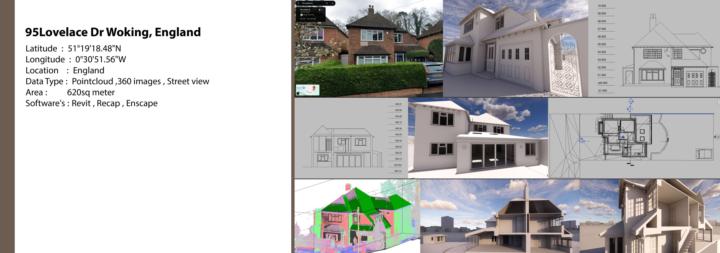
As-built Revit model and Drawings !
🏡 95 Lovelace Dr, Woking, England | Scan to BIM From point cloud to a fully detailed Revit model — here's a complete residential Scan to BIM project delivered for a property in England. 📍 Location: Woking, England 📐 Area: 620 sqm 🔧 Data Type: Point Cloud + 360 Images + Street View 💻 Software: Revit | ReCap | Enscape What we delivered: ✅ Accurate 3D Revit model from point cloud ✅ Architectural floor plans & sections ✅ Elevations with precise dimensions ✅ Enscape renders for visual presentation ✅ Full exterior & interior geometry captured Whether you have scan data or just 360 images — we convert it into a clean, accurate BIM model ready for design or renovation work. 📩 Have a project? Let's talk!
0 likes • May 12
Nice work Can you share what data you use? What is the input e57, rcp, lgs, las? Can you teach people how you do this? Grts Ben
May 6 •
Everything in BIM Felt Overwhelming… Until I Understood the Foundation
When I started with BIM, everything felt overwhelming.Revit modeling, templates, BIM coordination, standards, clash detection, data, CDEs, BCF… it felt like you needed to understand everything at once. And honestly? That’s where many people give up. That’s exactly why I created this community.Not to make BIM more complicated, but to make it accessible. Step by step.Practical.Low threshold.Focused on what you actually need to start working efficiently. No overload. No unnecessary complexity. Just clear guidance through the world of BIM and digital construction. And where do we start?With the foundation: the CDE. Because without a good structure, everything becomes chaos. If you ever felt overwhelmed by BIM, this community is for you.
1-10 of 12

@benjamin-maes-9644
BIM advisor and process manager with 13+ years of experience, helping companies implement BIM, optimize Revit workflows, and streamline processes.
Active 2d ago
Joined Aug 22, 2025
Belgium