Activity
Mon
Wed
Fri
Sun
Nov
Dec
Jan
Feb
Mar
Apr
May
Jun
Jul
Aug
Sep
Oct
What is this?
Less
More
Owned by Barbara
Online-Business starten: Der Lernraum für Gründerinnen und selbstständige Frauen mit monatlichen Themenschwerpunkten und Live-Sessions.
Online-Business aufbauen: einfache All-in-one-Software, KI-Prompts, Strategie inkl. Schritt-für-Schritt-Anleitungen, Gruppencoaching & Community
Worte-machen-Kunden-Challenge
1.1k
Free
Rundum kreativ mit KI
256
5.0
Free
Grow With Evelyn
3.4k
5.0
$29/m
AI Online Educators & Coaches
3.6k
5.0
Free
Women Build AI
6.6k
Free
skool Promo Hub 🇩🇪
233
5.0
Free
Skool Extensions 🧩
1k
5.0
Free
3 contributions to Skool Extensions 🧩

🔥
May 21 •
Community Pins
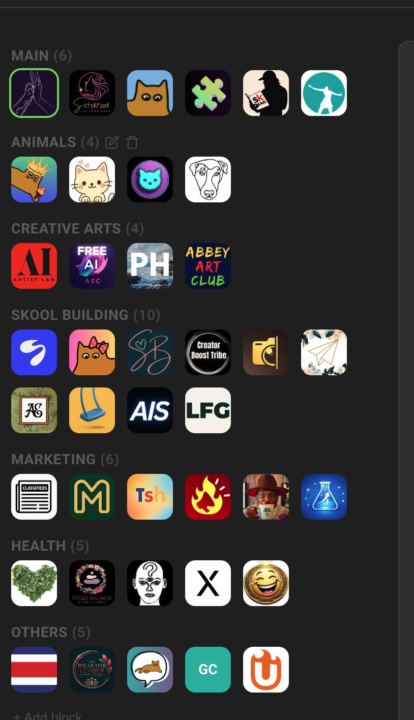
Replace Skool's left community switcher with a strip that holds every community you belong to, grouped into named blocks Skool's left sidebar only surfaces a handful of communities at a time — the rest sit behind a switcher dropdown you have to open every time. If you're active in a dozen or more, the ones you visit daily end up buried in a list you keep scrolling through. Community Pins replaces that switcher with a redesigned strip down the left edge that shows every community you belong to at once — your logos flow in rows across the space beside the page instead of one cramped column. Hover any community to see its name in a tooltip, and the one you're currently in is marked. Group your communities into named blocks. Add a block, head it "AI", "Clients", or whatever fits — each heading carries a live count of how many sit inside. A permanent "Pinned" block catches every community on its own: join a new one and it lands there, leave one and it drops out. Manage it all inline in the strip — "+ Block" adds one, the pencil renames a heading, and the trash icon removes a block (after a quick confirm) and drops its communities back into "Pinned". The "Pinned" block itself can be renamed but never deleted. Drag to organize. Reorder communities inside a block, pull one across to another block, or grab a block's heading to move whole blocks up and down. A custom mouse-driven drag tracks your cursor one-to-one, with no HTML5 ghost image or forbidden-drop flicker to get in the way. The strip scrolls quietly once the list grows long — a slim green scrollbar appears on hover and stays hidden otherwise, so the sidebar stays calm at rest. The whole arrangement is cloud-synced: lay your blocks out on one device and they show up the same on the next. Community Pins can be toggled in the Extension Settings under Appearance. --- Skools linken Community-Switcher durch einen Streifen ersetzen, der jede Community enthält, in der du bist, in benannten Blöcken organisiert Skools linke Sidebar zeigt immer nur eine Handvoll Communities auf einmal — der Rest steckt hinter einem Switcher-Dropdown, das du jedes Mal aufklappen musst. Wenn du in einem Dutzend oder mehr aktiv bist, sind die täglich besuchten in einer Liste vergraben, durch die du immer wieder scrollst.

2 likes • Jun 13
@Marco Berlin thanks!! no didn't change anything. Even though it is nice to have all the communities shown, why is it blinking?
2 likes • Jun 13
@Marco Berlin Yes thank you!!
🔥
May 13 •
#1 in the Chrome Web Store 🥳
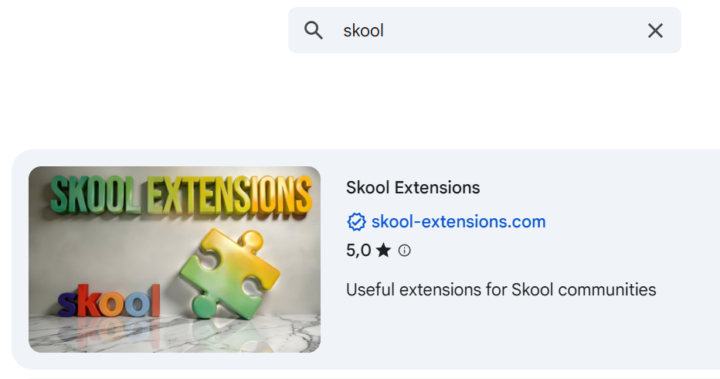
#1 in the Chrome Web Store - 683 users - Tons of positive feedback So, since today's update, the Skool Extensions have slipped to number 1 in the Chrome Web Store 🥳 (currently the best browser extension for Skool) The extension is now about 2.5 months old and has taken a bombastic turn. I got so much awesome feedback from you. Thank you very much at this point 🙏 Obviously there are some functions for us on Skool that sweeten our everyday lives in the many Skool communities. And that is exactly my ultimate goal: 𝗧𝗼 𝗺𝗮𝗸𝗲 𝗦𝗸𝗼𝗼𝗹 𝗲𝘃𝗲𝗻 𝗯𝗲𝘁𝘁𝗲𝗿 𝗳𝗼𝗿 𝘂𝘀 𝗮𝘀 𝗺𝗲𝗺𝗯𝗲𝗿𝘀 💪🏼 Free and as simple as possible. If you would like to give something back, I would be happy if you - did recommend the extension, - rated with 5 stars in the web store - you are really active here in the community, - or simply leave me positive feedback here as a comment. At this rate, the 1,000-user limit will definitely be reached soon. As 𝗰𝗼𝗺𝗺𝘂𝗻𝗶𝘁𝘆 𝗼𝘄𝗻𝗲𝗿𝘀, the Skool Extensions should also support us as much as possible. In the background I am constantly expanding the premium features, but the Skool automations via a workflow builder will hit the next level of this extension. I’m close to finishing my testing and should be able to publish this soon. There will be also guided tours, a full classroom and live calls for these and all the other functions. My foot is still at full throttle 🚀 --- Nr. 1 im Chrome Web Store - 683 Nutzer - Tonnenweise positives Feedback So, seit dem heutigen Update sind die Skool Extensions im Chrome Web Store auf Nummer 1 gerutscht 🥳 (aktuell beste Browser Extension für Skool) Die Extension ist jetzt ca. 2,5 Monate alt und bombastisch eingeschlagen. Ich habe so viel geniales Feedback von euch bekommen. Vielen Dank an dieser Stelle 🙏 Offensichtlich gibt es für uns auf Skool einige Funktionen, die uns unseren Alltag in den vielen Skool Communitys versüßt. Und genau das ist mein oberstes Ziel:
3 likes • May 13
Congrats and of course a ⭐⭐⭐⭐⭐ rating @Marco Berlin
🔥
Apr 13 •
Video Download in Postings (Premium Feature 👑)
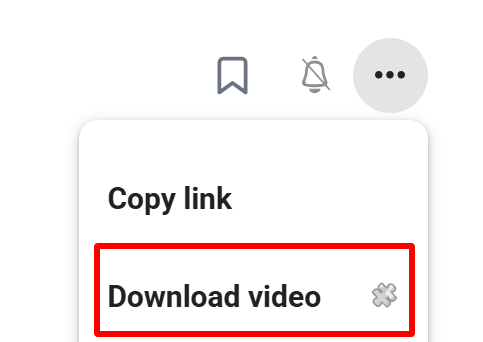
𝗩𝗶𝗱𝗲𝗼 𝗗𝗼𝘄𝗻𝗹𝗼𝗮𝗱 — 𝗦𝗮𝘃𝗲 𝗔𝗻𝘆 𝗦𝗸𝗼𝗼𝗹 𝗩𝗶𝗱𝗲𝗼 𝗮𝘀 𝗠𝗣𝟰 Skool posts often contain valuable video content — tutorials, walkthroughs, live replays — but there's no built-in way to save them for offline viewing. Video Download adds a "Download video" entry directly to the 3-dot menu of any post that contains a video. One click and the full-quality MP4 lands in your downloads folder. Under the hood the extension detects the video in the post, extracts the HLS stream URL, and sends it to a secure server-side ffmpeg transmuxer. The stream is remuxed to a valid MP4 container without re-encoding — lossless, fast, and ready to play in QuickTime, Windows Media Player, VLC, or any other standard player. A toast shows the download progress and confirms when the file is ready. Perfect for archiving course content, watching on the go, or keeping a backup of your own community's material. --- 𝗩𝗶𝗱𝗲𝗼 𝗗𝗼𝘄𝗻𝗹𝗼𝗮𝗱 — 𝗝𝗲𝗱𝗲𝘀 𝗦𝗸𝗼𝗼𝗹-𝗩𝗶𝗱𝗲𝗼 𝗮𝗹𝘀 𝗠𝗣𝟰 𝘀𝗽𝗲𝗶𝗰𝗵𝗲𝗿𝗻 Skool-Posts enthalten oft wertvolle Video-Inhalte — Tutorials, Walkthroughs, Live-Aufzeichnungen — aber es gibt keine eingebaute Möglichkeit, sie für die Offline-Nutzung zu speichern. Video Download fügt einen "Video laden"-Eintrag direkt ins 3-Punkte-Menü jedes Posts mit Video ein. Ein Klick, und die MP4 in voller Qualität landet im Downloads-Ordner. Im Hintergrund erkennt die Extension das Video im Post, extrahiert die HLS-Stream-URL und schickt sie an einen sicheren server-seitigen ffmpeg-Transmuxer. Der Stream wird ohne Neukodierung in einen gültigen MP4-Container remuxt — verlustfrei, schnell und sofort abspielbar in QuickTime, Windows Media Player, VLC oder jedem anderen Standard-Player. Ein Toast zeigt den Download-Fortschritt und bestätigt, wenn die Datei fertig ist. Perfekt zum Archivieren von Kursinhalten, zum Anschauen unterwegs oder als Backup für das Material deiner eigenen Community.
2 likes • Apr 13
This is great @Marco Berlin BUT as a creator one of the reasons I choose skool for my content is, that the videos are not downloadable. I think this is against copyright regulations. Just did a quick search this is what I found. Copyright and Legal Considerations: - Usage Limitations: Downloading copyrighted content without permission is illegal in most countries, even if intended for personal use. - Platform Policies: Downloading videos from platforms like YouTube, Facebook, or Instagram often violates their terms of service. - Risk: Users are solely responsible for compliance with copyright laws, and unauthorized downloading may lead to penalties.
1 like • Apr 14
@Marco Berlin thanks! I overread this point ...
1-3 of 3

@barbara-valenti-8513
Gründerin Launch-Tribe Community auf Skool 🔥 Entwicklerin des Produkt-Labs. Natur- & Tierliebhaberin, Pasta-Passionista & Smart-Working-Nerd.
Online now
Joined Apr 3, 2026
ENFP
Germany
Powered by