Activity
Mon
Wed
Fri
Sun
Apr
May
Jun
Jul
Aug
Sep
Oct
Nov
Dec
Jan
Feb
Mar
What is this?
Less
More
Memberships
Bubble Gods
24 members • Free
No-Code Society
124 members • Free
Ai Filmmaking
7.4k members • $5/month
AIography: The Pro AI Film Lab
835 members • Free
IV/AI
49 members • Free
Imagine Art Films (AI Cinema)
7k members • Free
Business Builders Club
7.7k members • Free
2 contributions to No-Code Society

3d •
Bubble: Protection Score not updating in UI even though checkboxes save to database
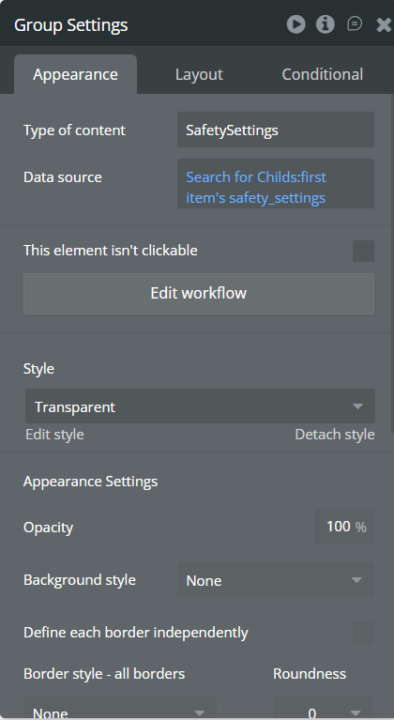
Post Content Hi everyone, I’m building a Bubble MVP and I’m stuck on a UI data-binding issue. I have: * A SafetySettings data type * It stores boolean fields like: • safe_search • youtube_safe_mode • block_adult • block_violence • block_gambling • learning_unlimited Each child has one SafetySettings record. ⸻ What works The checkboxes are auto-bound to the database fields, so when I toggle them they save correctly. ⸻ What I’m trying to do Display a Protection Strength score (0–6) based on how many checkboxes are enabled. I tried calculating it in a text element using: safe_search:formatted as number • youtube_safe_mode:formatted as number • block_adult:formatted as number • block_violence:formatted as number • block_gambling:formatted as number • learning_unlimited:formatted as number ⸻ The problem The UI score does not update correctly, even though the database values change. ⸻ Setup Group Settings Type: SafetySettings Data source: Search for Childs:first item’s safety_settings Checkboxes use auto-binding to the parent group’s thing. ⸻ Question Is this the correct way to calculate a UI score from boolean fields? Or should this be handled with a workflow instead? ⸻ I’ll attach screenshots of: * Group data source * Checkbox auto-binding * Score expression * Safety Level conditions Thanks in advance!
1 like • 3d
Hi Shon, thanks for taking the time to look at this. 1️⃣ The text does update when I click the checkbox, but not correctly. For example, when I toggle the checkboxes, the Protection Strength bars and Safety Level label do not always change to the expected level. 2️⃣ The protection_score field is a number field in the SafetySettings datatype. Right now it is updated through workflows like this: When Checkbox value is changed → Make changes to SafetySettings → protection_score = Checkbox A is checked:formatted as number + Checkbox B is checked:formatted as number + Checkbox C is checked:formatted as number ... So the score is saved in the database, but the UI does not always reflect the correct value. Expected behaviour: The Protection Strength bars and Safety Level label should update instantly when checkboxes change. Actual behaviour: The value in the database updates, but the UI sometimes still shows the wrong strength level.
1 like • 3d
I’ve previously attached screenshots of:• Group data source• Checkbox auto-binding• Score expression• Safety Level conditions. You can take a look at the screenshots and Let me know if there is something wrong in the way I’m calculating or displaying the score. Thanks again!

Feb '25 •
Welcome to The No-Code Society! (Start Here)
We help Bubble Developers build and launch professional-grade SaaS apps fast Step 1: Introduce yourself by commenting on this post. "Hey! My name is _____. My job is _____. My current project is _____. My favorite fruit is _____." 🍑 🥝 🍉 🥥 🍋 🍐 Step 2: Reply to 3-5 other introductions. This is a community after all 😊
1 like • 3d
Hey! My name is Anthony. My job is in logistics and operations. My current project is building a safeguarding app on Bubble focused on children’s online safety. I’m still learning Bubble and would love to connect with experienced builders as I run into workflow challenges. My favorite fruit is mango 🥭.
1 like • 3d
@Shon Zimkov Thanks and I really look forward
1-2 of 2

@anthony-anyaehie-1863
Aspiring IT professional transitioning from healthcare and operations. Building skills in IT support, systems, and problem-solving.
Active 18h ago
Joined Mar 11, 2026
Powered by