Activity
Mon
Wed
Fri
Sun
Jul
Aug
Sep
Oct
Nov
Dec
Jan
Feb
Mar
Apr
May
Jun
What is this?
Less
More
Memberships
Neuro's Ko-Fi Academy
7 members • Free
Healthy People Have Gardens
27 members • Free
BUNDLES BY JONEL
599 members • Free
The Lazy Dinner Club
111 members • Free
Make Money With Pam & Sadie
962 members • Free
Digital Creators Collective
1.7k members • Free
Empowered AI Collective™
3k members • Free
AI Business Wealth Builders
1.3k members • Free
Build A Skool University
889 members • Free
4 contributions to ChatGPT Users

Nov '25 •
ChatGPT brain meltdown - Can no longer complete tasks
QUESTION: Is there a prompt to reset ChatGPT's brain so it can forget previous tasks and focus clearly on new ones please? BACKGROUND: I have been using ChatGPT quite a lot recently, mainly to reduce the body text of a long manuscript. I have broken the task down to one chapter at a time, giving it clear instrcutions as to how much text to cut – and it has confirmed that it understands my instructions every step of the way. Initially I asked it to reduce the body text (not headers <h2> <h3> etc) down to something between 80% and 85%. It got stuck in, producing new chapters very speedily, but when I checked the word count, I realised it was cutting the body text down to about 50%. I halted the task, and asked it to start again, reminding it of the agreed parameters –incl. not cutting as much text. It proceeded by generating new text, and word count was about right. However, this time it was re-writing the content so much – to the point that it changed the headers also, and the content no longer matched the references section. I reminded it of the brief, and it aknowledged where it had gone wrong. I asked it to only re-write the body text to reduce the overall word count (down to 80–85%), removing duplication and fluff. It demonstrated that it understood in the chat. Now it cannot seem to generate anything. It seems to be stuck. I asked it if the previous tasks might still be clogging up its memory, and it replied saying that this was the case. So, i asked it to disregard all of the previous re-writing instructions, and just stick with the new plan. It agreed. ... However, it still appears to be stuck. Every time I ask it to rewrite the Introduction (800 words), it tells me the task wil be completed in 20 mins, or 30 mins, or 90 mins, etc. Every time I check on it, it keeps giving me another time delay... this has gone on for days now. 🤯 🔫 Would appreciate any help... thanks for reading.

2 likes • Nov '25
so is this the "improvements" they made to 5

Nov '25 •
AI word detector and remover
Hello, I'm sure we are all tired of editing out em dashes from our AI text, but did you know ChatGPT and others inject hidden characters into your outputs as well? They're not visible to the human AI but make it easy to detect if what you've written used AI or not. Here's a tool that detects and scrubs those words from your AI text https://www.agenticworkers.com/hidden-character-detector
3 likes • Nov '25
I usually just "command" gpt to Not use any em dashes, and they magically don't appear!
3 likes • Nov '25
@Joel Cedano well I did test it out, with something I wrote completely, no AI, and it told me 80% of what I wrote was AI, SO, it certainly does not work for me. The words and sentences it tagged, are all mine, and always have been, been writing like that since I was 17 (74 now) including some of my favorite words, TAPESTRY and PLETHORA, and the way I see it is, eventually AI will catch up, to real writers, and learn that words like that are part of the essence of some human writers. I don't know what you mean by "hidden watermarks" never heard that associated with AI before. Anyway, just as I have stated on my blogs at Medium and Substack, this is the way I write and I am not changing to please a bot, or people who have no udea that em dashes and using words with "color" have been used for centuries. No one has ever questioned Jane Austen, Shakespear, or any other writer that is famous in literature, so I will continue to write the way I always have, and bots be damned! BUT, good luck with your app!

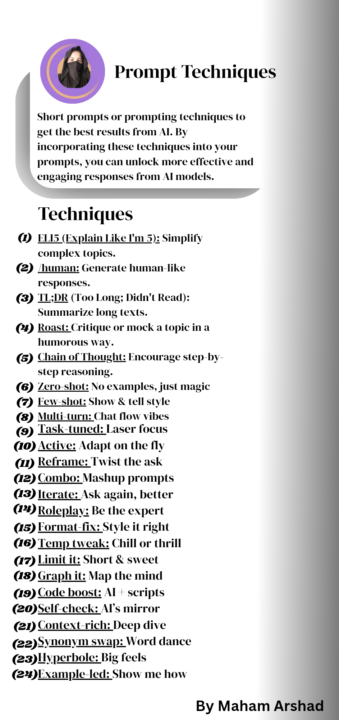
1 like • Jul '25
Thank you, it does look interesting, but how do you use this. Could an explanation of how to use be posted please.
1 like • Jul '25
@Maham Arshad Thank you

Nov '24 •
🎬 Check Out This New AI Video Generator! 🎬
If you're into AI and the latest tools that push creative boundaries, you might want to watch this video: "This AI Video Generator is SCARILY Good!" 🎥🔗 It dives into an AI-powered video generator that's super easy to use and perfect for social media stuff. magine making high-quality videos in minutes with minimal effort! 🤯 Whether you're looking to up your content game or just curious about the latest in AI tech, this video is a must-watch! ✨ Highlights: - Effortless video creation with AI - Ideal for quick, polished social media posts - Explore how AI can transform your video-making process - Bring still images to life Head over to watch, and let me know in the comments what you think about this innovative tool! 👇 Cheers Jason 🙌

1 like • Nov '24
Well that is very interesting lol!! Here is the one I just made there ... https://pollo.ai/v/cm3kfnm5y04ccohqy9hbkl4vm and here is the one I made last night using the original prompt in my NightCafe account... https://creator.nightcafe.studio/creation/hTTMhvWPRarUs1tTnalk?ru=DigiGirl
1-4 of 4

@angela-h-4682
I'm an artist, writer & ex entertainer, my content is focused on DFY, content design, graphics & publishing. I run many websites & am always creating.
Online now
Joined Nov 16, 2024
Richmond, Virginia
Powered by