Activity
Mon
Wed
Fri
Sun
Jun
Jul
Aug
Sep
Oct
Nov
Dec
Jan
Feb
Mar
Apr
What is this?
Less
More
Memberships
AI Video Creators Community
5.2k members • $9/month
Emprendedores.com
8.1k members • Free
AIlink Free
9.6k members • Free
IA Masters Essentials
6.3k members • Free
IA Builders Academy
958 members • Free
Automate What Academy
2.6k members • Free
AI Voice Academy
3.3k members • Free
The AI Blueprint
8.4k members • Free
AI Automation Society
350.9k members • Free
11 contributions to AI Automation Society

🔥
Nov '25 •
🏆 Weekly Wins Recap | Nov 15 – Nov 21
From first clients to viral posts and new product launches - this week inside AIS+ showed how fast things move when you stay consistent 👇 Here are this week’s highlights inside AIS+ 👇 👉 @Avosanda Ramarson landed his first-ever client by pitching AI automation to a local startup - leading with value and building confidence through action. 👉 @Jose M Lopes closed a $500 audit on his very first sales call, with follow-up projects ranging from $1.2K to $12K systems and monthly retainers. 👉 @Elvin Roest shipped his first productized workflow using Base44 - an invoice-renaming automation turned into a working MVP. 👉 @Patrick Siewert published his second Creator Template, an automated content safety guardrail system - one more away from verified creator status. 👉 @Aden Mann went viral on LinkedIn with his AI Impact Measurement Framework - 12,000+ impressions and 200+ comments in days. 🎥 Super Win Spotlight of the Week: @Jose M Lopes | First $500 Audit & Confident Sales Breakthrough Jose turned weeks of learning into action - closing a $500 audit on his first-ever sales call with full confidence. AIS+ gave him the clarity to price, pitch and communicate value like a pro - turning hesitation into momentum. 🎥 Watch his quick story below👇 Jose’s journey is proof that confidence grows fastest when you take action and back it with learning. ✨ Want to see more wins like these every week? Join the builders inside AI Automation Society Plus - where consistency turns learning into real results 🚀


5 likes • Nov '25
amaazzzziing, congrats a todos :)
Nov '25 •
First client signed. 50% paid. First website of our lives. HELP haha ;)
We’re Alba and María, ALMA Consulting. And here’s the honest truth: we just signed our first real client (a physiotherapist in Barcelona)and part of the project is building a website + landing page + appointment automations + brand strategy. And… this will be our first website ever. We know automation, strategy, workflows…but the web part? We want to choose the right setup from the start. Right now, we’re between three options: 1) Lovable (free) + Cursor + Vercel Super fast and we love how simple it is.But the free version feels a bit limited and visually basic for a real business. And no video hero section (static only), which is not ideal for a physio. 2) Hostinger + Hostinger Website Builder Templates available, some good, some not super customizable. BUT the hero section with a videoloop (like someone giving a massage) looks amazing for a physiotherapist. This alone gives it a huge advantage over Lovable right now. 3) Hostinger + WordPress + Elementor We still need to test it, but on paper it seems like the most flexible and powerful option. More learning curve, yes, but also more control. The client only needs something simple for now:about me, services/bookings, testimonials, contact, location. Later we’ll probably add a payment system in a second phase. We want to deliver something clean, visual, professional, easy to use,and something he can keep managing without depending on us for every tiny update. So here’s our question to the community: If you were in our position… which option would you choose for your first real client? Lovable for simplicity? Hostinger builder for speed?WordPress + Elementor for full control? Or something else we haven’t considered yet? All ideas, warnings, shortcuts, templates — everything is welcome. We want to build this project properly (and survive the “first-client chaos” hahhaahahahahah).


Nov '25 •
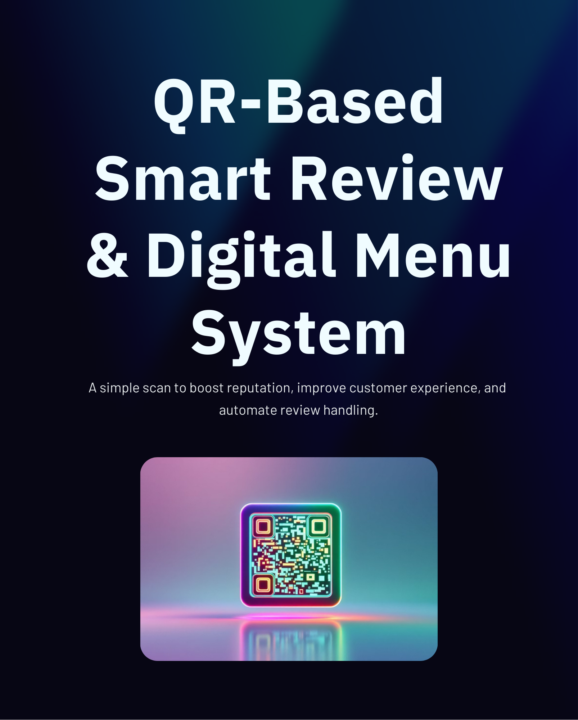
QR-Based Smart Review & Digital Menu System
Just built something powerful for businesses who want to improve customer experience + automate the entire review process! I created a QR-Based Smart Review & Digital Menu System that lets any business collect reviews, filter bad feedback, and send manager alerts — all automatically. Here’s what it does: — Customers scan a QR — They see the digital menu + rating page — Good reviews go public — Bad reviews go privately to the manager — n8n automation kicks in instantly This helps businesses: ✔ Catch issues before they hit Google ✔ Improve reputation ✔ Modernize the customer experience ✔ Run fully automated workflows I’ve shared a full presentation with visuals + a live QR demo. Would love your thoughts on it — and happy to help anyone implement this in their own business or for clients!
2 likes • Nov '25
@Abdul Raffay i just did a test now!! I like it a lot, I think here in Spain. It could work really well for Google reviews, and many restaurants would want it. But we also have to take into account people who might come directly from Google and give you a “BAD” review for this. I think it would be good to add an automation feature, so that when a bad review comes in (they should always be answered/the business should respond), sometimes the owners don't see it, so something that alerts you via Telegram/WhatsApp or email when someone leaves a bad review and you can respond directly, or there are templates to respond with, or a well-programmed LLM.
1 like • Nov '25
@Abdul Raffay amazing! I think with this: • Automatic alerts via WhatsApp/Telegram/Email • One-click response templates • Optional AI-generated replies It’s going to be a really good one! Congrats! Of course, maybe not right now, but my business partner and I are definitely open to seeing all the news and automations in general — especially because here in Spain culture around food is huge. DM :) @almaconsulting.ia
Nov '25 •
🧠 n8n experts: Anyone has a workflow/JSON for emails → key date → Sheets → Calendar → notification?
I think this automation is fairly simple, but if anyone has a similar workflow/JSON, I’d be super happy to check it out! I also think this flow could be packaged and reused across many businesses, so having a solid reference would be super valuable. I’m trying to build this flow in n8n: → Read incoming emails (Gmail or Outlook) → Extract one key date and other important info from the email body → Save the extracted data into Google Sheets → Create a Google Calendar event using that key date → Send a notification (email or WhatsApp) with the extracted information Ideally, I’m looking for an example that already includes: ✔ Email text parsing ✔ Date extraction (regex or any reliable method) ✔ Date normalization (YYYY-MM-DD) ✔ Writing results into Sheets ✔ Creating the Calendar event ✔ Sending the final notification I f anyone has an n8n workflow JSON or something similar I can use as a reference, I’d really appreciate it! 🚀
0 likes • Nov '25
@Zamir M ohhh, thank you, I'll take a look at it right now.
0 likes • Nov '25
@Great Ai Automation Specialist Cool :) loveeeee it! I will write you a DM

Nov '25 •
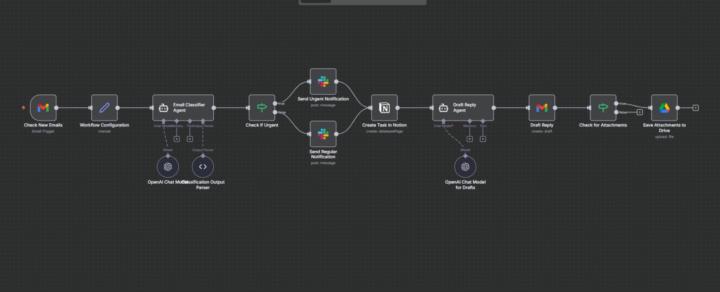
Build 34 # AI Email management
Just shipped an AI Email Management Agent inside n8n — and it's creating an issue of nodes while importing JSON Here’s exactly how it works: 1. Gmail Listener (Intake Layer) Checks your Gmail every 5 minutes. Pulls: – sender – subject – full body – attachments – direct email link This is your “always awake” inbox watches 2. System Configuration Layer Stores your: – Notion Tasks DB – Slack alert channel – Google Drive folder for attachments Once set, you never touch these again. 3. AI Email Classifier (The Brain) This is where the magic happens. AI reads the email and sorts it into: Urgent Money Clients Tasks Other Plus it extracts: summary, priority, action items, people, dates, amounts — everything. It even flags isUrgent = true when needed. 4. Smart Alert Router If it’s urgent → Sends a red-alert message in Slack. If not → Sends a regular update. Never miss what’s actually important again. 5. Notion Task Creator Every email becomes a fresh, clean task with: title category priority sender summary link to email Your task list updates itself while you do… absolutely nothing. 6. AI Reply Generator Reads the whole context and writes the perfect reply: urgent → acknowledgment + timeline money → confirmation + clarity clients → warm + helpful tasks → clear next steps other → short + professional You basically stop writing emails. 7. Attachment Manager If the email has files → Automatically uploads them to Google Drive. No more “Where did I save that PDF?” This turns Gmail into a fully automated operations system — without hiring a VA and without touching your inbox. What should I add to improve this?
3 likes • Nov '25
ohhh Muskan amazing I am trying to do something similar The flow I want to build looks like this: → Read incoming emails (Gmail or Outlook) → Extract dates and other key information from the email body → Save the extracted data into Google Sheets → Create a Google Calendar event using the date → Send a notification to the right person (email or WhatsApp) Ideally, I’m looking for an example that already includes: - Parsing email text - Extracting dates using regex or any method - Normalizing dates (e.g., YYYY-MM-DD) - Writing results to Sheets - Creating Calendar events - Sending a notification
2 likes • Nov '25
@Muskan Ahlawat trueee, maybe its better to do it by email or slack or telegram :), but I'm just getting started.
1-10 of 11

Active 12d ago
Joined Nov 3, 2025
Powered by