Activity
Mon
Wed
Fri
Sun
Aug
Sep
Oct
Nov
Dec
Jan
Feb
Mar
Apr
May
Jun
What is this?
Less
More
Memberships
Clief Notes
40.9k members • Free
9 contributions to Clief Notes

2h •
Central map or per-project maps?
Small test from the last couple days: I started treating context as two layers instead of one pile. Raw evidence stays raw: notes, screenshots, logs, exports, messy captures. The operating context is rewritten separately: short index, current state, rules, and next actions the agent can actually load. That made the workspace easier to reuse because the agent is not asked to carry the entire history every time. Question for people running multiple workspaces: do you keep one central map that routes everything, or a small map inside each active project? I can see both working, but I am leaning toward per-project maps with a tiny global index.

🔥
1d •
😅 I just spent the last few hours asking Fable to make itself cheaper.
💪 It did not disappoint. 👉TL:DR - It made all AI use cheaper in my environment, made me more efficient, and it increased my memory system usage by almost half. It should be no secret to anyone here: I don't count tokens. 🪙 I'm on a Pro Max plan and I go where the work, and the passion takes me. But I have used Fable before, and I know about the token burn! So I came up with a plan! I pointed Fable at my own setup and pulled the report. 😅 I'm glad I did. Turns out it could've been cheaper and cleaner the whole time. I didn't ask Fable what it thinks. I pointed it at the real thing. My hooks, my handoff files, my subagent config, the actual token counts on disk. Two questions: where does the money go? & how do we spend less? 💡The answers. A silent forgotten tax on every message, A safety hook was injecting around 800 tokens into every prompt I sent. Repeated rules I already load once at the top. And a file that runs at every session start called itself " 450 tokens" in its own header. It was not... it was 7,000. My actual face when I saw this--->🤬 a few moments later--->😆 (Apparently, it's not only AI that is bad at counting sometimes!) My own file lied to me, and I'd read past that number a hundred times with a smile on my face! My long sessions. The ones I'm proudest of. Turns out that hour six is my most expensive and also least impactful at the same time. 💩 I know that models follow instructions worse at higher context. And because the quality was still there, the marathon I read as momentum was being billed to me at top rates for the weakest output of the day. 🙄 My helper agents were all running on the flagship (Most expensive model). These are the agents Claude spins up to send off to do tasks to get more accomplished in a shorter amount of time! This I knew about, and it was by choice, it's my environment and I never hit my 5 hour or weekly cap, so I did not care about this for myself, bigger = better right? Use Fable 5 on UltraCode in my environment, and we find out that logic was wrong....

1 like • 15h
The part that stands out to me is the gap between what a file claims about itself and what it actually is. A header saying "small/current" can become stale faster than the file content, and then the agent trusts the label instead of the evidence. I would make that audit mechanical: size, age, last touched decision, and whether the file is still referenced by an active workflow. Anything that fails becomes review-only, not auto-loaded.

1d •
Claude Code Is Losing It
I've just had the most amount of hallucinations ever in one session. My model is completely making shit up. I have no idea where is this coming from, because I have not modified any of the foundational/instruction files or changed my processes. It's undertaking tasks or modifying files in ways I didn't ask for and it seems to be 'assuming' what I want instead of listening to instructions and its constantly forgetting context now. I'm thinking of removing and reloading Claude Code too if its a potential caching issue similar to the old 'memory' files issue I was having where it was generating custom instruction files outside of our working directory which were negating my claude.md, etc. Anyone else seeing issues increase lately?
1 like • 15h
I would treat this like a regression investigation, not just a bad session. Before reinstalling, I would run a quick diff against the project instructions, any global rules, and whatever handoff/status file the agent reads first. If nothing changed there, start a fresh session with a tiny reproduction task and make it explain which instructions it loaded before touching files. That usually tells you whether the drift is coming from model behavior, hidden/global context, or a local workspace rule conflict.

3d •
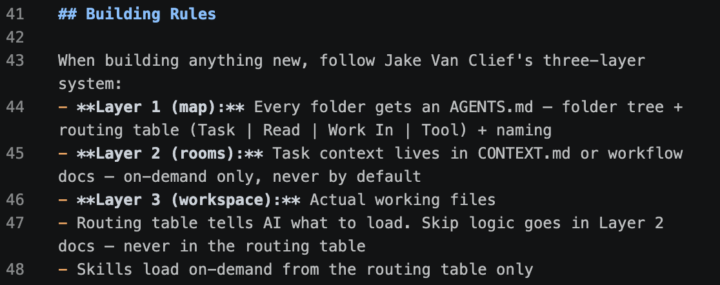
How does everyone get Claude/AI to consistently follow ICM / Jake methodology on every build?
I've been working on this and have something that somewhat works, but I keep running into pieces that get messy and don't hold up well in practice. My current approach: the image I've attached lives in my AGENTS.md at the root of the project, so any time I build, the AI has the structure to reference. What I'm really after is the best way to implement the ICM system so that anything I build, Claude/AI already knows the way to build and stays inside that structure. Is anyone else doing this? Would love to hear how you've set it up.
0 likes • 15h
One thing I would add is a small bootstrap check before every build. Before Claude writes anything, have it answer: what workspace am I in, which layer controls this task, what files are allowed to change, and what would count as drift? If it cannot answer those four cleanly, the system probably needs one more routing file or a tighter task folder before the build starts.

2d •
Knowledge graphs vs ICM
is the orchestration based on folder structure/ICM better that creating a knowledge graph and a semantic layer to get the required context from the knowledge graph. Which will yield better results if we evaluate both. What are the pros and cons of each approach?
3 likes • 2d
I would use ICM as the control plane and the graph as a retrieval tool, not as the thing that decides the workflow. Folders answer: where is the agent, what job is it doing, and what files or rules are allowed here? The graph answers: what related facts should be pulled inside that scope? A skill file can query the KG from a specific stage, but I would avoid letting the graph roam across everything by default.
1-9 of 9