Activity
Mon
Wed
Fri
Sun
Feb
Mar
Apr
May
Jun
Jul
Aug
Sep
Oct
Nov
Dec
Jan
What is this?
Less
More
Memberships
AI Automation Society
241.6k members • Free
9 contributions to AI Automation Society

7h •
Security Concerns Around Selling Claude Code Automations
I've just watched Nate's recent video on basics of Claude Clode, (Master 95% of Claude Code in 36 Mins (as a beginner)); If I want to build and sell automations, what security concerns should I have? What security concerns will my client have that I need to be able to address?

3d •
What is your best productive hours?
Through the day, what is your best zone in time? How long you work and when you take a breaks?
4 likes • 2d
12 am to 6 am; probably cuz all of my regular distractions are gone
0 likes • 8h
@Dean Razic I usually only work about 1-3 of those hours, rearely do I stay up until 6. I usually take a 1.5-3 hr nap in the afternoon cuz I never have anything going on. Usually if I stay up until 6 it's a weekend and I can sleep in. Also sometimes I'll go to bed early at like 9 and wake up around 12 or 1:30. This rly only works because I'm a college student.

2d •
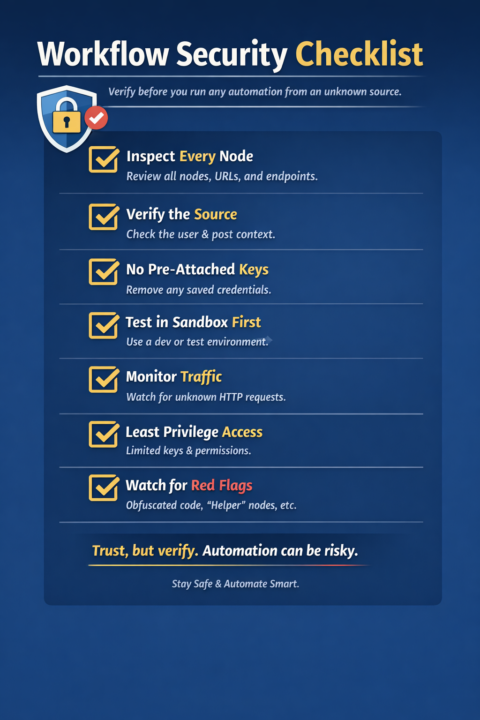
🚨 A quick security reminder about automation workflows
Don’t run workflows from strangers without inspecting every single node first. Whether it’s an n8n workflow, Make scenario, Zap export, or a random JSON someone drops in a Discord or Skool post — blindly importing and running automations is risky. There are bad actors out there. Some are obvious. Some are very good at hiding what they’re doing. I’m sharing workflows to help people learn and move faster — but you should still verify everything before you run anything. Why this matters Automation tools usually have deep access to: - APIs - Databases - Credentials - File systems - Webhooks - Internal business data A single hidden node can: - Exfiltrate credentials - Send your data to a third-party server - Create hidden webhooks - Write or delete database records - Trigger actions on a schedule you never notice And the scariest part? ⚠️ It can look completely harmless at first glance. Good security practices (please don’t skip these) 1️⃣ Inspect every node — no exceptions - Open each node - Check URLs, endpoints, headers, payloads - Look for unfamiliar domains or IPs - Be suspicious of “utility” or “helper” nodes 2️⃣ Verify the source - Who posted it? - Do they explain what it does and why? - Does the workflow come with context or documentation? - Anonymous drops = 🚩 3️⃣ Never import with credentials pre-attached - Remove all credentials before testing - Re-add your own manually - Never trust “ready-to-run” workflows with keys baked in 4️⃣ Test in a sandbox first - Use a dev instance - Use test APIs / fake data - Never run unknown workflows in production first 5️⃣ Watch for outbound traffic - HTTP Request nodes - Webhooks - “Logging” endpoints - Anything sending data “for analytics” If you don’t recognize the destination — investigate. 6️⃣ Least-privilege access - Use limited API keys - Separate prod vs dev credentials - Rotate keys regularly 7️⃣ Assume automation = code No-code does not mean low-risk.
0 likes • 2d
Thank you, this is really helpful

6d •
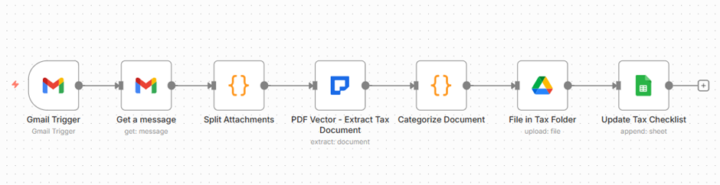
Tax Document Workflow Enhancement = 3 Paying Clients 🔥
Community shared basic tax filing workflow. Good structure. Missing intelligent extraction. Added document extraction capability. Landed 3 accountant clients immediately. THE OPPORTUNITY: Original template: Email monitoring, folder creation, manual document review. Accountant still reads each document. Still categorizes manually. Still types into spreadsheet. Half-automated. Not compelling enough to sell. Added extraction node. Now FULLY automated. Accountants impressed. Accountants pay. THE ENHANCEMENT: One extraction node between email and filing. Reads tax document automatically. Identifies form type. Extracts taxpayer info, income amounts, deduction amounts. Structured data flows to categorization and spreadsheet. Complete automation achieved. No manual document reading. THE ACCOUNTANT REACTION: Before enhancement: "Interesting but I still need review every document." After enhancement: "Wait, it reads W-2s and 1099s automatically? Extracts the amounts? Yes, I need this." Enhancement changed free template into paid service worth monthly retainer. WHY THIS MATTERS FOR TAX SEASON REVENUE: Partial automation = hard to sell to busy accountants. "Still doing manual work." Full automation = easy sell during tax crisis. "Literally handles everything. Just review organized results." One enhancement node turned community template into profitable service offering. THE CLIENT RESULTS: Accountant 1: 40 individual clients. Processing 200+ documents monthly. Pays monthly retainer January-April. Already renewed for next year. Accountant 2: Small business focus. 30 clients. Each sends multiple quarterly documents. Year-round monthly retainer. Continuous revenue. Accountant 3: Referred by Accountant 1. 25 clients. Signed up immediately after seeing demo. Monthly revenue started same week. Same enhanced template. Three paying clients. Tax season making money. THE TEMPLATE PHILOSOPHY: Community templates provide workflow orchestration. Document intelligence extensions provide extraction capability. Combination creates sellable professional service.
1 like • 2d
So do your clients pay one time for the workflow or do they come to you every year?

3d •
Wondering how a 17 year old got started?
Any of you guys looking to get more into automation here is what I did to get started, spread some love and like it really tried to drop some good content https://youtu.be/p-xyK9bDdOs?si=HjRAjjHS5j-sribC
0 likes • 2d
Thanks, 18 here, this is very helpful
1-9 of 9

@adam-hasan-3312
Hi, my name is Adam Hasan. I'm a second year Computer Engineering student.
Active 7h ago
Joined Jan 16, 2026
Powered by