Activity
Mon
Wed
Fri
Sun
Sep
Oct
Nov
Dec
Jan
Feb
Mar
Apr
May
Jun
Jul
Aug
What is this?
Less
More
AI Sales Agency Launchpad
15.5k members • Free
AI Automation Society
440.2k members • Free
DataLinkk AI Skool
118 members • Free
3 contributions to DataLinkk AI Skool

Sep '25 •
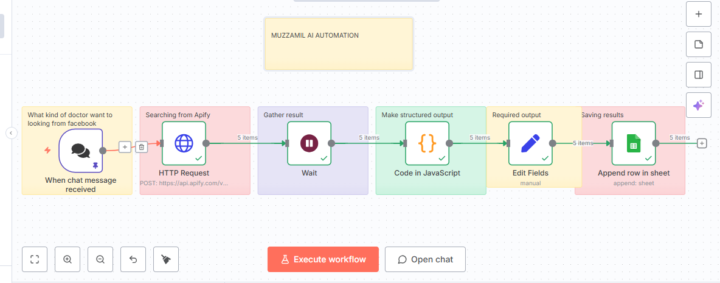
💥 Built something new,Apify web scrapping using Google Search Scrapper
🧩Step-by-Step Breakdown: 🗨️Trigger: "When chat message received" --This node listens for incoming chat messages from the user, asking for a specific type of doctor on Facebook 🌐HTTP Request: "Searching from Apify" --Sends a POST request to the Apify API to search Facebook for the type of doctor mentioned by the user (e.g., “best gynecologist in Sukkur”). ⏳Wait: "Gather result" - Pauses the workflow until Apify completes the search. - Outputs 5 result items from Facebook. 🧠Code in JavaScript: "Make structured output" - Doctor’s name - Timings - Availability - Location ✏️Edit Fields: "Required output" --Get required output 📄Append row in sheet: "Saving results" --Appends the final structured data into a connected Google Sheet for record-keeping.

1 like • Sep '25
great job dear!

Sep '25 •
💡Want ad-ready images without designers?
👉This workflow automatically takes an image, analyzes it, and generates a professional ad-ready version using AI. Let’s walk through how it works. 📌 Step 1 – Form Trigger “We start with a simple form trigger. Here, I can upload an image and give it a short description. This kicks off the entire workflow.” 📌 Step 2 – Upload to Google Drive “Next, the workflow uploads that image to Google Drive. This makes the file accessible for the next AI steps.” 📌 Step 3 – AI Image Analysis “Then, the image is analyzed using OpenAI’s vision model. It checks whether the picture is mainly a product, a character, or both, and describes the visual details in structured YAML format.” 📌 Step 4 – Prompt Generation “Based on that analysis, another AI agent creates a short and natural image prompt. This prompt is carefully designed for ad use, making sure the product looks authentic, the text stays accurate, and the style feels realistic—like a genuine ad photo.” 📌 Step 5 – Structured Parsing “To keep things consistent, the prompt is passed through a structured parser. This ensures the final text is clean and ready to use.” 📌 Step 6 – Image Generation via OpenRouter “Now comes the fun part! The workflow sends both the original image and the AI-generated prompt to the OpenRouter API, which calls Google’s Gemini 2.5 Flash model. This generates a brand new ad-style image.” 📌 Step 7 – File Conversion & Save “The generated image data is processed, converted into a file, and stored. So at the end, I get a ready-to-use ad image that matches my original product shot, but looks polished for marketing.” 👉drop “ad-ready” in the comments to get the file

1 like • Sep '25
ad-ready
0 likes • Sep '25
@Knooz Fatima thanks🫡

0 likes • Sep '25
@Nain Tara here comunity working both solution n8n , code if you can able to learn also beneficial for you if you have programming background and also langgraph is called low code because everything avalible on internet if any query about it let me know.
1-3 of 3

Active 109d ago
Joined Aug 26, 2025
karachi, Sindh, Pakistan