Activity
Mon
Wed
Fri
Sun
Oct
Nov
Dec
Jan
Feb
Mar
Apr
May
Jun
Jul
Aug
Sep
What is this?
Less
More
Creative 3D Community
7.1k members • Free
3D Artists
3k members • Free
2 contributions to Creative 3D Community
Jul 7 •
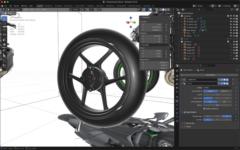
Houdini engine for unreal unreal material
After about a week of digging through scattered documentation and conflicting information, I finally figured out something embarrassingly simple: the “Unreal Material” node in Houdini’s Tab menu is just a pre-configured Attribute Create node. It generates a string attribute that Unreal recognizes for material assignment. Once you set this up in your HDA and import it into Unreal Engine, you can assign or change the material by entering its path into the exposed string parameter. A whole week for something this basic. Lesson learned: sometimes the simplest things are the hardest to find clear answers on. On a related note, I also used Attribute Wrangle with VEX to generate an ARM (AO/Roughness/Metallic) texture, but I haven’t figured out how to bring that into Unreal Engine yet — that’s my next challenge.
0
0

May '24 •
👉 START HERE
Hey, Welcome to our Plasticity Community🚀 It would be amazing to see, how your setup is looking and in which environment you are using Plasticity. Feel free to introduce yourself by doing the following: 👉 Step 1: Post a picture of your setup 👉 Step 2. Write a thing or two about the essential tools that you can't without:) 🛠️ My setup (May/24) Laptop: MacBook 16" M1 after 27 years of using Windows lol iPad: It's the extension of my brain. I literally write every day, everything that comes into my mind. Strategy, systems, ideas, business, thoughts, journaling, everything... Classic Moleskine Notebook: That's my whole to-do list which I am writing every evening for the next day. I like to keep things simple in business and not to use too many tools. Graphics tablet: For ANY creative or graphical work I prefer to use a pen tablet as I am much more comfy with a "pen" than a mouse for creative tasks. Plant: To keep the environment a bit more friendly as I am working every day all-day basically. It's very minimalistic and nothing fancy, as I am traveling constantly and live in different countries (it's the 6th country I have been living in in the last 3,5 years. So I try to keep everything to the essentials and not expand to much.

2 likes • Jul 7
My Creative Gear & Setup Main Workstation: Mac Studio (M4 Max, 128GB RAM, 2TB SSD) Laptop: MacBook Air (M1, 16GB RAM, 500GB SSD) Tablet: iPad Pro (M2) Display: Dell UltraSharp 27 4K Thunderbolt Hub Monitor (U2725QE) Keyboard: Apple Magic Keyboard with Touch ID Mouse: Logitech MX Master 4 Software: Apple Logic Pro, SideFX Houdini, etc. Featured Tools Mac Studio (M4 Max with 128GB RAM) The centerpiece of my setup is the Mac Studio. I am currently focusing on learning Houdini for 3D creation, which involves complex procedural workflows and heavy simulations. To handle these demanding tasks efficiently without any bottlenecks, having 128GB of memory is absolutely essential. It provides the seamless performance required for my creative growth. Apple Magic Keyboard (with Touch ID) Another indispensable tool in my daily workflow is the Magic Keyboard. The built-in Touch ID is incredibly convenient. It allows me to log in instantly, autofill passwords, and authorize system changes securely with just a quick touch of my finger, keeping my workflow smooth and uninterrupted.
1-2 of 2