Activity
Mon
Wed
Fri
Sun
Jan
Feb
Mar
Apr
May
Jun
Jul
Aug
Sep
Oct
Nov
Dec
What is this?
Less
More
Memberships
Learn Power Apps
2.5k members • Free
Power Apps Templates
128 members • $25/m
The Microsoft Stack
108 members • Free
26 contributions to Learn Power Apps

Jun 4 •
Community Meeting! Vote on what times are best for you!
Let's meet and talk about anything you guys would like to bring up! Here are my ideas: - Plans for a new web site - Talk about a migration roadmap (moving to a new platform...off of whop / should we stick with Skool or not?) - How can I make this a better community for you guys? - I need input from you! - Roadmap for content creation - Do you guys miss the live streams on Saturday mornings or not? - Power Apps how to questions Everyone is invited, but I'll prioritize questions/answers by membership status: - Insider group members - Anyone/everyone - (Accelerator Students already have a chance to meet with me several times a week) There's a good chance I'll make this a reoccurring thing. Perhaps not every week, but at least once or twice a month. https://calendly.com/d/cszy-8py-kqm/insider-s-group-virtual-meeting


1 like • Jun 5
On which platform is the Power Apps Template material now located? Yes! The Saturday morning live streams were great. But during the summer months I'd miss the live stream and watch them at night.
Mar 24 •
March 24th (today) Update: New platform & Template Meeting Today!
I've made a lot of progress on a new beefy linux server to host... - Virtual Classroom Software | BigBlueButton - Home | Moodle.org - https://coolify.io/ (what is coolify??) #️⃣ COOLIFY! Something new and exciting, is that because I've invested into virtual private servers (VPS) is that I can run Coolify and provide insider and accelerator members with accounts where they can hold stuff on (for their personal use)! (think about using AI or other apps freely) ➡️ https://coolify.io/#features ⬅️. I'm always looking for more ways I can provide value for you guys! 4️⃣pm EST today! We will have a group call on the template building. Email us at support@superpowerlabs.co if you don't have the zoom link (those who are insider members and accelerator students). If anyone reading this is waiting on me or my staff to get back to you on anything, please send us an email (today or any day) at support@superpowerlabs.co as a follow-up. I'm juggling many things like setting up the Linux server, preparing for today's 4pm, and the Mastering Coding 6-week Power Fx Course ...so please and thank you for bearing with me. 😅😅💟💟 If you didn't see it before, check out this thread: https://www.skool.com/learn-power-apps-9036/i-resumed-this-skool-community-for-another-month

0 likes • Mar 26
Is "Power App Templates" an "insider" group?
Dec '24 •
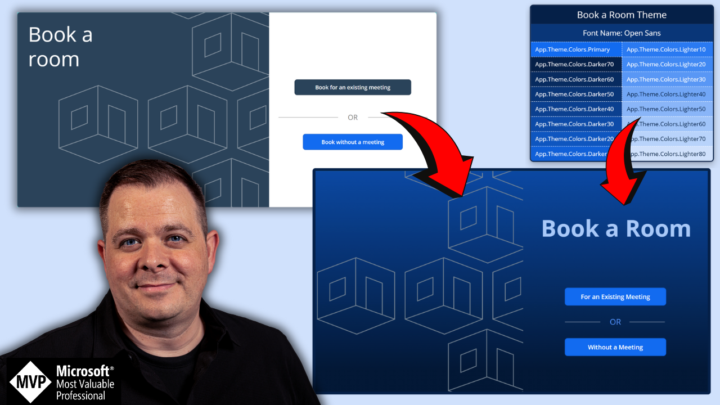
Today's Workshop: Remastering Microsoft's Templates
- Today at 1pm EST - If you don't have access yet, go here: https://whop.com/super-power-labs/ - Don't miss out! It's always better live, so you can get all your questions answered! Please let us know in the comments what topics you'd like for future workshops! 😊👍
2 likes • Dec '24
YouTube?
Nov '24 •
Shutting this down by December 9th - Join the New One!
We are moving to a much more feature rich community! Join now before we shut this one down! If you have any concerns, you may comment below, or email us at support@superpowerlabs.co 📨 🔴 UPDATE 4:10pm EST -- I just want to reassure everyone you will still have access to anything/everything you've purchased in the past. I'll be sure to have everything in Whop before the cut off date. If you're upset about any of the details or have concerns, just email us at support@superpowerlabs.co and we'll make sure you're taken care of. ➡️ Call to Action: ============================= 1. At least click on the 1st link down below which is 100% FREE. 🆓 2. Comment below! 😋👍 ➡️ Why are we moving? ============================= - Skool costs us $500 every month. - I've created separate Skool communities for different purposes and based on the limitations of Skool. It gets complex and confusing having material spread out all over the place. Each of these communities costs me $99 a month. - Even though I have a lot of content and offerings, the structure needs to be simple and straight forward for you guys. - With the new features in Whop, I can serve you guys better and more efficiently. - Don't worry: if you purchased anything, you will retain access to it, but please join the free option below. ➡️ Stay in by clicking on these links: ============================= 1. FREE - https://whop.com/learn-power-apps/ 2. Insiders Group - https://whop.com/super-power-labs/ (50% off Black Friday Deal) 3. Accelerator Program - https://whop.com/power-performance-accelerator/ (join the waiting list if you're interested) ➡️ Black Friday Offer - 50% OFF ============================= - Limited-time offer lasts until December 3rd at midnight! Normal price is $97/mo. - Discounted price is $47/mo. - Promo Code: ➡️ black_friday_2024 ⬅️ - https://whop.com/checkout/plan_yNLZQnjHdiBP9?d2c=true
1 like • Nov '24
🙁

Nov '24 •
How to set displayMode of a button based on a condition that loops through gallery content
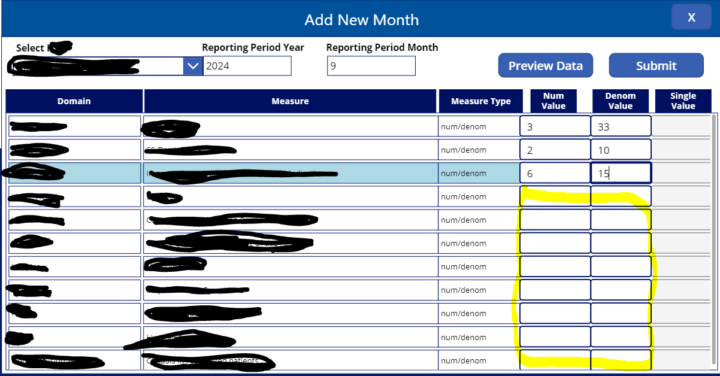
I wanted to ask if anybody had an example of how to do this in PowerApps. I have an App that collects data through a gallery with a couple of text input fields. The 'Submit' button needs to be in disabled mode until user has filled all the text input fields in the gallery. At that point, when all text input fields are filled, the 'Submit' button should be in Edit mode until user removes some data and leave input fields empty. How can I loop through the collection behand the gallery each time a user enters or removes data from each input field to see if there are any empty cells and then change the DisplayMode of the button accordingly?
2 likes • Nov '24
Hi @Ervina R , You might check that each text box is not empty with an if statement in the submit button's DisplayMode property. If( (!IsBlank(txtNumValue.Text) && !IsBlank(txtDenomValue.Text)), DisplayMode.Edit, DisplayMode.Disabled )
1-10 of 26

Active 84d ago
Joined Jun 27, 2023
Braintree, MA USA
Powered by