Activity
Mon
Wed
Fri
Sun
Feb
Mar
Apr
May
Jun
Jul
Aug
Sep
Oct
Nov
Dec
Jan
What is this?
Less
More
Memberships
Level Up Guild
1.1k members • Free
Amplify Elite
471 members • Free
Creator Profits
17.1k members • Free
Resolve School
127 members • Free
Amplify Views
27.9k members • Free
The 5- Hour YouTuber Community
946 members • Free
1 contribution to Resolve School

Nov '25 •
A tiny Fusion thing that clears up a lot of confusion
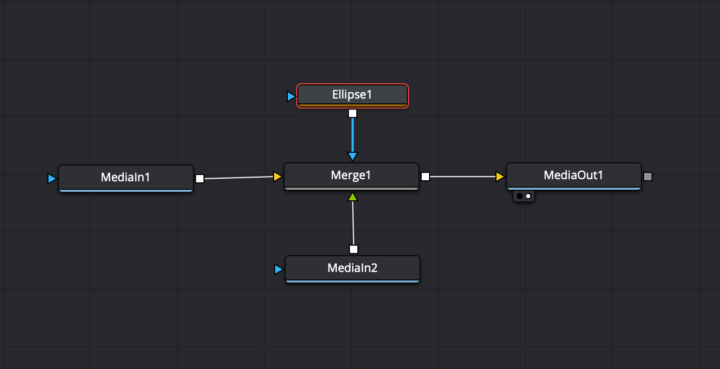
Shoutout to @Tobi Bambida for sparking this one. He posted a screenshot from Fusion and mentioned having trouble getting his circle pop animation to actually show up when connecting nodes to Merge and MediaOut. That is one of the most common Fusion roadblocks, and it almost always comes down to one tiny rule. In Fusion, every Merge has two sides. Yellow is your background, green is your foreground. If something disappears, clips behind something else, or refuses to show in MediaOut, it is usually plugged into the wrong side. A super quick checklist ✅ Background goes into the yellow input. ✅ The thing you want on top goes into the green input. ✅ Make sure the chain flows left to right into MediaOut. ✅ Preview the Merge node in the viewer, not just the individual nodes. This alone clears up a lot of those early Fusion headaches. If anyone else is running into weird Fusion behavior, toss a screenshot in the comments. Happy to help break it down.

1 like • Nov '25
[attachment]
1-1 of 1

@imtiaz-khan-1899
Hello there!
I started doing YouTube- well to overcome my introvert nature!
Planning to do vlogs once we hit scale.🤞
https://www.youtube.com/@ImtiKai
Active 7h ago
Joined Nov 26, 2025
INTP