Activity
Mon
Wed
Fri
Sun
Jul
Aug
Sep
Oct
Nov
Dec
Jan
Feb
Mar
Apr
May
What is this?
Less
More
Memberships
Chase AI Community
66.6k members • Free
2DAnimation101
693 members • $9/month
Creative 3D Community
6.8k members • Free
77 contributions to 2DAnimation101
21d •
Daria Leaves Home
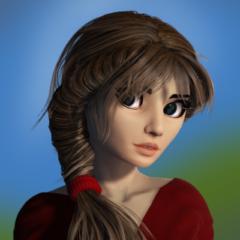
I started writing a novel long ago and enjoyed it, but didn't finish it - yet-. Let's see what happens when it becomes a video. I started with this scene because I could figure out how to do it :)


1 like • 17d
@Divinia-Ann Howe I agree, @Helene J what is the artstyle used or was it some of your own work?

20d •
Important Poll for AI Animation Masterclass
Big question for you. I need your honest vote. I’m at a crossroads with what to build next, and I want YOU to be the one who decides. Here are your two options: - Option A: Videos first, software second: I keep building out the weekly video lessons on schedule. You can see exactly what’s coming by clicking the curriculum link below. New modules drop consistently, you follow the step-by-step process, and we build the pipeline together lesson by lesson. - Option B: Software first, videos second: Instead of learning how to do each technique, you get a tool that does the technique for you, powered by AI. Here is what the software would include: - Brainstorm story ideas fast - Develop character psychology to build interesting characters quickly - Write and fix scripts line by line with AI assistance - Design characters with an integrated image generator - Build full storyboards shot by shot - Fix any shot to adjust camera angle or character position - Manually fix any panel with a built-in Photoshop-like editor - Put clips together with an online video editor - Advanced cinematography controls when generating your images, including: ∙ Close up ∙ Medium close up ∙ Full shot ∙ Over the shoulder ∙ Low angle / high angle ∙ Frontal, side, and 3-quarter view And this one is my favorite. - An AI coach assistant, available 24/7, powered by Claude. This is not a generic chatbot. It will have access to everything the video lessons are supposed to teach you. So instead of waiting for the next module, you ask a question, and you get the exact answer you need, right now, for your specific situation. Now here is something important regardless of which option wins. Whenever we start building the software, everyone in this community gets unlimited FREE credits for image generation and the AI chat assistant while we are in development. That is a gift from me to you for being here early. Video generation is more expensive to run, so that part will require a small pay-as-you-go investment when the time comes.
Poll
36 members have voted
2 likes • 19d
Software first is clearly the option you've put the most effort into selling above so that's the one you want to be doing. As it's your course, that's probably the direction you should go. 🤷🏻♂️
1 like • 18d
@Mark Diaz OK swap the word selling for the phrase "enthusiastic about". That's what I meant. 😁 I think there's room for a bit of both, a good tool is only as good as the understanding if its usage and the documentation accompanying it. The video course format is still a good way of passing that information on. Though good text documentation is also fine for me, but many won't make the effort to read it or can't understand things as week in that format. Plus you're a really great presenter on video, it's hard to carry that to another format.
May 1 •
I built a shot compositor and other tools 😮
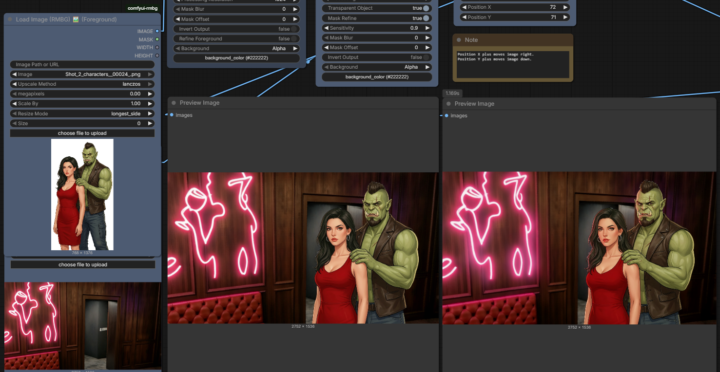
I did start working on the shots for the storyboard and I found Nano Banana 2 suddenly started producing different results. Same seed and everything from the previous session as it was saved, but a different output, now with some background changes. 🤦♂️ They must have changed something again. So I decided to go through and build more controlable tools to stablize my workflow. I've already got a tool to fix up the Marble images, but I noticed their screenshots come out in a weird 1598x910 resolution, NEARLY 16/9 but not quite. It does not care if you are running on a 21:9 monitor or running fullscreen either, you're still getting that output. So I built a simple tool to take those images and match them to the Nano Banana 2 2MP sizing, which is an equally weird 2752x1536 (actually this is really 4MP 🤷♂️) and I'm standardizing everything on that for now. That was a quick one. The mask tool workflow I built last week worked quite well but I found myself going out to other image editors to tweak, which is fine, I'll still use it where it makes sense. NB2 still follows the prompts for character positioning and retains the best likeness compared to Flux 2 Klein. I tried cutting NB2 out of the loop but can't get there right now with Klein so I'm doing the characters seperately in NB2 then popping them into my compositor. The compositor has a load more elements off to the side but the screenshot would be silly looking so here I've lumped the staged outputs into one window. With this I can add characters (or props I suppose), size and position them against the background then when I'm happy with the screenspace composition I activate the second part of the workflow and it sinks them into the scene adding lighting and shadows where appropriate. Left is traditional image editing part, the right is the re-lit output.
3 likes • 26d
@Michel Diamantis Of course. The channel is Pixaroma. I'd tried a few different ones previously and they just weren't explained well, plus he gives out free workflows shown in the videos. This is the current course, there is an older series which is probably out of date now. https://www.youtube.com/playlist?list=PL-pohOSaL8P-FhSw1Iwf0pBGzXdtv4DZC
1 like • 21d
@Helene J Yeah that can be tricky. This course has an accompanying Easy installer though, I'd recommend starting from scratch with that and then just copying any models and workflows over from your old one if you still want them. While I'm not using the Easy install option myself, I did try it alongside and will probably move onto that at some point.
27d •
Exciting NEWS for AI ANIMATION MASTERCLASS - Image Generator Coming Soon!
Right now I'm working on the early prototype of the image generator. Right now it's still very buggy but at least it started creating images using NanoBanana Pro and NanoBana 2. I'm trying to add a couple of features that I have not seen in the other engines. The one that I'm most interested in is in being able to edit the images with Photopea right there in the interface (which is basically Photoshop but online, and without the AI), and also be able to select areas and ask for adjustments using any AI model like Nano Banana Pro, SeedDream, or any image generator of your preference. And for those of you in the AI Animation Masterclass, can test the super early prototype right now, if you are interested, send me a DM. After this is polished, and improved, will have unlimited image creations for 6 months, just to make it up for the delays in the training. -- Again pivoting from just creating another online course and instead create an online software that guides you to animate any AI Shortfilm step by step, I believe becomes much more powerful. We are also learning a lot in the freelance project we're doing for the video game FreeFire (disclaimer - this is not our trailer, this is from the game just for context), and all the process we do, for visualization, storyboarding, color grading, etc, is something we want to include in this online software. Right now it's still not ready for early testers but I plan to have something solid next week.

2 likes • 26d
Hey @Mark Diaz I'd like to have a look at it, see what you're doing. Obviously I'm building my own so I'm not going to be hammering the credits on it, I'm just super interested. :D
May 3 •
Hybrid Cartoon Animator 5 + AI tools
Hi, all - here's my latest, again combining CA5 with AI elements. The first story (Movie Theater Rules) is the most recent one. In this one, the interior theater lobby background started as a stock image with no characters. I edited the image a bit in AI to suit my needs, then had Seedance animate the characters in the background. I made some additional adjustments in Photoshop and Final Cut Pro, then pulled the video into CA5 as a prop and made it the background of the scene. The blue monster's flying popcorn was also animated in AI. I had the image of the popcorn bucket, and I created the first frame of the animation with a green background. Then I had Seedance animate the popcorn flying out of the bucket and all across the frame. That took multiple tries - the popcorn bucket and the camera had to remain stationary, but AI kept moving them. The flying popcorn scene was a bit trickier. I did the animation of the characters in CA5 and placed the AI popcorn animation on the Z axis so that it lined up with the blue monster's position. So Officer Bob and the first row of seats were in front of the flying popcorn, then I had the popcorn animation with the green screen background, then everything else behind it. I output just the Bob/front row/popcorn layers as one video. Then I turned off those layers and output the scene again with only the background layers. In Final Cut Pro I layered the two outputs, and applied the chromakey (green screen) filter so the green background disappeared and Bob and the first row of seats were in front of the popcorn, and everything else was behind the popcorn, creating the illusion I was going for. Later in the video, we actually see the movie that the characters are watching, and those clips were done entirely in AI... the dancing dinos/bunny and the pirate ship scene. I inserted them into the movie theater frame using green screen again.
3 likes • 27d
Brilliant, that worked really well. I could not tell which bits were and which weren't.
1-10 of 77
Active 13h ago
Joined Jan 30, 2026
Powered by