Activity
Mon
Wed
Fri
Sun
Aug
Sep
Oct
Nov
Dec
Jan
Feb
Mar
Apr
May
Jun
Jul
What is this?
Less
More
Memberships
SOLIDWORKS Accelerator
2.3k members • Free
6 contributions to SOLIDWORKS Accelerator

Dec '24 •
🟢Fun Challenge: Winner Gets SCP or GCP for Free (Your choice)🎊
I have made over 100 tutorials in the library of SCP (SolidWorks Course Pro) and 10 of them are included in this forum. Sadly I see some of my tutorials are already going around the internet claimed by others. I am looking for a person that can turn these 10 tutorials into a video like below (attached) 🔥Game conditions: 🟢The FIRST person who can turn the first tutorial like the video and send it to me, get's my attention. You need to make the video STYLE different (new style). If I confirm your style,... 🟢🟢You can continue with the rest 9 tutorials. 🟢🟢🟢Whoever finishes these 10 tutorials, get's SCP (full course) for free. @Jesse Davis @Jn Barbacena @Naval Kishore Singal @Riki Alexander @Rommel Dave Tejano @Emmmanuel Uwayo @Troy Williams Gelobter @Xander Steyn


1 like • Feb '25
Is this challenge still active?

Feb '25 •
The Game 2025-02 Level 1
[EDIT - 2025 Feb 23] LEVEL 2 has started! Click here to check it out. We are finished Level 1! Please see the PDF "Debrief" file attached to this message, and down below. Thank you everyone for the great participation this time! I just need to do the drawing for Level 2 and it will be up very shortly. [[ Current level is open to anyone whose forum level is 1-3 ]] Welcome back to the game everyone! I am going to try to start out with a more straighforward model for level 1 this time. Please give it a try! When we have a few submissions, we will take a look at all the different approaches and then move on to a slightly more interesting level 2. Upload your screenshots and part files in this thread. Comments and questions are welcome. When we close the level I will post whatever we have found the "best" solution is, incorporating everybody's different appraoaches. =============================== NOTE 1: for SW2025 users; I only have the 2024 version, so if you want me to review your .SLDPRT file, please make a version for 2024 using File >> Save As... before uploading NOTE 2: for Maker's version users; I am sorry but I don't have Maker's version. I am not sure If @Aryan Fallahi has it or not but I hear that he is off to the USA this month to attend a conference. I wish I could give a better answer for you, but maybe you can post STEP files? ASSIGNMENT BELOW (or PDF file is attached to this message) =============================== From: ned.oran.goody@fallahi.net To: lowlevelers@fallahi.net Subject: URGENT NEW CLAMP DESIGN NEEDED Despite being more than a week behind schedule on the last project, it seems the client was happy enough with your drilled aluminum fascia plate design that they have decided to hire us for their next project.

2 likes • Feb '25
I am joining the game. My model was made a bit differently from the others, i.e. the tree is longer. I achieved the required weight. I used global variables for the thickness of the rods, tolerance, pin thickness, and the distance between the rods. Regarding the missing dimension, I first determined the material density and the missing weight, and then the width (X) of the 140x65xX cube. After finishing everything, I read that you published this dimension. :)
Jan '25 •
Level 3 Tutorial Posted! - The Game 2025-01
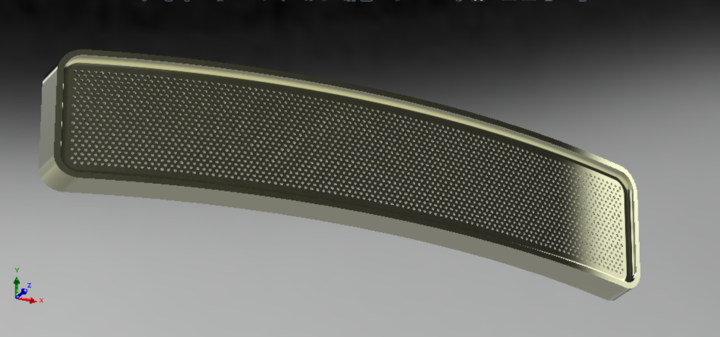
THE NEXT GAME HAS STARTED! CLICK HERE TO GO PLAY!!! [EDIT (final) Feb 11] All done 💯 I have added a tutorial file in PDF for anyone who wants to try this. It took me a looooong time and it is the first time I have ever done a full tutorial so please give it a try and let me know what you think. I added the PDF to this post and it is down in the replies as well. [EDIT Feb 05] Okay we are pretty much done. Just waiting on me to write up the results and post them here. I am slow though, so please go ahead and keep trying it if you like. For anyone who is all finished, - have you tried making one with hundreds of holes, like speaker grille? - How could you parametrically link the size of the holes to the number of holes, so that they always adjust to fit without destroying the structure? The answers to all your questions .... Soon™ [EDIT Feb 02] After Aryan posted his submission I found a couple more problems with the drawing and my actual master file (big surprise 😬) so I have updated the drawing with some scribbles. Should not change too much but if i caused anyone pain im terribly sorry. [EDIT - I think this will be the last level for this model, as I have ideas for different ones already, so EVERYone give it a try if you want. What is a master's way? ] Shouting out the recent forum illuminati to come drop some knowledge @Eric Nadeau @Duff Emediong @Naval Kishore Singal @David Roy @Zacharias Kourelis @Romit Makwana @Jn Barbacena @Sohaib Ahmed @Jonathan Florez , and of course @Avito Lourenco and @Aryan Fallahi
3 likes • Jan '25
Here is my attempt. I managed to align the number of holes and bend the model using flex features. However, the side faces are not vertical as required in the provided technical drawing, and the rebuild time is high. Work in Progress!

Jan '25 •
3DConnexion Mouse Pro Set up
Been using it for 3 months, I kinda like it but find it hard to customize the buttons. I would prefer to have the further right button to rotate my part and have the middle button assing the same fiunction as the regular right button on a regular 2 button mouse. I cannot find the way to do that... Is this possible and how?
2 likes • Jan '25
Hi @Eric Nadeau If I understood correctly, you're using a regular mouse (first picture), not a SpaceMouse (from second pic). Have you tried using the original application? You can download it from their website. If that doesn’t work, I recommend X-Mouse Button Control. I customized my mouse (it’s not a 3DConnexion, just a random one) using this application.
Jan '25 •
[Completed] Level 2 - I want to play a game
Okay well Level 3 has been up for a minute. I know @Drago Račić has been working on it already. I will post a debrief of lvl2 here in the thread soon. Level 1 of The Game went pretty well for a first attempt. Our hero @Xander Steyn stepped up and hit the ball outta the park. But he was the only one!! Anyway I am not sure about these strict rules forum level limiting who participates, so even if the spirit of the rules still exist, I am gonna open this level to anyone who wants to try... so long as you think it is interesting or challenging. On the other hand If you see this model and think it will be super easy, then hold back for now and you can flex on us in the next level.
![[Completed] Level 2 - I want to play a game](https://assets.skool.com/f/121564c9cfc34f85b5370b5d9fc0dffe/b8a8d950662d4192bba4b326de5ba2477986335d548e4b158a8be525994ebc21-md.png)
1 like • Jan '25
After a few days' break from this project, I'm back. Checking the Geometry Pattern option when using Linear Pattern has given excellent results in reducing rebuild time. Also, I managed to create the model using the Sweep option, but I noticed that multiple separate surfaces appear if I don't check the Merge Tangent Faces option. However, if I do check it, the rebuild time increases from 0.08s to 0.24s. I’m attaching the new model.
1 like • Jan '25
@Jesse Davis Original attempt was same like on your machine 0.28s. Definitely slow. But when I applied different options, the rebuild time improved. I also noticed that if I use global variables for height and width and define the initial rectangle using them, the overall rebuild time decreases.
1-6 of 6

Active 269d ago
Joined Jan 15, 2025
Powered by