
Write something

Nov '25 •
Here are some API resources to use with any agent/project you need!
Quick resource drop! If you're using Claude, ChatGPT, or any other AI to help build workflows, you've probably noticed they hallucinate API endpoints, make up node configurations, or confidently give you code that doesn't work. The simple fix I found is to provide them with the actual markdown files for all API documentation for whatever program you are using! I've compiled markdown files for three of the common tools I use: - Shopify API –– GraphQL and REST patterns, bulk operations, and pagination - n8n —– Node configurations, expressions, workflow patterns - Salesforce REST API —– Authentication, SOQL queries, object operations If you upload the relevant file to your conversation before asking for help, the difference was night and day for me. Grab what you need and let me know if there are other APIs you'd want documented.
1
0
Nov '25 •
Shopify's n8n Nodes vs. HTTP Requests: Why I Build It Myself
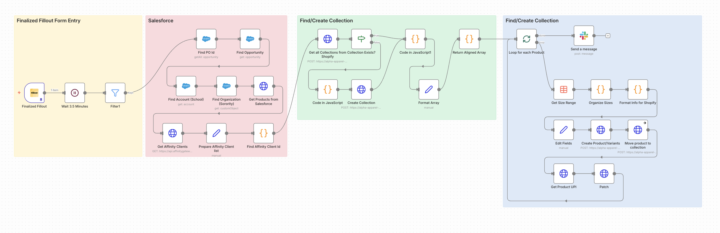
If you've used n8n's built-in Shopify nodes, you've probably hit the same wall I did! They work great for basic stuff like grabbing an order or updating inventory. But the moment I needed to created a product with multiple variants & variant images, set metafields, or dynamically assign the product to a collection, I was stuck. The alternative is HTTP Request nodes with Shopify's REST or GraphQL API. For beginners it can be scary, but I found a great workaround solution to learn and solve the issues you need to. 1. Visit the shopify API docs (https://shopify.dev/docs/api) 2. Open a Claude conversation or similar LLM. 3. Begin to talk to about the problem you need solved, and take the findings and use them to chat with the built-in shopify api expert agent. It knows more than your LLM will ever know about how to set this kind of thing up. 4. Slowly iterate and learn and build your steps! Here is an example of a workflow that provides real value and saves about 25 minutes of work per run. It takes a form submission, pulls product info from Salesforce, and automatically creates fully-configured Shopify products — complete with size variants, images, pricing, and collection assignment. All through HTTP nodes, all reliable. If you want to see how to structure Shopify API calls in n8n without losing your mind, this is a good place to start.

Nov '25 •
5 Pillars of Exceptional User Experience
Great UX isn't just a bonus feature—it’s the foundation of a successful digital product. If you are looking to elevate your site's performance, start with these five non-negotiables: 📱 Adopt a Mobile-First Mindset: Don't just retro-fit desktop sites for phones. Design for the smallest screen first to ensure essential content is prioritized. ⚡ Optimize for Speed: Attention spans are short. Ensure your load times are lightning-fast to reduce bounce rates. 🧭 Streamline Navigation: If users can't find it, it doesn't exist. Keep menus intuitive and the user journey logical. 🎨 Maintain Consistency: Use consistent typography, color palettes, and spacing to build trust and brand recognition. ♿ Design for Accessibility: The web is for everyone. Ensure your site is navigable and readable for users with disabilities (contrast, screen readers, keyboard nav).
1-3 of 3
powered by

skool.com/vowel-automation-tools-2807
Building automations that connect tools and eliminate repetitive work. For anyone who'd rather grow their business than drown in manual tasks.
Suggested communities
Powered by