
Write something
Pinned

Jun 11 •
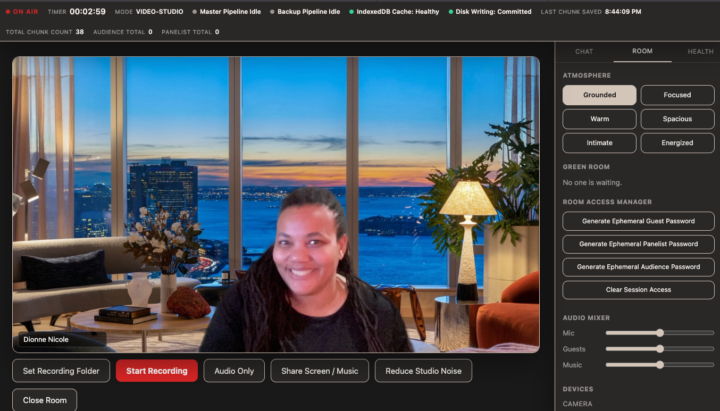
I built a Zoom-replacement with Claude Fable
This week for my Fable use case, I decided to build my own recording studio that was local to my computer. Why? 1) I wanted to see what was possible. 2) I have 60 more podcast episodes to make, and I didn't want to pay for Zoom or other podcast recording software every month. Now I can record audio only, video chats or even do a webinar. FOR ZERO DOLLARS. The files save locally on my computer. I spent 80% of my time (like I recommend) planning it out with Gemini (for the tech aspects) and my Vibe Thinking GPT for the user experience. When I brought it to Fable? It was built in 7 minutes and saved soooo many tokens! Take advantage of a two-week trial period window until June 22nd to try it with your Claude Pro ($20/m) account. Our next live class is happening Friday, 6/11 at 12pm EST and I will be going over my build! And doing on the spot Q&A! Other time zones: 1:00 AM CST (Chicago), 9:00 AM PST (Los Angeles), 5:00 PM GMT/UTC (London) And always remember, even though the community is going to be archived for now, you can always reach out for a 1:1 to go over your build.
Pinned
Jun 4 •
Let's populate the community together!
DROP YOUR QUESTIONS & NEEDS BELOW ⬇️⬇️⬇️ I want to give you as many resources as possible so that you have access even after the community archives. This is the thread to literally tell me what you want to know and I will create tutorial walkthrough videos or posts and organize classrooms for you. I'm just not going to pre-build anything unless it's something someone really wants to know. So drop it below ⬇️⬇️⬇️ NO QUESTION IS TOO SMALL OR STUPID OR BEGINNER. I genuinely want to know what is preventing you from either getting started or building your app in confidence, and we will get you what you need so it's here as a resource. Heads up: I'm going to populate the community with A LOT before the official end date of June 16, 2026 so if you follow me, go ahead and stop so you won't get annoyed, lol. Don't say I didn't warn you. You can hover my face and click UNFOLLOW or visit https://www.skool.com/@dionnenicole
Jun 12 •
My Self-Hosted Tool: Vimeo Audio Extractor
What Claude and I built: Vimeo Audio Extractor A web tool that takes any public Vimeo video — either by direct link or by pasting a webpage that has a Vimeo video embedded on it — and downloads the audio as an MP3 file. The problem it solves If you have video content on Vimeo and you want the audio — for a podcast, a transcript, repurposing content — there's no native way to do that. You'd normally need a paid tool, a sketchy website, or a technical workaround. This eliminates all of that. How it works (non-technical) 1. You paste a URL into the tool 2. It detects whether that's a direct Vimeo link or a webpage with a Vimeo video embedded on it 3. If it finds one video, it goes straight to extraction. If it finds multiple, it shows you a list to pick from 4. It pulls the audio track from the video and hands it back to you as a downloadable MP3 How it works (technical) Three layers: - Frontend — a clean single-page HTML app. No frameworks, no dependencies. Just a URL input, smart detection logic, and a download button. - Backend — a Node.js Express server with two endpoints. /api/detect fetches the page HTML and scans it for Vimeo video IDs using pattern matching. /api/extract runs yt-dlp — an open source audio/video extraction tool — converts the output to MP3, and streams it back to the browser. - Infrastructure — deployed on Railway, a cloud hosting platform. The key reason Railway over alternatives: no timeout limit. Extracting audio from a video can take 20–30 seconds, which kills free-tier serverless platforms like Vercel. Railway runs a persistent server with no cutoff. What makes it a micro app It does exactly one thing. No login. No database. No subscription. You paste a link, you get a file. The entire project is five files. The build progression It went through three iterations in one session: 1. First pass — browser-only prototype using a third-party API (Cobalt). Fast to build, fragile to depend on. 2. Second pass — self-hosted Railway version with a real backend. Owned infrastructure, no third-party dependency. 3. Third pass — added smart URL detection so the tool accepts both direct Vimeo links and any webpage with an embedded video. One video auto-extracts, multiple videos shows a picker.
4
0
Jun 11 •
What is Claude's Fable all about?
What is the Claude Fable Drop? - Anthropic just launched Claude Fable 5, their newest 5th-generation "Mythos-class" frontier model designed to tackle incredibly complex, multi-day, and asynchronous tasks. - It represents a massive leap in AI capabilities, featuring an expansive 1-million-token context window and advanced adaptive thinking for highly ambitious projects. - Built with a focus on deep logic and autonomy, Fable 5 can act as an agent that plans across multiple stages, writes its own tests, and uses advanced vision to check its own work. How it is "Free" Until June 22 - To celebrate the launch while managing server capacity, Anthropic has included Fable 5 in all Pro, Max, Team, and seat-based Enterprise subscriptions at no extra cost from now through June 22, 2026. - On June 23, Fable 5 will be temporarily removed from standard subscription tiers and will require pay-as-you-go usage credits due to the massive compute power it demands. - This two-week window is essentially an exclusive, built-in "free trial" for subscribers to test drive Anthropic's most expensive and powerful model before it transitions to consumption-based pricing. Why People Should Give it a Whirl - Unprecedented Autonomy: It is a major breakthrough for "vibe-coding" and multi-step analytics, allowing you to hand off massive, complex projects and simply review the completed, self-tested output. - Massive Performance Jumps: Early benchmarks show Fable 5 completely outperforming older models like Opus 4.8, shattering records on complex coding, finance, and physics research tasks. - A Sneak Peek at the Future: Testing it right now lets you experience true next-level, long-horizon AI agent workflows for free before it becomes a premium, metered feature.
Jun 11 •
how to find ".claude" on desktop
To find the .claude folder (which stores your local settings and custom skills for Claude Code) on your desktop, you need to reveal hidden files on your system. On MacOS 1. Open Finder. 2. Press Command + Shift + Period (.) on your keyboard to instantly toggle hidden files on or off. 3. Navigate to your Home directory (your user folder). 4. You will now see the .claude folder. (Alternatively, in any Finder window, press Command + Shift + G, type ~/.claude, and hit Return). On Windows 1. Open File Explorer. 2. Click the View tab at the top of the window. 3. Click Show (or look for the Show/hide option) and check the box for Hidden items. 4. Navigate to C:\Users\[YourUsername]. 5. You will now see the .claude folder.
1-28 of 28
powered by

skool.com/vibe-code-on-the-cheap-6934
Build your own apps w/ Claude Code, Codex + Lovable. Solve your exact friction, save tokens, and run them forever for $0. Use SEARCH BAR for help.
Suggested communities
Powered by