
Write something

May 25 •
Gobos: the Most Underrated Tool in a Lighting Tech’s Kit
Most new techs don’t know what gobos are, let alone how to use them. Once you understand what gobos do — and how to use them well — they become a valuable resource for creating a fantastic room look. What Is a Gobo, Actually? A gobo is a thin metal or glass disc that slots inside an ellipsoidal fixture (also called a Leko or profile spot). It sits between the lamp and the lens, and light passes through the cutout pattern in the disc to project that shape onto a surface. Metal gobos are punched or etched — geometric patterns, foliage, abstract textures, window frames. Glass gobos are photographically produced and can carry full colour and fine detail. They’re more fragile and more expensive, but the image quality is in a different league. The basic concept is simple. The craft is in the execution. How the Optics Work Ellipsoidals have a focus barrel — a sliding lens system you adjust to sharpen or soften the projected image. Push it toward a hard focus and the gobo pattern comes in crisp and defined. Pull it the other way and the edges bloom and soften. Neither is wrong — they’re creative choices. A sharp window pattern on a cyc looks architectural. A soft leaf texture washing over a stage looks organic. Two other things affect how big the projection ends up: throw distance (how far the fixture is from the surface) and the fixture’s lens focal length. Longer throw means a bigger image. If you need a gobo to land at a specific size in a specific spot, look up your fixture’s beam angle specs and do the math before load-in. Surprises at focus time cost everyone. Static vs. Rotating Gobos On a conventional ellipsoidal, the gobo sits still. Drop it in, focus it, done. Moving head fixtures are different. Many have two gobo wheels — one static, one where each gobo can spin independently. Slow rotation gives you a hypnotic ambient look. Fast rotation breaks up into something almost stroboscopic. Some fixtures let you lock the gobo at a precise angle, which matters when you’re trying to line up a pattern across multiple fixtures.
0
0
Mar 15 •
Dip Switches on Dimmers and Controllers
Solved this issue the other day on a job site and thought it would make a good post! Dip Switches are a series of tiny binary switches numbered 1-9 that can be switched ‘on’ or ‘off’. They have different functions on different devices. Sometimes they indicate the radio frequency the device uses to operate - for example, perfect cues. In the case of Dimmers, they determine the starting address of the dimmer. - For example, if you have 1 ON and the rest OFF, on a 4 channel dimmer, channel 1 will be address 1, channel 2 will be address 2, channel 3 - address 3, and channel 4 - address 4. - If you have a additional dimmers, you could set the dip switches such that the dimmer channels will be addresses 5-8, 9-12, etc. Similarly, for analog lighting controllers, dip switches determine the starting address of the faders. - For example, if you have 1 ON and the rest OFF, fader 1 will control channel 1 of the fixture assigned to address 1. Hope that clears up some confusion and helps troubleshoot “issues” that you may encounter in your lighting setups. Often the “fix” is as simple as flicking a switch to the correct setting for your desired outcome!
0
0
Feb 19 •
Presets, Cues, Cue Stacks/Lists, Sequences, and Executors
These terms are most commonly used in professional lighting consoles such as those from MA Lighting (e.g., grandMA3) and ETC (e.g., Eos). The exact terminology varies slightly by brand, but the core concepts are similar. Here’s a clear breakdown of each term and how they relate to each other: 1. Presets Building blocks (raw ingredients). A preset stores a specific value for one parameter (or a group of related parameters) that you can reuse. Examples: - A specific red color - A pan/tilt position called “Downstage Center” - A gobo selection - A beam look Instead of recreating values every time, you reference the preset. If you update the preset, every cue using it updates too (if stored by reference). Think of presets like: 🎨 Paint colors in a palette 2. Cues A snapshot of the stage at one moment in time. A cue stores the state of fixtures (intensity, color, position, etc.) plus timing information. Examples: - Cue 1: Stage wash at 50% - Cue 2: Spotlight on Actor A - Cue 3: Blue night look Cues typically include: - Fade times - Delay times - Follow times Think of a cue like: 📸 A photograph of the stage look 3. Cue Stack/List A list of cues that play in order. A cue stack (sometimes just called a “sequence” depending on console) is an ordered list of cues that you step through during a show. Example:Cue 1 → Cue 2 → Cue 3 → Cue 4 You can: - Go to next cue - Go back - Jump to a specific cue - Auto-follow cues Think of a cue stack like: 🎬 A scene list in a script 4. Sequence This term depends on the console. On consoles like grandMA: A sequence contains a cue stack. On consoles like ETC Eos: A cue list is similar to a sequence. The term “sequence” isn’t commonly used the same way. So in most modern systems: Sequence ≈ Cue stack 5. Executors The playback controls. An executor is a physical or virtual control (fader or button) that runs a sequence/cue stack. An executor can: - Play a cue stack - Control intensity via fader - Trigger effects - Run chases - Toggle sequences on/off
Feb 13 •
Fixture Types & Functions
Here’s a video explaining the different types and functions of common event lighting fixtures!
0
0
Nov '25 •
How to use a DMX Controller for Basic Corporate Conferences
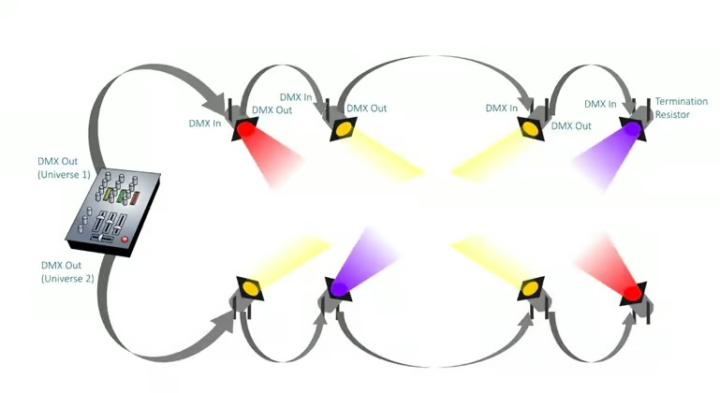
Lighting is a huge part of creating a polished, professional atmosphere at any corporate event. Whether you're illuminating a keynote stage or setting the mood for breakout sessions, a DMX controller gives you precise control over your fixtures. Here’s a simple guide to help you understand and operate a basic DMX lighting setup. 1. What Is DMX? DMX512 (Digital Multiplex) is a standard communication protocol used to control stage and event lighting. Think of it as a language that lets a controller “talk” to multiple lighting fixtures over a single cable line. For a conference environment, this typically includes: - LED wash lights - Spotlights or profile fixtures - Uplights for décor - Stage backlight or accent lighting 2. Components You’ll Need To get up and running, you’ll typically need: - A DMX controller (hardware board or software-based) - DMX cables (XLR 3-pin or 5-pin, depending on your gear) - Lighting fixtures with DMX capability - A DMX terminator (recommended for stable signals) 3. Setting Up the Physical Connections Step 1: Connect the Controller to the First Fixture - Using a DMX cable, plug DMX OUT from the controller into DMX IN on the first light. Step 2: Daisy-Chain Additional Fixtures - From the first fixture’s DMX OUT, run a cable to the next fixture’s DMX IN. - Repeat for each light in the chain. Step 3: Add a DMX Terminator - Plug a terminator into the DMX OUT of the final fixture. - This helps prevent data reflection and flickering—especially important in conference settings where reliability matters. 4. Addressing Your Lights Every DMX fixture must be assigned a DMX address—like giving each light its own “mailbox number.” This tells the controller which channels (functions) belong to which fixture. How to Address Fixtures: - Check how many channels your fixture uses (often 3, 5, 7, or more). Some fixtures have multiple “channel modes” and allow you to select how many channels you’d like the fixture to use. E.g., in 5 channel mode, each fixture will use 5 channels. So fixture 1 would take up channels 1-5, fixture 2 would take up channels 6-10, etc.
3
0
1-10 of 10
powered by
skool.com/the-av-wizards-club-1325
THE #1 Community For Learning Audio, Lighting, and Video. Join today to become a Wizard at event technology and content creation! 🧙🏻♂️
Suggested communities
Powered by