Write something


Mar 13 •
Introduction 🌺
Hi everyone! I'm Mitta Wise, from NZ, living in LA and sometimes found in India :-). I'm a hypnotherapist and empowerment coach with some current prosperity upcoming programs.
1
0

Jan 31 •
Introduction
Hi everyone, I’m La-Trenda.I’m originally from New York and I currently live in Raleigh, NC I’m here to build, not dabble. My focus in AI is content, visibility, and execution. I want to learn how to increase my social media presence, build a real following, and confidently create, edit, and extend video content across platforms. I’m especially interested in using AI to streamline my creative process, sharpen my storytelling, and turn ideas into consistent, high-quality content without burnout. Looking forward to learning, sharing, and actually applying what we’re building here.

Dec '25 •
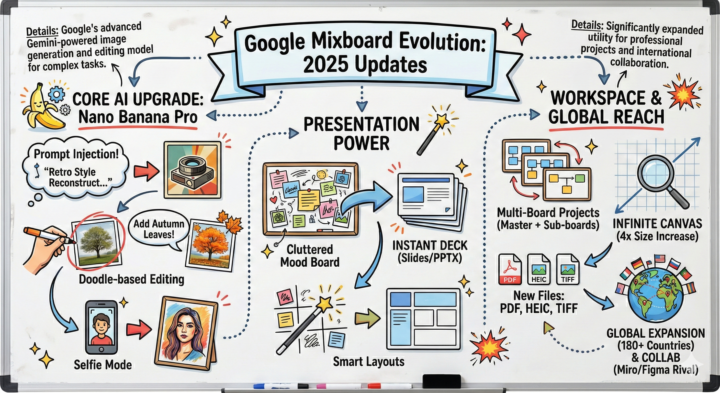
Google Mixboard grew up fast in 2025.
Is Google Mixboard the new essential workspace tool? Based on the massive 2025 updates summarized in this visual, it’s certainly making a strong case for shifting from an experimental sandbox to a professional powerhouse. Google has significantly upgraded three key pillars: 🤖 Core AI (Nano Banana Pro): The move toward intuitive "doodle-based editing" and complex prompt injection makes generative AI much more controllable for rapid iteration. 📊 Presentation Power: This is a game-changer for workflow. The ability to instantly transform a cluttered mood board into a polished, smart-laid-out slide deck solves a major pain point in the ideation-to-execution process. 🌍 Scale & Reach: By quadrupling the canvas size to an "infinite" feel, adding professional file support (HEIC, TIFF), and expanding globally, Mixboard is clearly positioning itself to challenge established collaboration giants like Miro and Figma. The evolution over the last year has been rapid. Which of these features do you see using in your daily workflow the most?
Dec '25 •
ChatGPT Wrapped is live. Here’s how to get yours 👇🏾
A few of us have been sharing our ChatGPT Wrapped stats, and now it’s your turn. How to find yours: 1. Open ChatGPT on web 2. Look for the “Your Year with ChatGPT” or “Wrapped” banner on the left navigation bar 3. Tap through the slides 4. Screenshot your favorite slide (or the one that humbled you 😭) Then share it here: • Post your screenshot • Tell us one thing that surprised you • Or what you want to use ChatGPT more intentionally for next year There’s no competition here. This is about awareness. Your data tells a story about how you think, build, learn, and experiment. Drop your Wrapped below when you’ve got it. I’m excited to see how y’all are really using this tool.

1-30 of 106