
Write something

6h •
Knowing HOW to prompt makes a huge difference
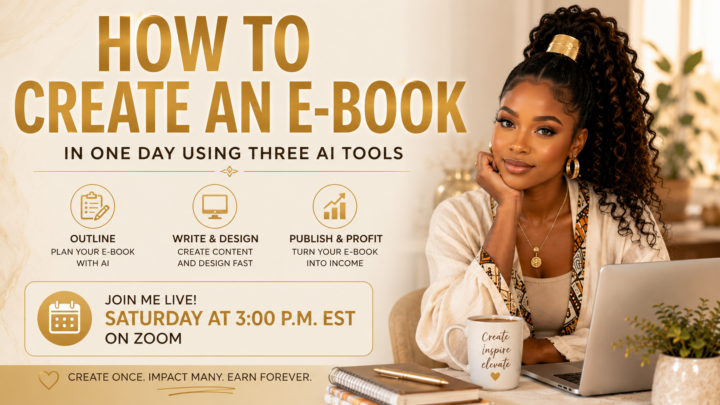
Hello, my beautiful Soul Aligned Content Creators! We're officially in the middle of the month, and I wanted to start getting more content out for you. Over the next few weeks, I'll be creating a series of trainings and inspiration focused on becoming self-employed, building income online, and creating a business that's aligned with who you are. Whether your goal is to become a Content Creator, an entrepreneur, a solopreneur, or simply become more financially independent, these trainings are for you. One thing I want to leave you with today is this: There are many ways to make money, but one of the simplest and most sustainable ways is to do something you genuinely love—unapologetically. Create without constantly worrying about the outcome. When you stop allowing fear, doubt, and overthinking to lead the way, you create from a place of authenticity, and people naturally connect with that energy. This Saturday at 3:00 p.m. EST, I'll be hosting a live Zoom workshop: Create an eBook in One Day During this one-hour session, I'll show you: - How to outline your eBook so the writing process becomes simple. - How to use ChatGPT to help you organize and expand your ideas. - The two programs I personally use to create beautiful, professional eBooks. - How to turn your eBook into a digital product that works for your business. Your eBook can become: - A lead magnet to grow your email list. - A digital product you sell. - A free resource that introduces people to your brand. - A companion guide to one of your services. - A prerequisite workbook or guide for a coaching program or course. There are so many ways to use an eBook, but the important thing is this: we need to get into the habit of creating digital products that support our services, our businesses, and our income. If you're serious about building an online business, this is a great place to start. I can't wait to see you Saturday at 3:00 p.m. EST. Bring your ideas, bring your questions, and let's create something that can continue working for you long after you've finished making it.
3
0


Jun 4 •
Happy Summer!!!
During this summer, we are going to be prioritizing, self-awareness mindset and manifestation concepts while learning AI tools to help you to grow on your platforms. June is the month of resetting because we are at the half year mark for 2026 . so what are your goals moving forward? we’re not looking backwards. We are moving forward in the next six months if you were to lock in what could you accomplish? think about that❤️🤏🤏🤏🤏🤏

Jun 13 •
EFT TAPPING SESSION - Today at 1:30pm est
Good morning, Soul-Aligned Family, Today, I’ll be holding an impromptu EFT Tapping Session, and if you’re able to join us, I would love to see you there. 💕💕💕ON CAMERA ONLY – EFT Tapping Session Mental Release: Creating Miracles in the Now Date: Saturday, June 13, 2026Time: 1:30 PM Eastern Time (US & Canada) Register in Advance:https://us06web.zoom.us/meeting/register/n2aJpEXbRWOVnbrjU02WOQ This session is all about releasing, letting go, relaxing, and creating space for something new. We’ll spend some time talking about the power of your words, how to focus your energy on what you want to experience, and how to shift your state quickly when life feels heavy or overwhelming. If you’re new to EFT tapping, I encourage you to do a quick Google search so you can familiarize yourself with the practice before joining us. If you’re already familiar with EFT, we’ll be doing a simple three-point tapping sequence, and I’ll guide you through releasing anything that may be weighing on your spirit. A few important notes: • Your camera must be on for the entire session. As an EFT practitioner, I need to be able to observe participants for safety and legal purposes. • Please do not participate while driving, operating heavy machinery, or doing anything that requires your full attention. • I am not a medical doctor. This session is intended for holistic wellness and personal development purposes only. • Participation is entirely voluntary and at your own discretion. By joining, you acknowledge that you are responsible for your own participation and experience. I am not responsible for any physical, emotional, or medical reactions related to EFT tapping. Schedule for Today: 1:30 PM ET – Zoom Room Opens 1:40 PM ET – Zoom Room Closes 2:00 PM ET – EFT Tapping Begins From 1:30 PM to 2:00 PM, we’ll have spiritual conversation, reflection, and discussion. Once the room closes at 1:40 PM, no additional participants will be admitted. If you arrive after 1:40 PM, you’ll have to catch the next session.
May 23 •
Prompt Practice:
Prompt I used for my still photo in chat gpt: Create a 16.9 aspect ratio photo with the reference photo position her in a living room that has purple and gold aesthetics in a blurred background. She has three pictures of beautiful black women in different sizes on the wall behind her. Her hair is in a high ponytail she has on a cream colored sundress with small purple flowers on it. She has on thick, gold hoop earrings. She has thick gold bangles on her wrist. Her makeup is golden brown light beat. She’s holding a book that says soul align. There is a brown and tan cat Lane next to her on the couch.

1-30 of 69
powered by

skool.com/soul-aligned-ai-mastery-lab-7227
Spiritual women mastering AI, faceless channels, and AI music to grow authentic brands, income streams, and purpose-led businesses.
Suggested communities
Powered by