Write something

Jun 17 •
Claude can now sit in on your meetings — live (and it's free) 🎙️
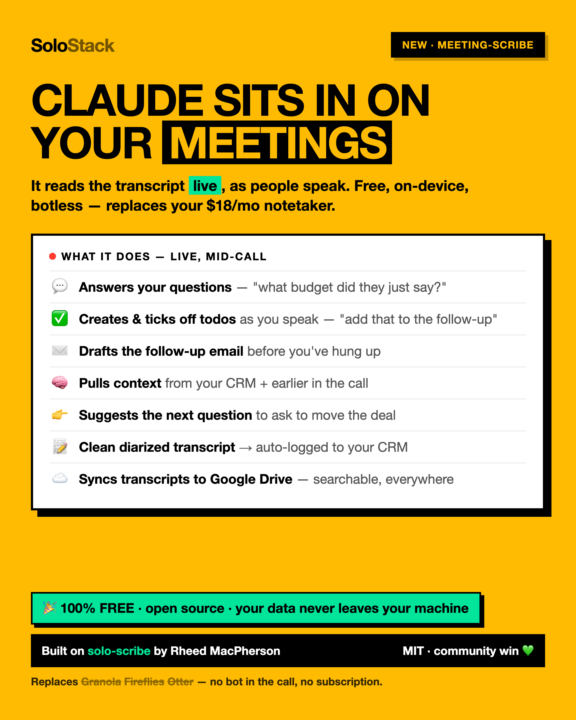
Claude now sits in on your meetings — live. And it's free. 🎙️ The headline feature in this month's drop is meeting-scribe, and it does something the SaaS notetakers can't. Granola, Fireflies, Otter — they hand you a transcript after the call. meeting-scribe gives Claude the transcript live, as the person is speaking. So Claude isn't a notetaker — it's in the room with you. What it does, mid-call: • 💬 Answers your questions — "what budget did they just say?" "did we cover the timeline yet?" • ✅ Creates and ticks off todos as you speak — "add that to the follow-up." Done. • ✉️ Drafts the follow-up email before you've even hung up • 🧠 Pulls context from your CRM and from earlier in the same call • 👉 Suggests the next question to ask to move the deal forward • 📝 Walks you out with a clean, diarized transcript that auto-logs to your CRM • ☁️ Syncs every transcript to your Google Drive — searchable, on every device And the best parts: It's free. No subscription. It's open source — you're replacing a $10–18/mo notetaker with something you own. It's local and botless. No bot joining your call, no audio uploaded to anyone's cloud. It runs on your machine (macOS), taps system audio directly, and nothing leaves your laptop except the transcript you choose to sync. --- 🙌 This one's a community win — shoutout to Rheed meeting-scribe is built on solo-scribe, which Rheed MacPherson built and open-sourced (MIT). One of our own shipped something genuinely great, opened it up, and now the whole community gets a live-meeting copilot on top of it. This is exactly the network effect we keep talking about: one person solves a hard problem, shares it, and everyone levels up. Win-win, every time. Thank you Rheed 💚 --- It's in the June boilerplate drop — free, with setup docs included (one-time: Python env + an audio device, ~10 min, all documented). Try it on your next call and tell us the first thing you asked Claude mid-meeting. 👇
1
0
Jun 17 •
SoloStack Boilerplate — Mid June 2026 release
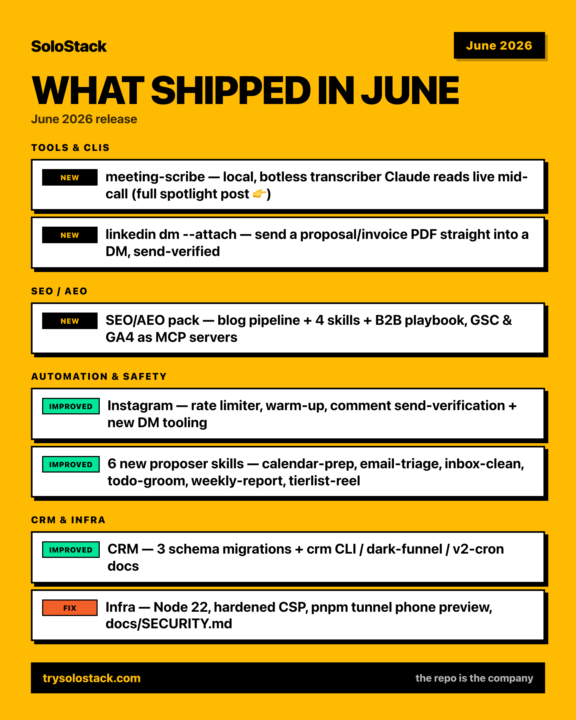
June changelog. Seven things shipped into the boilerplate this month. Quick list below — and meeting-scribe gets its own post, because it's a big one 👇 🎙️ meeting-scribe — a local, botless meeting transcriber Claude can read live, mid-call. Replaces Granola / Fireflies / Otter. (full breakdown in the spotlight post) 📎 linkedin dm --attach — drop a proposal or invoice PDF straight into a DM. Verifies the attachment landed and the message actually sent before logging to your CRM. 🔎 SEO/AEO pack — blog pipeline + keyword research, the seo-blog-writer (research → write → publish → review), plus money-keyword-matrix, competitor-listicle, and deep-avatar-research (mine real customer language from Reddit). Comes with the B2B SaaS SEO/AEO playbook and GSC + GA4 wired in as MCP servers — Search Console and Analytics live inside your agent. 🛡️ Instagram hardening — shared rate limiter + new-account warm-up, and comment send-verification that reads the comment back to confirm it actually posted (clicking "post" is not proof). 🗂️ CRM — three schema migrations (email-nullable, booking double-book guard, presentation refs) + crm CLI / dark-funnel / Netlify v2-cron docs. 🧰 Infra — Netlify on Node 22 with a hardened CSP, pnpm tunnel for a one-command phone preview, and a full docs/SECURITY.md. 🤖 New proposer skills — calendar-prep, email-triage, inbox-clean, todo-groom, weekly-report, tierlist-reel. Grab it: pull the latest master of the boilerplate repo. Setup snags → drop them in Setup Help. 🛠️
0
0
Jun 4 •
SoloStack Boilerplate — June 2026 release
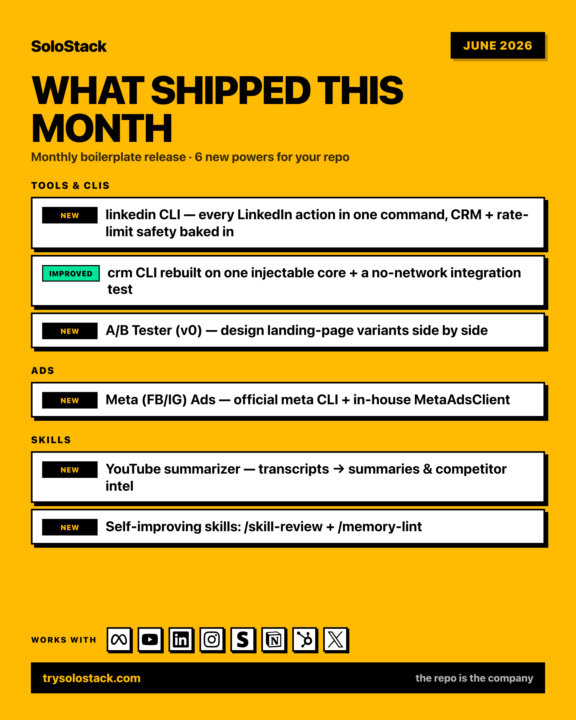
This month's SoloStack boilerplate drop is live — six new powers for your repo: 🛠 Tools & CLIs → linkedin CLI — every LinkedIn action (connect, DM, comment, scrape, post) in one command, with CRM logging, rate caps and send-verification baked in → crm CLI rebuilt on one injectable core, with a no-network integration test → A/B Tester (v0) — design landing-page variants side by side, pick the winner (pnpm ab) 📣 Ads → Meta (Facebook/Instagram) Ads — the official `meta` CLI + an in-house MetaAdsClient: campaigns, ad sets, creatives, audiences and insights, straight from the repo ⚡ Skills → YouTube summarizer — pull transcripts (one video or a whole channel) → summaries & competitor intel (free Supadata key) → Self-improving skills: /skill-review folds each session's lessons back into your skills, /memory-lint keeps the memory wiki honest Same philosophy as the whole stack: you own it, it reads from your .env, no per-seat fees. Full per-feature notes on the changelog page, and the CRM setup guide now documents exactly how data syncs in (webhooks + the CLIs). Grab the June release: • GitHub: https://github.com/Michaelrecycle/solostack-boilerplate • Or the zip — solostack-boilerplate-june.zip (no GitHub needed): https://drive.google.com/file/d/1yi-xx55IOcPJILjbMrs7V0bPkLQISgfl/view Built with Claude Code. Questions below 👇
0
0
Jun 4 •
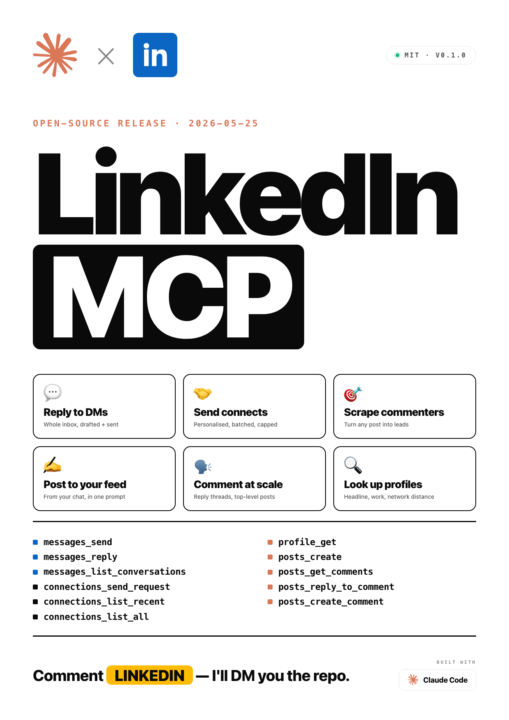
We open-sourced our LinkedIn automation — it's an MCP server (free, MIT)
We just shipped something a lot of you will get use out of: an open-source LinkedIn MCP server. It plugs straight into your AI client (Claude Code, Cursor, Claude Desktop) and lets it act on LinkedIn through your own logged-in Chrome — no third-party API, no per-seat fees, nothing sitting between you and LinkedIn. What it can do: → Reply to your DMs — whole inbox, drafted + sent from chat → Send connection requests — personalised, batched, daily caps enforced → Scrape every commenter on any post — turn a viral thread into a lead list → Post to your feed — from a single prompt → Comment on posts at scale — top-level or in reply threads → Look up any profile — headline, work history, network distance Why it's different from other LinkedIn tools: — No third-party API. It runs inside your real Chrome with your real cookies — indistinguishable from clicks you'd make yourself. — MIT licensed. Fork it, ship it, embed it in your own stack. — No pasting li_at cookies into janky tools. You log into Chrome once. — Built-in safety: send verification (throws if a DM didn't actually land), hard daily caps, single-writer lockfile. Repo (public, ~10-min setup — README has everything): https://github.com/Michaelrecycle/linkedin-mcp How you actually use it — just talk to Claude: • "Triage my LinkedIn inbox and draft replies to anyone asking about pricing." • "Scrape everyone who commented on my last post and pull their headlines into a list." • "Send a connection request to these 10 people, personalised note each." • "Post this to my feed, then check the comments in an hour." It's unofficial and a ToS gray zone (the README is honest about that), so keep it human-paced. But if you're running outreach, this replaces a $50–200/mo tool with something you fully own. Questions? Drop them below 👇
0
0

Apr 21 •
Yay I'm first!
Thanks for the template for intro, as we all here love a boilerplate :D Hello all, my name is Rheed from Signal Studio. 1. What I'm Building: I run a Webflow agency and as of today defined my a new ICP as Webflow Maxxing for B2B SaaS lol. Also launching a Webflow A/B testing app on the side called Split. 2. What stage: Currently scaling, so far it's me and one full time dev + a range of contractors. 3. Stack status: Getting there, almost all setup, made my first outreach campaign. 4. I want to have inbound cranking in the next 30day with 3 leads baby! 5. Wildcard: Cheese fondue is no good, don't do it. Anyways, thank you Solostack team, loving this journey thus far. Bring it on!
1-8 of 8