
Jan '25 (edited) • 🛠 Technical Questions
How to create a new part with Convert Entities
Sorry Guys but I am stuck at this stage...
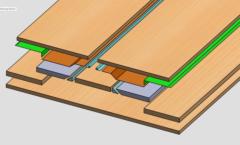
So I built a new plate using "Convert Entities" to transfer the angled extruded hole to a new part at 90 degree for the laser cut. But the new part is embedded in the original part...
How do I take the new body out of the original part?
When I try to use this drawing, I get 2 pieces, not just the new one, I just want the new one...
I guess I could have done it differently, like by opening a new part and copy the sketch but I was trying to be efficient... It was pretty quick to create a plane and Convert all Entities to the new plane and extrude...
How would you guys have proceeded to create the new plate?
4
2 comments
How to create a new part with Convert Entities

skool.com/solidworks-accelerator
Learn SOLIDWORKS Fundamentals in just 14 days.
Leaderboard (30-day)
1
+3
Powered by