
Pinned

4d •
Welcome to SEO for Photographers!
This community is designed to help you master SEO and grow your photography business. We've recently updated our structure to a freemium model, offering both free and premium membership options. Free Community Access: As a free member, you have access to our community chat and posts. This is a great place to connect with other photographers, share your progress, and learn from the collective experience of the group. Premium Membership: Ready to take your SEO to the next level? Our premium membership gives you full access to the comprehensive SEO Course, regular live Q&A sessions and help sections for your specific questions (please provide context and screenshots for the best support), and in-depth feedback on your website or Google Business Profile. To get the most out of this community, we recommend the following: - Free Members: Dive into the community discussions and start networking with your peers. - Premium Members: Begin with the SEO Course to build a strong foundation. This isn't just a group for sharing random 'tips' – it's a practical, step-by-step system for achieving real results. The more you put in, the more you'll get out. We believe that better questions lead to better answers, so don't hesitate to ask for help when you need it. We're excited to have you here!
0
0

18h •
Recommended Tool for Photographers: Repurpose.io
Just wanted to share a tool I've been using lately that's been a huge help with my social media workflow over the years. It's called Repurpose.io As you know, it can be a real grind trying to keep up with all the different social media platforms. You create some great content, and then you have to spend ages formatting and uploading it to each channel. It's a total time-suck! I've been using this tool personally, and it's been a lifesaver. It basically automates the whole process. You can post a video to one platform, and it will automatically send it to all your other channels, in the right format and without the watermarks. It's pretty slick. It's been great for getting my work out there more without having to spend all day on my phone. It even backs up all my videos to my Google Drive, which is a nice bonus. If you're feeling swamped with social media stuff, it might be worth a look. It's not for everyone, but if you're posting a lot of content, it could save you a ton of time and get your work in front of more people. They have a free trial if you want to give it a spin. You can check out here at Repurpose.io Hope this helps!
1
0
23h •
Quick update & inviting friends
Hi everyone, Just a quick heads-up on a little change I've made to the group. I've opened things up so that anyone can join our community discussions for free. The idea is to get more photographers in here, sharing ideas and helping each other out. The premium stuff, like the full SEO course and the live Q&A sessions, will stay as a paid membership. So, if you have any photographer friends who you think would benefit from the community chat, feel free to invite them to join the free part of the group. You can use the 'Invite' button in Skool to do that. Simon
1
0
23h •
Recommended Tool for Photographers: Social Share Preview
I wanted to share a super useful and FREE tool that can help you with your website's SEO and social media presence. It's called Social Share Preview. https://socialsharepreview.com/ What does it do? It lets you see exactly how your website, blog posts, or portfolio pages will look when you or someone else shares them on platforms like Facebook, Twitter, LinkedIn, and Pinterest. Why is this important for photographers? As photographers, visuals are everything! When you share a link to your beautiful online portfolio or a new blog post, you want the preview to look amazing, right? A broken image or a weird-looking title can stop people from clicking. This tool helps you: • Make a great first impression: Ensure your featured image and title are perfect before you share. • Improve your branding: Control how your brand is represented on social media. • Increase website traffic: A great-looking preview encourages more people to click through to your website, which is a positive signal for SEO. It's super simple to use. Just paste a link from your website into the tool, and it will show you the previews for different social networks. If the preview doesn't look right, it's likely an issue with your website's "Open Graph" tags. This tool helps you spot those issues so you can fix them. Give it a try and let me know what you think! It's a quick and easy way to make sure your website is putting its best foot forward on social media.
4d •
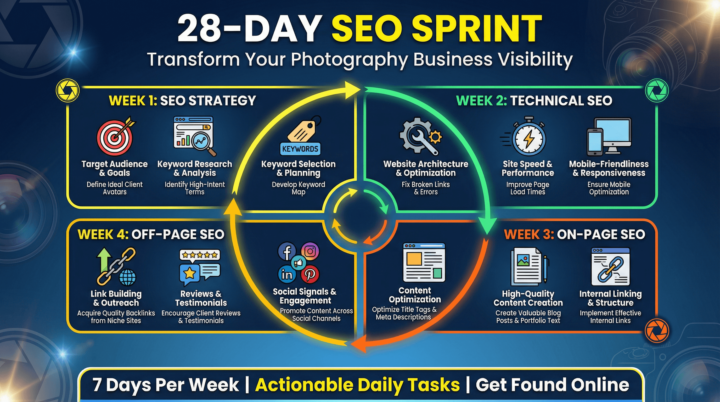
🚀 NEW MODULE DROP: The 28-Day SEO Sprint! 🚀
Hi everyone! I'm excited to shared a brand new module I've just added to the course: The 28-Day SEO Sprint Action Plan! I know how overwhelming SEO can feel, so I've taken everything from the course and distilled it into a focused, day-by-day roadmap to get you taking action and improving your website SEO in just four weeks. What is the 28-Day SEO Sprint? It's a downloadable PDF guide that walks you through a daily action plan, covering: • Week 1: SEO Strategy • Week 2: Technical SEO • Week 3: On-Page SEO • Week 4: Off-Page SEO No more guesswork, no more wondering what to do next. Just a clear, actionable plan to transform your photography business's visibility. Where to find it: You can find the new module in the course classroom now! It includes the full 28-Day SEO Sprint PDF, ready for you to download. I can't wait for you to dive in and start seeing the results. Let me know in the comments what you're most excited to tackle first! 👇
1-9 of 9

skool.com/seo-for-photographers
Master SEO to rank higher on Google & ChatGPT. Get found by people searching for professional photographers and book more dream clients organically.
Leaderboard (30-day)
1

+1
2
+1
Powered by