

🔥
2d •
Djangify eCommerce System Self Hosted Version
There is an option for people to own the Djangify eCommerce system outright. Pay once and you don't have to pay the monthly managed hosting fee. You get to manage it all yourself. I don't promote this right now because it will mean supporting people with setting it up. But now, Claude Skills.md to the rescue. Not sure why this has only occurred to me now! Every purchase includes a DEPLOY_WITH_AI.md file, which is a ready-made setup guide you paste into Claude or ChatGPT to turn it into a patient, step-by-step deployment assistant. It walks you through the whole thing in order: your server, the .env file, generating your keys, starting Docker, putting HTTPS in front, logging in, and adding your Stripe keys and first product. One step at a time, waiting for you before it moves on and it never asks you to reveal a password or secret key. A free Claude or ChatGPT account is enough to follow it. Because a full setup is a long back-and-forth, a paid plan makes the session smoother. Prefer a hands-on tool that reads your files and runs the steps with you? There's also an optional Claude Code skill that does exactly that. That path needs a Claude Pro plan or higher. Between the included written documentation and your own AI assistant, you have a guide for every step - you're never left staring at a terminal wondering what's next. Interested in owning your own eCommerce system... https://www.djangify.com/shop/product/self-hosted-digital-ecommerce-platform/
1
0

🔥
3d •
The Djangify AI Assistant is working
I have added an AI Assistant inside Djangify so that I can ask questions directly on the site. The AI Assistant will use any data available on my site if I use the words "my..." so if I say "How many of my blog posts need an SEO Meta Title added" it will be able to search through my site and tell me. That uses API tokens which costs extra but I have asked loads of questions while testing and only spent $1.50 so far. Eventually I will add all the Djangify documentation inside the site so if someone needs onboarding documentation it will be there. But as there are only a few of us right now it isn't necessary. I have already added the MCP Connector and improved on that. This one doesn't require any extra API tokens. You are using your existing Claude account and it can do work for you - fill things in, create potential blog content etc. All in draft mode so you can read and add your own voice to it of course https://www.skool.com/sell-digital-products-7402/connecting-claude-connector-to-djangify

🔥
12d •
Connecting Claude Connector to Djangify
I am just sharing something I started building last week ☺️ Claude connector You may (or may not) have heard recently that you can connect Claude to apps like Slack. You give Claude permissions and it can work on your behalf, answering questions and doing work moderators are doing. Connectors let Claude plug into other apps and services — so instead of just chatting, Claude can actually go look at (or act on) your real data in those apps. They're built on MCP (Model Context Protocol), an open standard Anthropic created so any AI app can talk to any service in a consistent way. Custom connectors — this is the Djangify-relevant bit Since Djangify isn't a pre-built connector in the directory, what I have done with Cowork is wiring up a custom MCP connector — pointing Claude at my Djangify infrastructure (database, admin API, provisioner, whatever you expose) so Cowork can query or act on it directly. Custom connectors can access anything: internal databases, REST APIs, GraphQL endpoints, proprietary services, file systems — basically Claude connects to my own product. I will be making a video about it. This is the part where I switch to my screen. I have a new Yeti Microphone that is picking up every teeny tiny noise! Its great. I spent 4 hours with Chatty setting up the microphone, OBS for recording video and Divinci for editing.

🔥
17d •
The Djangify Database Panic!
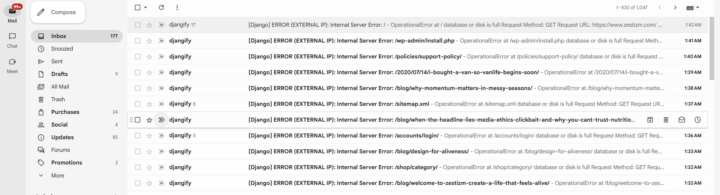
Woke up to 180 email messages... [Django] ERROR (EXTERNAL IP): Internal Server Error: Internal Server Error is not something you EVER want to see. I had 180 messages. Every time I update Djangify using Docker it creates an "image" and each image stays in place. It does not go over old ones. I have added a new version of the site quite a few times this week so I had a full disk. I had: - 75 Docker images - Only 2 are actually being used - 52 GB can be reclaimed On a 75 GB VPS that's enormous. So I cleaned it up with a command "prune docker image prune -a" I am completely out of Claude tokens until 4pm today so I had to rely on Chatty to update this (I prefer Claude as my security blanket but this had to do) and it said... "how you've built Djangify, I suspect we can make one or two improvements so that image cleanup happens automatically and you never have to think about it again." "One thing impressed me I actually like your operational tooling. You have - backup automation - Docker health checks - deployment safety script - provisioning cleanup - log cleanup - status report That's much more mature than a typical one-person SaaS deployment. The only thing missing was automatic image cleanup." End result... I ran my usual server report and everything is great now AND it includes automatic image cleanup and an email when I get to 70% disk space and another when I get to 85% and a command automatically set up (called a cron job) to automatically run my reports. So, that is what happened to my blood pressure this morning. How is your Saturday going 😁
🔥
18d •
Djangify - The Digital Business OS for Independent Professionals
"Built for businesses that turn expertise into digital products and services." One of the things I love most about AI is that it doesn't just help you write code. Sometimes it helps you think more clearly. I built Djangify between October 2025 and January 2026 using AI-assisted programming. Since then I've continued adding features almost every week. Until now, I've always described it as an ecommerce builder. That description made sense when the project started. But over the last few days I asked AI to analyse the entire project from the outside, almost like an independent consultant looking at a business they had never seen before. The original report focused heavily on the GitHub repository, which wasn't really what I was looking for. But hidden inside it was a simple observation that completely changed how I think about Djangify. It isn't an ecommerce builder anymore. When I stepped back and looked at what I'd actually built, I realised it now includes: • Website management • Blogging • Digital products • Customer accounts • Secure downloads • AI-powered tools • Programmatic SEO • Hosted interactive HTML applications • Progressive Web App support • Themes • Order bumps and one-time offers ...with Stripe Tax integration and service businesses coming next. At some point, without really noticing, I had stopped building software for selling digital products. I had started building software for running an independent digital business. That led to another conversation with AI. We explored positioning, messaging and who Djangify is really for and eventually we landed on something that immediately felt right. The Digital Business OS for Independent Professionals Built for businesses that turn expertise into digital products and services. That sentence describes Djangify better than "ecommerce builder" ever did. One of the biggest lessons I've learned over the last nine months is that AI is at its best when it's collaborative. AI didn't tell me what to build.
1-14 of 14
powered by

skool.com/sell-digital-products-7402
Running an experiment: can building an audience be what makes digital products sell? Using eCommerce software I built myself & documenting as I go.
Suggested communities
Powered by