

10d •
💡 Figma Config 2026 Recap
Config 2026 was less about UI design and more about general design practice. Figma is moving away from the idea of “AI replaces the designer” and toward something much more practical: AI as a creative layer inside the current design workflow. At some point, I thought that Figma was trying to build a simple version of the Adobe toolkit for creatives. The most useful 4 Figma updates for product designers: 1️⃣ Figma Motion: Create expressive animations with timelines and reusable systems. 2️⃣ Shaders: Generate rich visual effects, image fills, mesh gradients, and material-like styles. 3️⃣ Generative Plugins: Prompt Figma AI to build custom plugins tailored to your workflow. 4️⃣ Code Layers: Build and preview coded UI directly on the Figma canvas. You can see how all features except Code layers work in the attached video 📕Complete Figma Config 2026 recap: https://medium.com/ux-planet/figma-config-2026-recap-1852ccf5e1d1?sk=a8ee5ee6d115102b6b95ab777aa6bfe8
0
0

16d •
CLAUDE[.]md Tips & Tricks (Cheatsheet)
CLAUDE[.]md is one of the most important files in any Claude Code project. Think of it as project memory + execution guidelines. It tells Claude what your project is, how the codebase is structured, what design rules to follow, and what patterns to avoid. Here are 8 practical tips for writing a better CLAUDE[.]md: 1. Know the difference between project and global CLAUDE[.]md: A project-based CLAUDE[.]md lives in your project root and is specific to that product. A global CLAUDE[.]md lives in your Claude env and defines reusable preferences across all projects. Project CLAUDE[.]md: = project contextGlobal CLAUDE[.]md:= personal working style 2. Structure it properly Claude performs better when information is grouped semantically. Thats why don’t write random instructions. Use clear sections like: ✅ Project Overview ✅ Tech Stack ✅ Folder Structure ✅ UI/UX Principles ✅ Component Rules ✅ Accessibility Requirements ✅ Testing Strategy ✅ Content Guidelines ✅ Deployment Notes 3. Use [/]init to create the first draft You don’t need to start from a blank page. Run [/]initso Claude Code will scan your project and generate a first version of CLAUDE[.]md It won’t be perfect, but it gives you a solid starting point. 4. Keep it short CLAUDE[.]md is loaded into every Claude Code session, so it consumes context. My rule of thumb: Keep it under 200 lines. Ideally, under 100. For detailed documentation, use routing rules 5. Be specific Bad instruction: “Write clean code.” Better instruction: “Use descriptive prop names, no abbreviations” and “Prefer composition over inheritance.” The more precise your instructions are, the more deterministic Claude’s output becomes. 6. Treat CLAUDE[.]md: as a living document Don’t create it once and forget it. Update it when: ✅ Claude repeats the same mistake ✅ You introduce a new pattern ✅ Your product requirements change ✅ Your design system evolves ✅ Your team agrees on new rules The best CLAUDE[.]md: files are built from real usage, not theory.
1
0
![CLAUDE[.]md Tips & Tricks (Cheatsheet)](https://assets.skool.com/f/760b77fe998c4be1a1452e9d4115968f/b2b731111e0f404da462b6df3678e7069a582a4f86b143338bf9814b6cc56a84-md.png)
17d •
DESIGN[.]md Best Practices
DESIGN[.]mdis quickly becoming one of the most useful files for AI-assisted UI design because it help AI understand your design system well enough to create UI that actually feels like your product. A good DESIGN[.]md usually includes your design tokens, brand style, color rules, typography, spacing, and component guidance. 3 best practices for creating a strong DESIGN[.]md: 1. Treat tokens as decisions: A token is not just a variable. It defines the role something plays in the interface. 2. Add reasoning. Don’t just say what a style is. Explain why it exists, when to use it, and when not to use it. This helps AI make better design decisions. 3. Build components on top of tokens. Components should reference your tokens and design rules. Complete guide to DESIGN[.]md: https://medium.com/ux-planet/design-md-best-practices-c00325e8b23a?sk=6e97ad8d6c6fc014f45bb7db864a554b
1
0
![DESIGN[.]md Best Practices](https://assets.skool.com/f/760b77fe998c4be1a1452e9d4115968f/b04bbabbe663415190bd39188f70d0a4a8dc514b8eda4a61889d7b541d21a775-md.png)
23d •
3 Popular Questions about Claude Fable 5
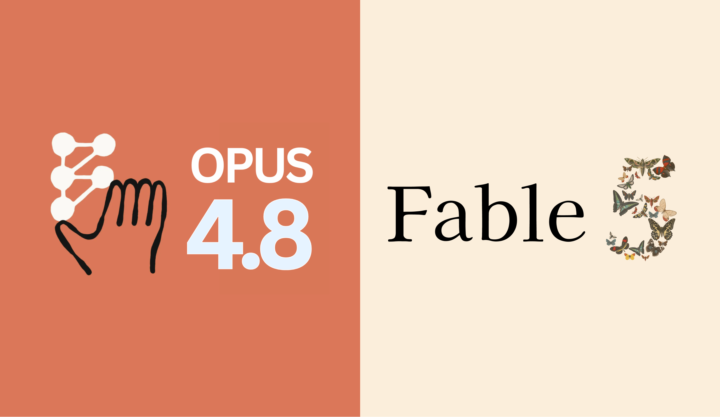
Fable 5 is Anthropic’s new Mythos-class Claude model, available to the general audience; the company positions it as a tier above Opus in capability. Here are 3 popular questions about this model Q: Is Fable 5 really better than Opus? A: Yes. It performs better than Opus, especially for complex tasks like prototyping and coding (link to performance test below) Q: Is Fable 5 not very token-efficient? A: No. The model consumes more tokens than Opus, but it also produces much better results (in my experience, you spend 3x more tokens but get 5x better output generated by AI) Q: Is Fable 5 available to everyone? A: Yes, it’s available at no extra cost for Pro, Max, Team, and seat-based Enterprise plans until Jun 22 but starting from Jun 23, it will require usage credits. 👉 Claude Opus 4.8 vs Fable 5 for product design task: https://medium.com/ux-planet/claude-opus-4-8-vs-fable-5-2b0a442ccdcb?sk=3ba4768a81ebc5dd094a9e21734002e9
1
0
24d •
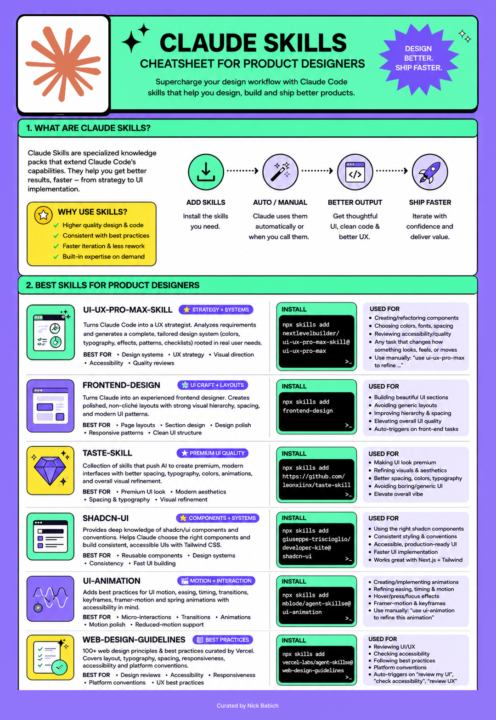
📕 Claude Skills for Product Designers (Cheathseet & Essential Guides)
Claude skill is a reusable set of instructions that teaches Claude how to perform a specific task. In product design, skills can teach Claude to follow your exact brand style guidelines or execute a complex workflow that is relevant to your specific organization. Below is essential collection of 5 guides that will help you improve your Skill creation abilities: ✅ Introduction to Claude Skills: https://uxplanet.org/claude-skills-for-product-designers-a453a7a8faa7?sk=f7f7c081ad565150731d4ddaf57a64ec ✅ Popular mistakes to avoid when creating Claude Skills: https://uxplanet.org/7-common-mistakes-to-avoid-when-creating-claude-skills-7bd99dc85e2f?sk=088486170d5937dd4cc038cd9edd73be ✅ How to use Claude's Skill Creator Meta-skill: https://uxplanet.org/claude-skills-2-0-for-product-designers-a86f4518b3ba?sk=c9bef60bcd4d69ea915f1e9194613aff ✅ Practical tips for using skills listed in the cheatsheet: https://uxplanet.org/must-have-ux-ui-design-skills-for-claude-code-364e93e3a614?sk=f6b3b6c4abc437cd4e0301d275fd9476 ✅ Troubleshooting Claude Skill (very handy if your skill is not working as expected): https://uxplanet.org/troubleshooting-claude-code-skills-bf29c8383abd?sk=107a18aae3b87a1804abeeaa57d8376a
1
0
1-30 of 35
powered by

skool.com/product-design-7868
A great place to learn how to build digital products—from initial idea exploration and UI design to product testing and market release.
Suggested communities
Powered by