
Write something

Oct '25 •
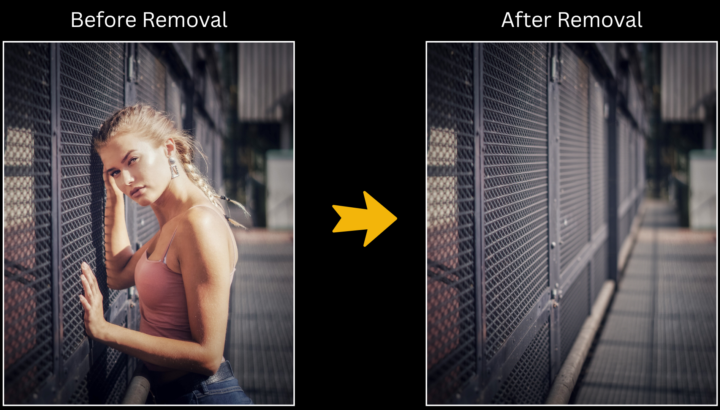
Object/Peson Removal Workflow
Hey everyone! I'm excited to share a workflow that allows you to easily remove objects/people by painting a mask over them. You can find the model download link in the notes of the workflow. If you're running low on VRAM, don’t worry! You can also use the GGUF versions of the model. This workflow maintains image quality because it only resamples the specific area where you want the object removed, then seamlessly integrates the resampled image back into the original. It's a more efficient and faster option compared to Qwen Edit/Flux Kontext! And don’t forget to subscribe to my YouTube channel for more insights and tutorials on ComfyUI: https://www.youtube.com/@my-ai-force
Aug '25 •
Face and Background Swaps with Flux Redux Model
YouTube Tutorial: https://youtu.be/HDVh4rYC9OQ Uploaded Models --- 1_Set-Model --- 🌟Load Diffusion Model🌟 - Download Link: https://civitai.com/models/141592/pixelwave - File Names: pixelwave_flux1_dev_fp8_03.safetensors - Directory: ComfyUI/models/unet/ 🌟DualCLIPLoader🌟 - Download Link: https://huggingface.co/comfyanonymous/flux_text_encoders/tree/main - File Names: clip_l.safetensors & t5xxl_fp8_e4m3fn.safetensors - Directory: ComfyUI/models/clip/ 🌟 Load VAE 🌟 - Download Link: https://huggingface.co/black-forest-labs/FLUX.1-schnell/blob/main/ae.safetensors - File Name: ae.safetensors - Directory: ComfyUI/models/vae/ 🌟Load StyIe Model🌟 - Download Link: https://huggingface.co/black-forest-labs/FLUX.1-Redux-dev/tree/main - File Name: flux1-redux-dev.safetensors - Directory: ComfyUI/models/style_models/ 🌟Load Clip Vision🌟 - Download Link: https://huggingface.co/Comfy-Org/sigclip_vision_384/tree/main - File Name: sigclip_vision_patch14_384.safetensors - Directory: ComfyUI/models/clip-vision/ --- 2_Set-Layout --- 🌟DetectFaces🌟 - Download Link: https://huggingface.co/bluefoxcreation/FaceAlignment/tree/main - File Name: fan2_68_landmark.onnx - Directory: ComfyUI/models/landmarks --- 4_Hand-Detailer --- 🌟UltralyticsDetectorProvider🌟 - Download Link: https://huggingface.co/Bingsu/adetailer/tree/main - File Name: hand_yolov9c.pt - Directory: ComfyUI/models/ultralytics/ --- 7_PuLID-FaceSwap --- 🌟 Load PuLID Flux Model🌟
Sep '25 •
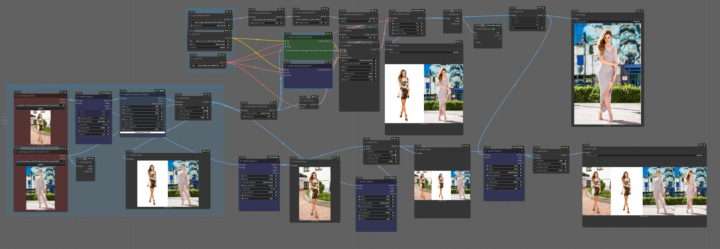
Qwen Pose Transfer Workflow
Here's a workflow that transfers a pose from a reference image to a different portrait. The trick is using a pose transfer LoRA trained for the Qwen image edit model. LoRA: https://civitai.com/models/1959609?modelVersionId=2221229 Download the workflow for free without registration: https://www.runninghub.ai/post/1968461413134020610/?inviteCode=rh-v1241
3
0
Aug '25 •
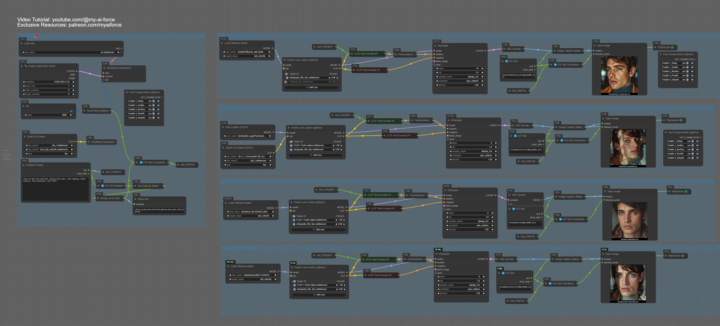
Compare 4 Flux Fine-Tuned Models
YouTube Tutorials: https://youtu.be/5MZG2mj3Vzc Models: - PixelWave: https://civitai.com/models/141592/pixelwave - stoiqoNewreality: https://civitai.com/models/161068?modelVersionId=979329 - fluxRealistic: https://civitai.com/models/652009/fluxrealistic - Shuttle 3 Diffusion: https://civitai.com/models/943001?modelVersionId=1058817 - t5-v1_1-xxl-encoder-gguf: https://huggingface.co/city96/t5-v1_1-xxl-encoder-gguf/tree/main LoRAs: - FLUX.1-Turbo-Alpha: https://huggingface.co/alimama-creative/FLUX.1-Turbo-Alpha/tree/main - Retrograde 80s: https://civitai.com/models/878753?modelVersionId=983735
Aug '25 •
Portrait Beautification with RF Inversion
YouTube Tutorial: https://youtu.be/puSjEeikYV4 Workflow is in the attachment. Required Models and Setup Below is a detailed list of each model you’ll need, along with download links and directories. Follow the instructions carefully to ensure everything is set up before running the workflow. --- Setup --- 🌟 Load Diffusion Model🌟 - Download: Link - File Name: pixelwave_flux1Dev03.safetensors - Directory: ComfyUI/models/unet/ 🌟 DualCLIPLoader 🌟 - Download: Link - File Names: clip_l.safetensors & t5xxl_fp8_e4m3fn.safetensors - Directory: ComfyUI/models/clip/ 🌟 Load LoRA 🌟 - Download: Link - File Name: diffusion_pytorch_model.safetensors (Rename to FLUX.1-Turbo-Alpha.safetensors) 🌟 Load VAE 🌟 - Download: Link - File Name: ae.safetensors - Directory: ComfyUI/models/vae/ 🌟 DownloadAndLoadFlorence2Model 🌟 If connected to a global network, this model will download automatically when used. Otherwise, download manually using the links below. - Download: Link - Download all files and place them in Florence-2-base - Directory: ComfyUI/models/LLM --- Texture Recovery --- 🌟 Load Upscale Model 🌟 - Download: Link - File Name: 4xNomos8kSCHAT-L.pth - Directory: ComfyUI > Models > upscale_models --- SD15 Sampling --- 🌟 Load CheckPoint 🌟 - Download: Link - File Name: epicphotogasm_ultimateFidelity.safetensors 🌟 Load LoRA 🌟 - Download: Link - File Name: add_detail_sd15.safetensors (rename as preferred)

1-13 of 13
powered by

skool.com/myaiforce-5872
A community for ComfyUI creators! Share workflows, swap ideas, and collaborate to level up your AI art game!
MyAIForce+: https://myaiforce.com/pg
Suggested communities
Powered by