

2h •
Bold and Underline in Skool Posts
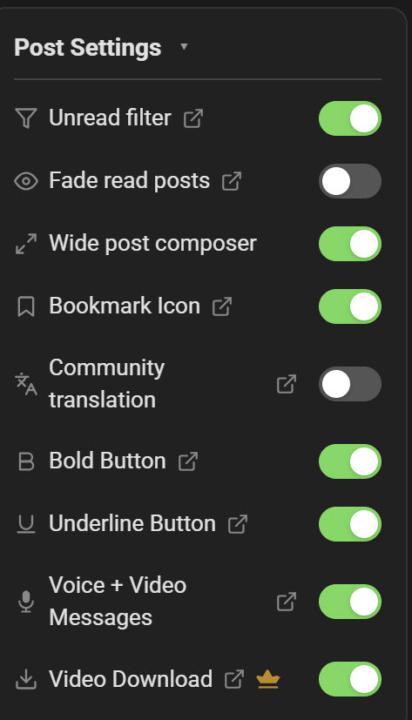
Someone asked me how I was creating 𝗯𝗼𝗹𝗱 𝘁𝗲𝘅𝘁 𝗹𝗶𝗸𝗲 𝘁𝗵𝗶𝘀 𝗶𝗻 𝗮 𝗽𝗼𝘀𝘁. I̲ ̲d̲o̲n̲'̲t̲ ̲u̲s̲e̲ ̲i̲t̲ ̲o̲f̲t̲e̲n̲,̲ ̲b̲u̲t̲ ̲y̲o̲u̲ ̲c̲a̲n̲ ̲a̲l̲s̲o̲ ̲u̲n̲d̲e̲r̲l̲i̲n̲e̲ ̲a̲l̲t̲h̲o̲u̲g̲h̲ ̲i̲t̲ ̲d̲o̲e̲s̲n̲'̲t̲ ̲l̲o̲o̲k̲ ̲g̲o̲o̲d̲ ̲I̲M̲H̲O̲.̲ ̲ There's a new Chrome/Edge browser extension called "𝗦𝗸𝗼𝗼𝗹 𝗘𝘅𝘁𝗲𝗻𝘀𝗶𝗼𝗻𝘀" that when installed gives you a 𝗯𝗼𝗹𝗱 and an u̲n̲d̲e̲r̲l̲i̲n̲e̲ button in your editor interface. There's lots of other stuff it does as well. At first, the interface is really intimidating with all the options. The attached image below is just one part of the settings related to posts. They also have a paid version with additional features, but I'm pretty sure the bold/italic is in the free version. (I'm in a free trial for the paid version so that's the interface I currently see) I didn't really explore privacy issues as much of my content is free and public, but that's always a possible concern when you use an extension. If you are interested in more options, I'd join their free community to check out what it can do and whether it fits what you want to accomplish. I really wish the default editing interface for Skool posts was more like WordPress with lots of functionality, but right now an extension is about the only way to enhance and do even basic formatting.
2
0
8d •
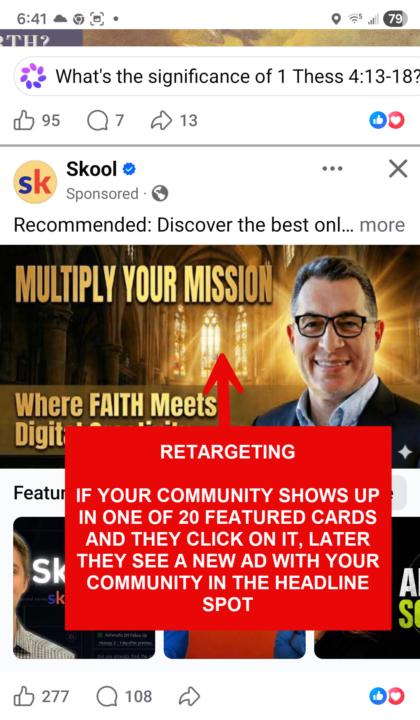
Skool is Now Promoting Communities on Facebook
Skool ads right now gives you a window into where the platform is heading, which communities are getting visibility, and how community owners are positioning themselves. Whether you're planning to start a community someday or just want to understand the Skool ecosystem better, the patterns showing up in these ads tell a bigger story. Click the link for my full breakdown if you are in Skoolers group. Skoolers
2
0
Apr 8 •
Questions/Comments- How to Build a Ministry Membership from Scratch
Have a question about anything covered in this course? This is the place to ask it. Drop your question in the comments below. Others in the community have likely run into the same thing, so take a scroll through before posting. You might find exactly what you are looking for. No question is too basic. Building a ministry membership from scratch comes with a learning curve, and that is exactly what this space is for. This forum is part of the free "How to Build a Ministry Membership From Scratch" course. TL;DR / DW (Too Long; Didn't Read / Didn't Watch) - How to Build a Ministry Membership From Scratch · Ministry Unlocked Every lesson is publicly available and indexed online, so if you landed here from a search, welcome. You are in the right place. To post a question or comment you will need a FREE account, which also lets you track your progress through the course. Look for the yellow Join Group button to create an account or use the link above to start viewing content.

Apr 3 •
Help Me- Help You- Google Search Results
As you know, I test everything in this public community in real time so you can see exactly how it's done. Google has now indexed all three of our existing courses plus several additional posts, which is a big milestone. Google rankings depend on a lot of factors, so I'd love your help with a quick experiment. If you have five minutes, search for the keyword terms below and let me know in the comments whether we show up on Google search in the first 3 pages. We'll most likely be the only Skool link you see. Search for: church visitor checklist Today is day 22 of building this community, and I honestly expected it to take 90 to 120 days before we started ranking for any term. If you're seeing us in the results, we are well ahead of schedule.👏 Drop your results in the comments and include the ranking page/position if you can spot it.
1-4 of 4

skool.com/ministryai
Equipping pastors, ministry leaders & faith-based creators to use AI with spiritual wisdom and practical clarity. Growth & reach extend your IMPACT.
Leaderboard (30-day)
1

🔥
+11
2

🔥
+7
3

🔥
+5
4

+1
5

+1
Powered by