
Write something
Pinned

Jan 22 •
Explanation of Tiers and Features AND Classroom Labels - UPDATED AUGUST 2026
A quick Explanation of the different tiers and features available in the Creative Illuminati. Standard - $1/Month - Open Access to Microcourses and Community Challenges - Short, bite-sized tutorial videos. <20 minutes. - Bonus content unlocked at each activity level. - Thank You Mentions at the end of Podcasts and other creative productions that are seen here first! Higher-priced tier levels removed. ALL CONTENT WILL NOW BE AVAILABLE ON the STANDARD TIER! Any questions? Need more details? Just DM Mike for more info! CLASSROOM LABELS Bootcamp - Intensive 8-12 week course with multiple one-on-one classes and work reviews every week with personal coaching to push you into producing a final product ready to publish or ship by the end. Course - a structured 8-12 week program that can be taken at your own pace and includes a weekly live one-on-one work review. Microcourse - a 1-7 day self-guided DIY program designed to help you get started, overcome the early hurdles and give you an early win. Bonus - a wide variety of bonus content that provide fun, entertainment, resources or tools to help on your creative journey. Some Bonuses are open to you just for being a member, some are FREE, but have to be unlocked with community activity. Others can be unlocked with a purchase in the classroom.

Pinned
Jan 22 •
START HERE
You have joined a mysterious and secretive community of knowledge, filled with fellow talented creators who want to share, support and help you grow your creative endeavours. As a new initiate, it is important to do the following two things to begin your journey of knowledge. 1. Introduce yourself in this thread. Tell us about yourself. What do you do? What are your skills and what are your goals? 2. Review and complete the onboarding course here: #Introduction - Onboarding

Pinned
Dec '25 •
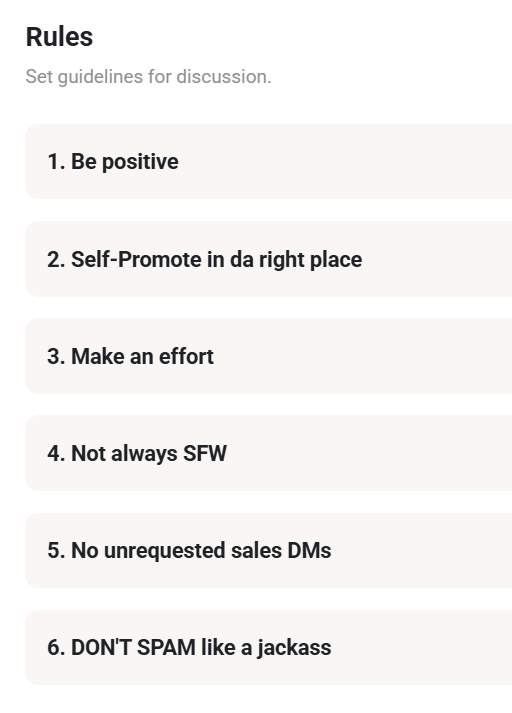
Updated Community Rules as of DEC. 19th 2025
1. Be Positive - We don't attack or deride other members. Keep criticism constructive. No vendettas or bullying. We kill trolls here without trial. 2. Self-promote in da right place - It's fine to self-promote, but when you do, make sure you choose the Plug your community/project category and don't do it more than once per day. <-NOTE: this is new. 3. Make an Effort - Ask questions. Speak up. Don't be afraid to take part. Greet new members. Etc. 4. Not always SFW - There are no 12-year-olds here. Sometimes we're Not Safe for Work. Sometimes we swear. Sometimes people have questions about adult-themed or targeted material. That's ok. Don't be afraid to ask a question; there is no taboo. 5. No unrequested sales DMs - Don't abuse access to the group. No one is here to buy your drop shipping system or anything else that isn't related to the community. 6. DON'T SPAM like a jackass - You know what spam is. Don't do it. If you post 27 one-word or one-letter comments on the same post within a few minutes to get attention, you will be banned. It makes no sense. That approach has never worked, and it sure doesn't here. Trolls are killed immediately.

3d •
For creating Films - Organization > Everything else
I don't think your problem is lack of ideas! I've spoken with hundreds of creatives, traditional and AI creatives. The biggest issue is usually FINISHING! The biggest difference for me was organizing the story into scenes and shots first. That gave the prompts, images, clips, and versions a structure to fit into. My workflow is: Script/idea → Characters → Storyboard images → Audio/dialogue → Video → Editing/compositing. Very first thing must be the story and characters, then I lay out the scenes/beats as storyboard images so I can see how the film flows. This is where I try to catch problems and make changes. Adjusting an image, reference, or prompt here is usually much less costly than discovering the problem after generating video. This avoids redoing everything later. The storyboard also becomes the organizing structure: each scene/shot has its associated references, prompts, audio, clips, and versions. Then I add dialogue/audio and time the images to it. That lets me check the pacing again before generating video. By that point, I can focus on getting the right performance and movement for each shot, with the surrounding story already worked out. For me, the biggest benefit is fewer things to rethink at once - and less rework, less complexity, less overwhelm. That makes a whole film much more manageable to finish. Trying to do a 300+ person jobs is INSANE without this. See screenshots of the flow to show what I mean.
2
0


Oct 4 •
Co-working?
Hey @Mike Gagnon I was just checking this group, and noticed a bunch of live calls on the calendar. Are you usually in there working on stuff, or is it just set up for members here to cowork together when times end up randomly converging for individuals? PS. Loved all the newscast comics posted in your substack recently! 😂

1-30 of 590
powered by

skool.com/mikes-sketchbook-7350
Learn from an Amazon Bestselling author and illustrator to turn your ideas into real comics, games, and more with low-cost tech. #CreativeIlluminati
Suggested communities
Powered by