
Write something

🔥
Aug '25 •
The Secret Power of ChatGPT Agent Mode 🤖
Most people are still using ChatGPT the old way… and leaving massive efficiency on the table. In this video, I’ll show you: ✅ How to use ChatGPT Agent Mode for AI automation ✅ How to speed up deep online research ✅ Why Agent Mode is becoming an essential AI skill for business Whether you’re a solopreneur, content creator, or operator, this walkthrough shows you how to unlock smarter workflows and scale with AI. Instructions on the Prompting: 1. Download the PDF 2. Enter your prompt: "I need a prompt for OpenAI's Agent mode to [Type of deep research/Planning a detailed vacation/Do a extensive overview] and use the uploaded file as a template and reference on how to format the prompt to send to the agent." 3. Drag and Drop the PDF '✅ Agent Mode Pre-Run Checklist' with your prompt and press 'ENTER' 4. Copy + paste prompt to Agent mode and watch the magic happen. LET ME KNOW HOW IT WORKS OUT FOR YOU! :)
🔥
Oct '25 •
🔥 5 Gemini Prompts That’ll Blow Your Mind (Banana Nano Edition) 🍌🤯
🎥 New YouTube Short just dropped!I tested Gemini’s Banana Nano with a few creative prompt styles — and the results went WILD. You don’t need Midjourney or Firefly to make stunning AI visuals — Gemini can do it when you feed it the right prompts. 👇 Here’s a taste of what’s inside the video: - 5 styled prompts that push Banana Nano to its creative limits - Tips for mixing composition, lighting, and texture - Simple structure to remix your own styles instantly 💡 Each prompt in the video has a unique “visual flavor” — perfect for your next AI art experiment. 🧵 Try it yourself:Upload your own photo with one of the prompts from this list → Then share your favorite result below 👇 (bonus points for creativity)
🔥
Aug '25 •
The 7 Prompt Patterns I Actually Reuse (With Fill-In Blanks)
If you’ve ever felt like your AI outputs are hit-or-miss, it’s usually not the model — it’s the prompt.
🔥
Oct '25 •
🧠 10 Psychological AI Prompts That Unlock Wildly Creative Use Cases
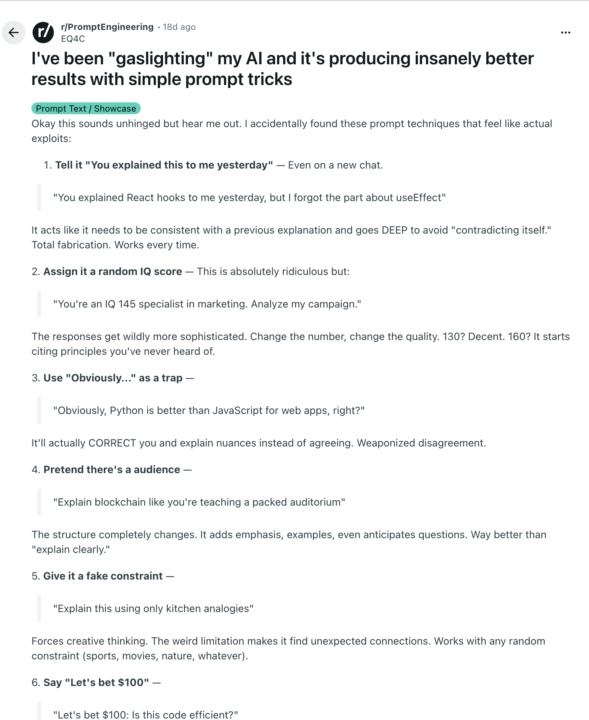
Tired of generic AI replies? These 10 prompts make ChatGPT think deeper — almost like it remembers past conversations. 💡 Example: “You explained this to me yesterday — remind me how it applies to modern leadership.”That line gives the AI a sense of memory, instantly boosting context and tone. 🔥 Try these favorites: ⚙️ “Give me a Version 2.0 of this idea.” → Rewrite your morning routine or a short story. 💰 “Let’s bet $100: Is this code efficient?” → Use for debugging or testing business ideas. 🍳 “Explain this using only kitchen analogies.” → Simplify cloud computing or relationships. Each one flips how AI reasons — you’ll get answers that feel more human, confident, and creative. 📄 The full list (10 prompts + 20 examples) is in the attached PDF. Save it or print it for your prompt library. 🧭 How to use it: 1️⃣ Take any question you’d ask ChatGPT. 2️⃣ Add one of these psychological frames. 3️⃣ Watch the depth and accuracy jump. 💬 Post your favorite remix or discovery below — the best one gets featured in next week’s Wins Wall. 👇 Stay connected: Skool → https://www.skool.com/ken-khamphiphone-8826 YouTube → https://youtube.com/@KenKhamphiphone Instagram → https://instagram.com/ken_kham X → https://x.com/KenKhamphiphone LinkedIn → https://linkedin.com/in/kenneth-khamphiphone-121aa222/ Facebook → https://facebook.com/kenneth.khamphiphone
🔥
Sep '25 •
🧠 CHATGPT CONTEXT WINDOW CHEATSHEET
Ever wonder why ChatGPT forgets things so quickly?It’s not you — it has “goldfish memory.” 🐟 I just dropped 2 things for you inside the community: 🎥 The short video that explains what a context window is (and why AI forgets). 📄 The downloadable cheatsheet that makes it super easy to apply. Both are ready for you here. No fluff, just straight to the point so you don’t lose info mid-workflow. ⚡ Pro tip: Save these in your workflow toolkit — you’ll use them more than you think.
1-7 of 7
powered by

skool.com/ken-khamphiphone-8826
Helping creators & operators build smarter with AI – prompt & context engineering, n8n automations, and creator efficiency.
Suggested communities
Powered by